
-
Zeitaudit: So finden Sie heraus, wo Ihre Zeit bleibt
 Bild: Studio Republic
Wo bleiben nur die Stunden? Warum haben Sie das Gefühl, den ganzen Tag konzentriert gearbeitet zu haben – und doch nur einen einzigen Punkt auf Ihrer To-do-Liste abgehakt? Hat diese Aufgabe wirklich nur ein paar Stunden gedauert, wie geplant? Oder waren es vielleicht mehr? Genau zu wissen, wie Sie Ihre Zeit an einem beliebigen Tag verbringen, ist gar nicht so einfach. Zum Glück hilft ein Zeitaudit.
Ein Zeitaudit bedeutet, die Stunden und Minuten Ihres Arbeitstags zu protokollieren. Es macht sichtbar, wofür Sie Ihre Zeit aufwenden, und liefert wertvolle Einblicke, mit denen Sie Fokus und Produktivität steigern, Burnout vorbeugen und Ihr Geschäft besser führen.
In diesem Artikel beleuchten wir die wichtigsten Aspekte von Zeitaudits – ihre Vorteile und wie Sie eines durchführen.
-
Dictation on Mac: How to Use Talk-to-Text & the Best Dictation Apps (2026)

Image: MART PRODUCTION
If efficiency and productivity are high on your list of priorities, you should be talking to your Mac, not typing on it. In recent years, dictation on Mac has evolved from a novelty feature to an essential time hack. Apple Dictation comes built into every Mac, and today everything from simple to-do notes to large emails and reports can be drafted with dictation software.
Here, we help you navigate this growing trend. How do you enable Apple Dictation? Should you stick with the built-in tool or invest in a third-party solution? And what are some of the best Mac dictation apps on the market?
Let’s get started.
-
Time Management Matrix: What It Is, How It Works, and Examples
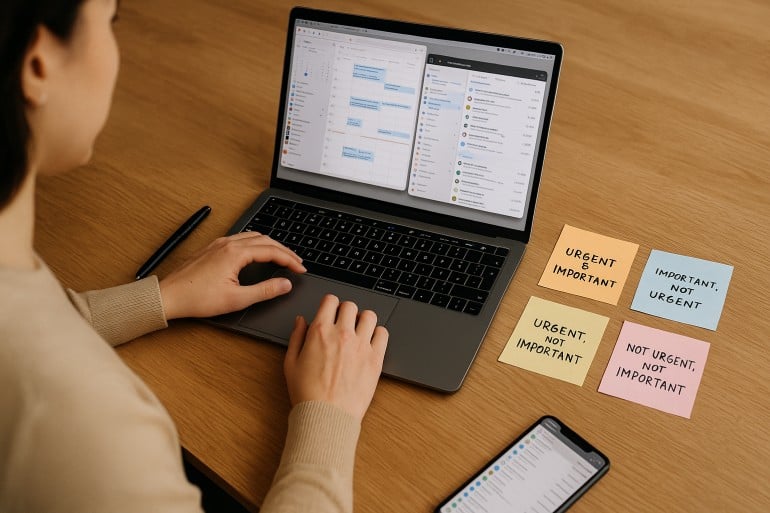 Image: ChatGPT
The time management matrix is one of the most effective prioritization frameworks available — and if you’ve been struggling to separate what truly matters from what just feels urgent, it might be exactly what you need in 2026. Also known as the Eisenhower Matrix, this simple four-quadrant grid helps you organize every task based on its urgency and importance.
Take a look at your to-do list. It probably holds pesky chores of little value, a few must-get-done-today tasks, medium-sized jobs that need planning, and heavy-duty projects that are time and resource intensive. Whether you manage to tackle the right activities in the right order depends on how you prioritize. The time management matrix gives you a clear, repeatable system for making those decisions — helping you focus on the activities that drive your personal and professional success, while identifying and reducing the time spent on those that get in the way.
Here, we define what a time management matrix is, explore its advantages and features, and offer a step-by-step guide on creating one of your own.
TL;DR: Time Management Matrix in 2026
The time management matrix (also known as the Eisenhower Matrix or Covey Matrix) is a four-quadrant framework that categorizes every task by two criteria: urgency and importance. Quadrant 1 holds urgent and important tasks you must do now. Quadrant 2 holds important but not urgent tasks — the key to long-term success. Quadrant 3 holds urgent but unimportant tasks to delegate. Quadrant 4 holds neither urgent nor important tasks to eliminate.
- The matrix helps you shift from reactive firefighting to proactive planning
- Spending more time in Quadrant 2 is the single biggest lever for productivity
- Pair the matrix with automatic time tracking to see where your time actually goes
- Works for freelancers, solopreneurs, and small teams alike
-
Time Theft Is Real – And It’s Costing You More Than Time

Image by: ChatGPTYou may not realize it, but time theft is costing your business and not in small change. The phenomenon manifests in the gaps between tasks, getting stuck in your inbox, and all the small administrative time sinks that never make it onto your invoice.
Unlike traditional workplaces, where time theft implies you’re deliberately slacking off, as a freelancer or solopreneur, it’s the opposite. Time theft is usually unintentional. Instead of shirking your responsibilities, you might find yourself guilty of falling into a cycle of performative productivity or context switching.
Both reduce your capacity for impactful input. Without visibility into how you’re spending your time, you risk loss of revenue — and miss out on opportunities for sustainable business growth and the freedom to step away from your laptop without guilt.
Below, we’ll walk you through what time theft really looks like when you’re working for yourself, and how to get your time back by building a healthy accountability system without invasive micromanagement methods.
-
Best Mac Apps in 2026: 50+ Essential Tools We Use and Recommend

Image: Olia DanilevichIf you want to transform your Mac from a capable computer to a productivity powerhouse in 2026, you’re in the right place. We’ve curated a list of the best Mac apps to revolutionize how you work, without the need to upgrade any of your hardware.
From sophisticated time tracking tools and intuitive project management solutions, to powerful email clients and innovative note-taking apps, each recommendation has been carefully selected to solve real problems and enhance your Mac experience. Our list includes reviews of large and established apps, some beloved classics, and a few hidden gems you may not have heard of before.
Whether you’re a creative freelancer, a small business owner, or an ordinary Mac user eager to unleash your machine’s full potential, you’re sure to find valuable solutions in our comprehensive guide to the best Mac apps.
Let’s get started.
Read More… -
The Best Mac Time Tracking Software for Architects

Image: energepic.com
Architects face the constant challenge of managing complex projects with tight deadlines and balancing creativity with practicality. Poor time management can lead to missed deadlines, budget overruns, and lost opportunities for architects who need to focus on both the big picture and the finer details.
Moreover, architects who work on a Mac need time tracking software that integrates seamlessly into their workflow, offering reliability, security, and ease of use.
With the right time tracking tool, time management becomes effortless and directly impacts the quality of your work, client satisfaction, and your bottom line.
In this article, we’ll discuss why time tracking for architects is essential and the top time tracking apps you can use to get a more accurate picture of how you spend your work day.
Before we start with our top picks, let’s dive into the challenges architects face.
-
The 14 Best Project Management Software for Mac

Image: fauxels
What’s the best project management software for Mac? Unfortunately, there’s no one-size-fits-all answer here. Everyone you speak to is likely to have a preference for the solution that meets their unique requirements.
To help you find the option that works best for you, we’ve put together a detailed list of the 14 best Mac project management tools. Our review provides all the information you need to make the right choice. Whether you’re a freelancer, a manager of a small team, or a business owner looking to scale, our picks will ensure you stay on track and meet your goals.
-
Time Well Spent: What it Means and How to Get the Most Out of Every Day

Image: Nataliya VaitkevichTL;DR: What is Time Well Spent?
Time well spent means using your hours on activities aligned with your personal values—whether that’s productivity, self-improvement, quality time with loved ones, or rest. It’s not about maximizing every minute, but being intentional so your days feel meaningful rather than chaotic. Key strategies include: setting clear priorities, limiting distractions (especially social media), practicing mindfulness, and using automatic time tracking to see where your time actually goes.
Spending time well means different things to different people. Some associate it with productivity, personal fulfillment or self-improvement. For others, it’s about spending quality time with loved ones or helping people in need. Many associate time well spent with a good work-life balance — days that feel full and rich both professionally and personally, without being exhausting or overwhelming.
In an age when busyness is elevated, even revered, well-spent time offers a refuge. Rather than encouraging us to succumb to the pressures of constant activity, it emphasizes the quality of our experiences over the quantity. If we’re spending our time well, we’re prioritizing meaningful pursuits that enrich our lives instead of frantically ticking off an endless list of tasks.
Here, we explore the ins and outs of this concept and look into the tools that can help you get the most out of every day.
-
The Flowtime Technique: Find Your Flow for a More Productive and Enjoyable Workday

Image: Andrea PiacquadioHave you ever felt so immersed in a task, so wholly focused, that the minutes slip by unnoticed? Rather than watching the clock, anxious that you’re not working as productively as you should, or eagerly anticipating your next break, you simply lose yourself in your work? The world around you disappears. The project you’re working on is all there is. Now, what if there was a time management strategy that helped you lean into this state of flow? Enter the Flowtime technique.
The Flowtime technique encourages you to get in the flow. It’s all about working in a deep, focused way, and taking breaks when your body and mind give you the necessary cues, rather than at specific intervals. It’s also known as the “Flowmodoro” because it’s related to the Pomodoro technique, though it differs in some important ways.
Here, we’ll discuss what Flowtime is all about, compare it to the Pomodoro technique, and offer a step-by-step guide on how to implement it into your daily life to improve your productivity and work satisfaction.
-
Work Journal: What It Is and Why You Should Keep One

Image: Generated with Dall-EA work journal is the secret one-two punch of time management tools. It can help you uncover inefficiencies, boost your productivity, and give you a data-driven blueprint for your career growth.
At its core, a work journal serves as your personal log for daily work activities, achievements, and observations.
But it’s more than just a list of tasks.
It’s a straightforward method to document your progress, reflect on your experiences, and spot opportunities you might otherwise miss.
Dedicating a little time to your work journal each day can become a powerful habit that can give you a leg up in your career.
With a variety of approaches to choose from, keeping a work journal is a flexible practice that can fit anyone’s style and work routine.
