
The Best Lawyer Time Tracking Software in 2026

Image: Generated with Dall-E
The best lawyer time tracking software is Timing for automatic, hands-free time capture on Mac, Clio for full legal practice management with built-in billing, and TimeSolv for dedicated legal billing with LEDES and trust accounting. According to research cited by the American Bar Association, lawyers who delay time entries lose between 10% and 70% of billable revenue — making the right time tracking tool one of the highest-ROI investments a law firm can make.
TL;DR: Best Lawyer Time Tracking Software in 2026
Timing is the best choice for automatic time tracking on Mac — it records every app, document, and website you use without timers, so no billable minute goes unrecorded. Clio is best for firms that want complete practice management with case tracking, billing, and time tracking in one platform. TimeSolv is best for legal-specific billing with LEDES export, trust accounting, and UTBMS codes at a competitive price.
Table of Contents
TOC
How Much Billable Time Do Lawyers Lose?
Revenue leakage from delayed time entries is one of the most costly — and most preventable — problems in legal practice. According to research cited by the American Bar Association, delaying time entries can reduce revenue dramatically:
- Same day: 10% loss of billable time
- After 24 hours: 25% loss
- After one week: 50–70% loss
Contrary to what many people assume, delayed time entry almost always results in underbilling, not overbilling. Lawyers tend to forget short tasks — a five-minute client call, a quick email response, a brief document review — rather than fabricate work they didn’t do.
According to Clio’s Legal Trends Reports, lawyers bill only a fraction of their workday — with utilization rates ranging from roughly 33% to 37% (approximately 2.6 to 3.0 hours out of an 8-hour day). That means the majority of a typical lawyer’s working hours go unbilled. And according to research by AffinityLive, professionals who log their time less than once per week are only 35% accurate in their time records, compounding the revenue loss.
Revenue Recovery Example
Consider a solo practitioner billing 1,800 hours per year at $350/hour. If delayed time entries cause even a 5% loss in captured billable time, that’s 90 hours — or $31,500 in lost annual revenue. An automatic time tracker that recovers even a fraction of that lost time pays for itself many times over.
ABA Time Tracking Guidelines and Compliance
Accurate timekeeping isn’t just about revenue — it’s an ethical obligation. Understanding ABA requirements helps lawyers choose software that supports compliant billing practices.
ABA Model Rule 1.5: Reasonable Fees
ABA Model Rule 1.5(a) states that “a lawyer shall not make an agreement for, charge, or collect an unreasonable fee.” The rule lists factors for determining reasonableness, including “the time and labor required” and “the skill requisite to perform the legal service properly.”
While Rule 1.5 doesn’t explicitly mandate a specific time-tracking method, it creates a framework where accurate, defensible time records are essential. A lawyer who cannot demonstrate that billed hours reflect actual work performed risks violating this rule.
ABA Formal Opinion 93-379: Ethical Billing
ABA Formal Opinion 93-379 provides the most direct guidance on billing ethics. It explicitly prohibits billing more time than was actually spent on a client’s matter, double-billing multiple clients for the same hours, and reusing prior work product while billing as if the hours were newly spent.
The opinion emphasizes that lawyers must disclose the basis on which clients are billed and provide sufficient detail in invoices for clients to understand what they are paying for.
Why Contemporaneous Timekeeping Matters
While no ABA rule uses the phrase “contemporaneous timekeeping,” bar associations and courts consistently favor it as the best practice for defending fees against challenges. The logic is straightforward: the longer you wait to record your time, the less accurate your records become — and inaccurate records cannot support “reasonable” fees under Rule 1.5.
Automatic time tracking directly supports ABA compliance by creating a continuous, verifiable record of work activity. Instead of reconstructing your day from memory — which is where errors and omissions creep in — you have a factual log of every document, email, and website you worked on, timestamped to the minute.
How 6-Minute Billing Increments Work
Most law firms bill in 6-minute increments, which represent one-tenth of an hour (0.1). This means a 3-minute phone call gets rounded up to 6 minutes (0.1 hours), and a 42-minute research session becomes 42 minutes divided into seven increments (0.7 hours).
The 6-minute standard strikes a balance: it’s granular enough to be fair to clients while being practical for lawyers to track. Other common increments include 10 minutes (1/6 of an hour) and 15 minutes (1/4 of an hour), but 6 minutes remains the industry standard.
When choosing lawyer time tracking software, look for report rounding features that automatically convert your tracked time into the billing increment your firm uses. Timing, for example, includes report rounding that can round up, down, or to the nearest increment in intervals from 1 to 60 minutes — making it straightforward to generate clean timesheets in 6-minute increments.
Automatic vs. Manual Time Tracking for Lawyers
This is the single most important decision when choosing lawyer time tracking software: do you want a tool that requires you to start and stop timers, or one that records your work automatically?
The Problem with Manual Timers
Manual time tracking — whether with paper timesheets, spreadsheets, or start/stop timer apps — relies entirely on the lawyer’s discipline and memory. You need to remember to start the timer before every task, stop it when you switch contexts, and restart it when you return. For lawyers who routinely juggle multiple client matters in a single hour, this is practically impossible to do consistently.
The result is predictable: forgotten timers, missed tasks, and end-of-day time reconstruction that inevitably loses billable minutes. Distractions and context switches compound the problem — each interruption makes it harder to recall exactly how long you spent on a given task. As the ABA data shows, even same-day reconstruction loses 10% of billable time.
How Automatic Time Tracking Works
Automatic time tracking software runs silently in the background, recording which apps, documents, websites, and calendar events you spend time on throughout the day. At the end of the day (or whenever you choose), you review the automatically captured activity and assign it to client matters or projects.
For lawyers, this approach has a distinct advantage: every document you opened, every legal research session, every email you wrote is captured — even the 3-minute tasks you would never have bothered to start a timer for. Those small tasks add up to significant billable time over a week and a month.
Why Automatic Tracking Is Better for Lawyers
- No timer discipline required: You don’t need to change how you work. The software captures your activity passively.
- Captures context switches: When you jump from one client’s contract to another client’s email, automatic tracking records both — a manual timer can only track one at a time.
- Supports ABA compliance: A continuous activity log provides an objective, defensible record of your work, making it easier to justify fees if challenged.
- Recovers lost billable time: Most lawyers who switch from manual to automatic tracking discover they were consistently under-recording their billable hours by 10–20%.
The caveat: fully automatic time tracking at the document level is currently available only on Mac (through tools like Timing). If your firm runs on Windows, you’ll need to rely on manual timers or hybrid solutions like Rocket Matter’s passive tracking feature.
How We Evaluated These Lawyer Time Tracking Tools
As the developers of Timing, we’ve been building time tracking software since 2011 and have deep expertise in what makes a time tracker effective for billing professionals. We evaluated each tool based on:
- Tracking accuracy: How well does it capture all billable activity, including small tasks?
- Legal-specific features: Support for billing increments, LEDES export, UTBMS codes, trust accounting, and billing status tracking.
- Ease of use: Can a busy attorney start using it without extensive training?
- Platform availability: Mac, Windows, web, mobile — and how well the experience holds up across devices.
- Integration with legal workflows: Calendar sync, practice management integration, document tracking.
- Pricing and value: Cost relative to the features offered and the revenue a firm can recover.
- User feedback: Reviews from Capterra, G2, and legal-specific publications.
We include both standalone time trackers and practice management suites because different firms have different needs. A solo practitioner who already uses a practice management tool may only need a dedicated time tracker, while a firm without existing software may benefit from an all-in-one solution.
Last reviewed: March 2026
Quick Comparison: All 10 Lawyer Time Tracking Tools
| Tool | Type | Automatic Tracking | Platform | Starting Price | Legal Features | Best For |
|---|---|---|---|---|---|---|
| Timing | Standalone | Yes | Mac, Web | $9/mo | Billing status, report rounding, AI summaries | Automatic tracking on Mac |
| Clio | Practice Mgmt | No | Web, iOS, Android | approximately $49/user/mo | Trust accounting, LEDES, UTBMS, case mgmt | Full practice management |
| TimeSolv | Legal Billing | No | Web, iOS, Android | ~$40/user/mo | Trust accounting, LEDES, UTBMS, ABA codes | Legal-specific billing |
| Rocket Matter | Practice Mgmt | Yes (passive) | Web, iOS, Android | $49/user/mo | Trust accounting, batch billing, AI tracking | AI-assisted legal tracking |
| PracticePanther | Practice Mgmt | No | Web, iOS, Android | $49/user/mo | Trust accounting, tags, custom rates | Growing law firms |
| Bill4Time | Legal Billing | No | Web, iOS, Android | approximately $39/user/mo | Trust accounting, LEDES, UTBMS, conflict checks | Affordable legal billing |
| MyCase | Practice Mgmt | No | Web, iOS, Android | $39/user/mo | Smart Time Finder, LawPay, trust accounting | Client-facing firms |
| CARET Legal | Practice Mgmt | No | Web, iOS, Android | $79/user/mo | LEDES, UTBMS, rate cards, trust accounting | Mid-to-large firms |
| Toggl Track | Standalone | No | Web, Mac, Win, iOS, Android | Free / $9/user/mo | Billable rates, project tracking | Best free option |
| Clockify | Standalone | No | Web, Mac, Win, iOS, Android | Free / $3.99/user/mo | Billable rates, invoicing (paid) | Budget-conscious firms |
Prices shown were verified as of March 2026 and reflect annual billing rates unless otherwise noted. Visit each tool’s pricing page for the most current rates.
The 10 Best Lawyer Time Tracking Software Options
Here are the top lawyer time tracking software tools for 2026, covering dedicated time trackers, legal billing platforms, and full practice management suites.
1. Timing — Best Automatic Time Tracker for Lawyers on Mac
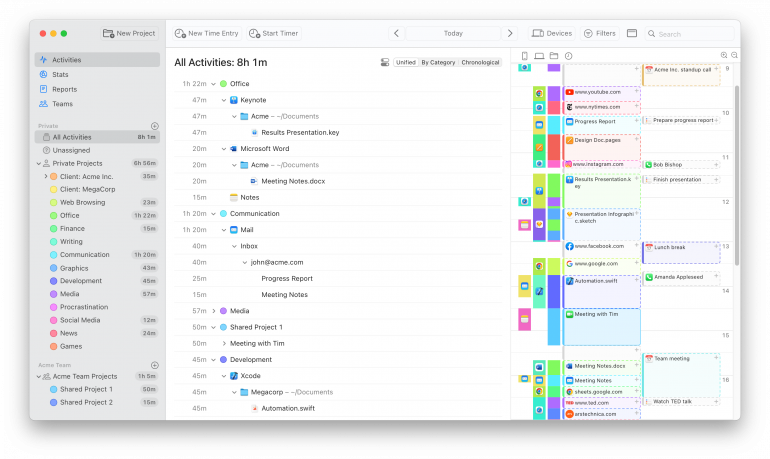
Timing is the best lawyer time tracking software for attorneys who work on Mac and want to capture every billable minute without manually starting and stopping timers. It runs silently in the background, recording every app, document, website, and calendar event — then lets you review and assign time to client matters with a few clicks.
Best for: Solo attorneys, small law firms, and any Mac-using lawyer who wants automatic, hands-free time capture.
Platform: macOS (automatic tracking), web app (manual timers from any device).
Tracking type: Fully automatic with optional manual timers.
Price: Free 30-day trial. Professional $9/mo, Expert $11/mo, Connect $16/mo (billed annually).
Rating: 4.8/5 on Capterra (141+ reviews).
Legal-specific features: Report rounding for 6-minute billing increments, billing status lifecycle (Not Billable → Billable → Billed → Paid), AI summaries for reconstructing work descriptions, rule-based automatic project assignment.
For lawyers, Timing’s core advantage is document-level tracking. It doesn’t just record that you used “Microsoft Word” for 45 minutes — it records which document you were working on. This means you can see exactly how much time you spent on each client’s contract, brief, or correspondence, making it straightforward to assign time to the correct matter.
Key features for lawyers:
- Automatic tracking at document level: Records which files, emails, websites, and calendar events you spend time on, giving you a precise activity log for each client matter.
- Rules engine: Assign rules to automatically categorize time by file path, website, or app — e.g., anything in your “Smith v. Jones” folder is auto-assigned to that case.
- Report rounding: Generate timesheets in 6-minute (or any other) billing increments with automatic rounding up, down, or to the nearest increment.
- Billing status tracking: Mark time entries as Not Billable, Billable, Billed, or Paid to monitor your accounts receivable at a glance.
- AI summaries: Automatically generate natural-language descriptions of your work sessions — helpful for writing detailed time entry narratives.
- Calendar and call detection: When you sync your calendar with Timing, events appear on your timeline, and Timing prompts you to log time after voice or video calls end (Zoom, Teams, FaceTime, etc.).
- Screen Time import: Capture iPhone and iPad usage from Apple’s Screen Time, so mobile work (client emails, legal research on the go) is included in your billable records.
- Identify time sinks: Use the Stats Screen and Reports to spot where non-billable time is leaking, then take action to reclaim those hours.
- Privacy by design: Data is stored locally on your Mac by default. Team features show only aggregate project time, never personal app usage. GDPR-compliant.
Pros
- Truly automatic — no timers to remember, no behavioral change required.
- Document-level granularity makes it easy to assign time to specific client matters.
- Rules learn from your assignments and automate future categorization.
- Integrates with calendars, Screen Time, and supports web-based manual timers for on-the-go tracking.
- Built-in billing status tracking and report rounding for legal billing workflows.
- Generous 30-day free trial (most competitors offer only 7–14 days).
- Active development since 2011, with 12–14 releases per year.
Cons
- Automatic tracking requires macOS — Windows users are limited to the web app’s manual timers.
- Not a practice management suite: no case management, document management, or client intake. Pairs well with dedicated practice management tools.
- No native LEDES export (you’d use your billing or practice management tool for that).
Timing’s Billing Status field is particularly useful for law firms working alongside a dedicated billing or practice management tool. Set each client matter to default to “Billable” and internal firm work (admin, marketing, CLE) to “Not Billable” so every entry gets categorized as you work. After exporting a LEDES invoice through Clio, TimeSolv, or Bill4Time, flip those same entries in Timing to “Billed,” then to “Paid” once the client settles. You always have a clear picture of outstanding accounts receivable, and you avoid the double-billing risk that ABA Formal Opinion 93-379 explicitly prohibits — because every invoiced hour is visibly marked as already billed.
What users say
“I love that this software tracks all I do, and when, while using any applications on my computer. I do not always remember to start the timer when I am working between clients, but I can go back and see what I was doing.” — Capterra reviewer, management consulting
“Probably the most awesome timing app that I have ever used… really, really simple to set up, simple to configure, simple to convince the team.” — David Foreman, Managing Director, Toast Design
2. Clio — Best Full Practice Management with Time Tracking
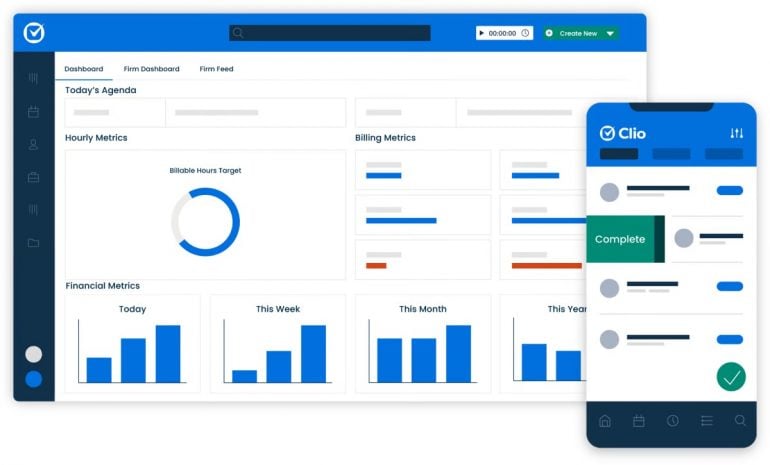
Image: G2
Clio is the most widely used legal practice management platform, trusted by over 400,000 legal professionals. It bundles case management, client intake, document management, billing, and time tracking into a single cloud-based platform.
Best for: Small to mid-sized law firms that want an all-in-one platform for managing cases, billing, and time tracking.
Platform: Web, iOS, Android.
Tracking type: Manual (timers, calendar entries, manual time entries).
Price: Free 7-day trial. EasyStart from approximately $49/user/mo, Essentials from approximately $89/user/mo, Advanced from approximately $119/user/mo, Expand from approximately $149/user/mo (billed annually; see Clio pricing for current rates).
Rating: 4.7/5 on G2.
Legal-specific features: Trust accounting (IOLTA), LEDES export, UTBMS codes, client portal, matter management, document automation, Clio Duo AI assistant.
Key features for lawyers:
- Inbox time tracking — add time entries for email responses directly from Gmail or Outlook.
- Custom billing rates by client, matter, user, or activity category with automatic rounding to your preferred increment.
- Built-in trust accounting and IOLTA compliance with automated payment processing via Clio Payments.
- Over 250 integrations including QuickBooks, Dropbox, Google Workspace, and LawPay.
- Clio Duo AI assistant for document summarization and case research.
Pros
- Comprehensive all-in-one platform — case management, billing, documents, and time tracking.
- Excellent trust accounting and IOLTA compliance features.
- Large integration ecosystem (250+ integrations).
- Strong mobile apps for tracking time on the go.
- SOC2, HIPAA, and PCI compliant.
Cons
- No automatic time tracking — relies on manual timers and entries.
- Premium pricing starts at approximately $49/user/month, which adds up quickly for larger teams.
- Can be feature-heavy for firms that only need time tracking and billing.
3. TimeSolv — Best Legal-Specific Billing and Time Tracking
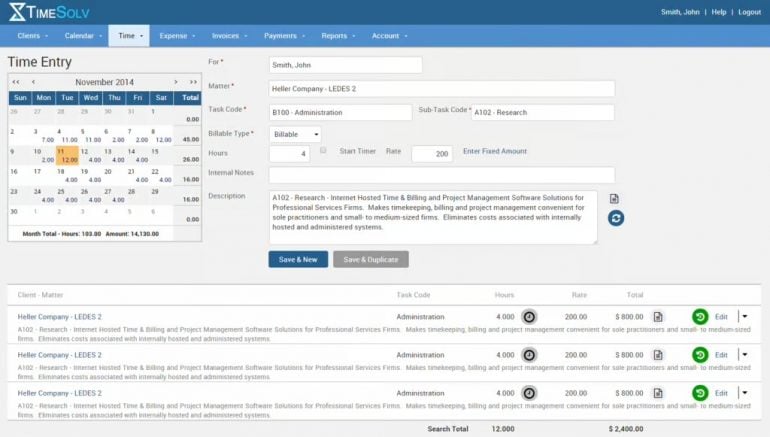
Image: G2
TimeSolv is a dedicated legal billing and time tracking platform that has been purpose-built for law firms since 1999. It focuses specifically on accurate timekeeping and professional invoicing rather than full practice management.
Best for: Law firms that need dedicated legal billing with LEDES compliance and trust accounting at a mid-range price.
Platform: Web, Mac, PC, iOS, Android (with offline desktop app).
Tracking type: Manual (multiple simultaneous timers, offline tracking).
Price: Free trial. Starting at approximately $40/user/mo (contact TimeSolv for current pricing).
Rating: 94% user satisfaction rating across review sites.
Legal-specific features: LEDES export, UTBMS/ABA task codes, trust accounting (unlimited accounts), batch billing, narrative replacement codes, custom abbreviations.
Key features for lawyers:
- Track time from any device with or without an internet connection via the TimeSync desktop app.
- Run multiple timers simultaneously and set billing limits to stay on budget.
- Over 30 built-in reports covering billable hours, accounts receivable, and performance metrics.
- LEDES and UTBMS code support for corporate clients who require standardized electronic billing.
- TimeSolvPay for accepting credit card and ACH payments directly from invoices.
Pros
- Purpose-built for legal billing with deep compliance features (LEDES, UTBMS, trust accounting).
- More affordable than full practice management suites.
- Excellent customer support with hands-on training for new users.
- Offline desktop app (TimeSync) for tracking without internet access.
Cons
- No automatic time tracking — all entries require manual timers or input.
- Interface can feel dated compared to newer competitors.
- Limited customization options for reports, according to user reviews.
- Not a full practice management solution — no case management or client intake.
4. Rocket Matter — Best AI-Assisted Legal Time Tracking
Rocket Matter is a legal practice management platform that stands out for its AI-powered passive time tracking feature, Rocket Matter Track. This feature automatically monitors activity across apps and websites, creating time entries that attorneys can review and assign to matters.
Best for: Firms that want passive AI-assisted time capture within a full practice management platform.
Platform: Web, iOS, Android.
Tracking type: Passive AI tracking (Rocket Matter Track) plus manual timers.
Price: Free trial. Essentials $49/user/mo, Pro $79/user/mo, Premier $99/user/mo, Elite $129/user/mo (billed annually).
Rating: 4.3/5 on G2.
Legal-specific features: AI passive timekeeping, trust accounting, batch billing, fee allocation, matter budgets, Kanban board for matter management.
Key features for lawyers:
- Rocket Matter Track uses AI to passively monitor and record time spent across applications and websites.
- Batch billing and bulk editing for getting invoices out quickly.
- Built-in trust accounting with automated payment plans via Rocket Matter Pay.
- QuickBooks integration for keeping accounting in sync.
- ChatGPT integration within the Rocket Matter interface (with data safeguards).
Pros
- AI-powered passive time tracking reduces missed billable hours.
- Full practice management suite — matters, billing, documents, tasks in one platform.
- Strong batch billing features for firms that invoice monthly.
- SOC 2 Type II certified with bank-grade encryption.
Cons
- Pricing starts at $49/user/month — expensive for solo practitioners.
- Some users report the time tracking interface can be cumbersome for managing multiple tasks.
- Software can be slow when handling large files, per user reviews.
5. PracticePanther — Best for Growing Law Firms
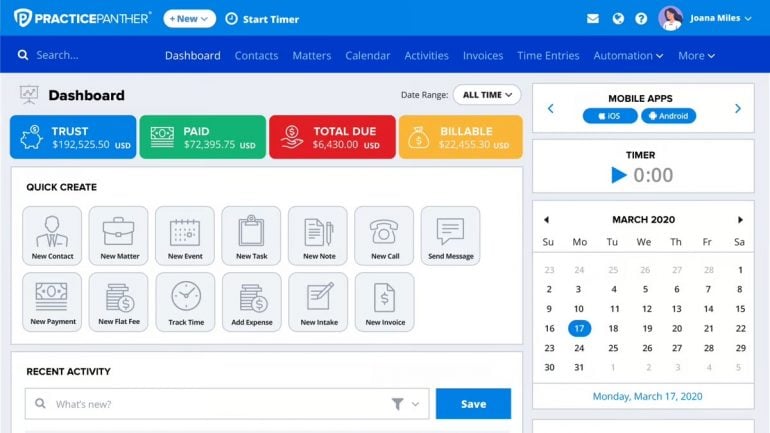
Image: G2
PracticePanther is cloud-based law practice management software that helps firms automate workflows with a suite of features including CRM, billing, document management, and time tracking.
Best for: Small to mid-sized firms that need a scalable practice management platform with solid time tracking.
Platform: Web, iOS, Android.
Tracking type: Manual (multiple simultaneous timers, calendar-to-time-entry conversion).
Price: Free 7-day trial. Solo $49/user/mo, Essential $69/user/mo, Business $89/user/mo (billed annually).
Rating: 4.3/5 on G2.
Legal-specific features: Trust accounting, custom billing rates, tags for matter attribution, automated invoice reminders, HIPAA compliance via Box.com.
Key features for lawyers:
- Run multiple timers simultaneously and create time entries from calendar events, tasks, emails, notes, or calls.
- Custom billing reports for billable and non-billable time and expenses.
- Customizable workflows that standardize intake and billing procedures.
- Integrations with Dropbox, OneDrive, Google Drive, Outlook, and Google Calendar.
Pros
- Scales well from solo to larger firms.
- Intuitive interface with good mobile access.
- Firms report saving 15+ hours per week with task automation.
- 256-bit encryption with role-based permissions.
Cons
- No automatic time tracking — all entries are manual.
- Some users report creating invoices can be challenging and the interface isn’t always intuitive.
- Limited reporting flexibility may require external tools for complex analysis.
6. Bill4Time — Best Affordable Legal Billing
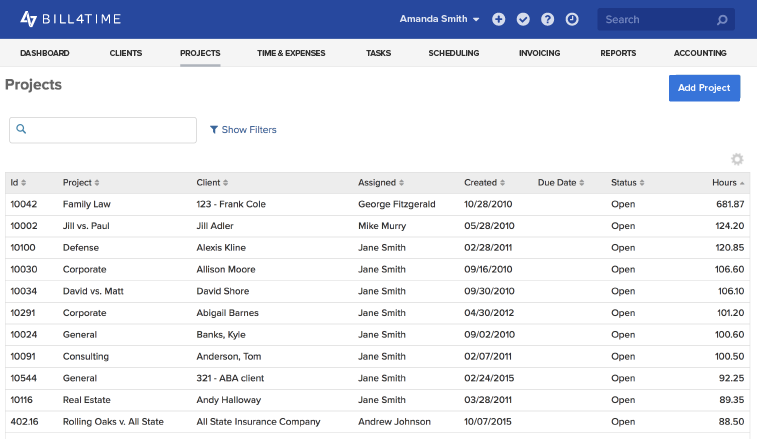
Image: Bill4Time
Bill4Time is cloud-based legal time tracking and billing software that offers IOLTA trust accounting, LEDES export, and UTBMS codes at one of the lowest starting prices among legal-specific tools.
Best for: Solo practitioners and small firms looking for affordable legal billing with compliance features.
Platform: Web, iOS, Android (with offline sync).
Tracking type: Manual (one-click timers, mobile time entry).
Price: Free trial. Starting at approximately $39/user/mo (billed annually; see Bill4Time pricing for current rates).
Rating: 4.8/5 on Capterra.
Legal-specific features: IOLTA trust accounting, LEDES export, UTBMS code sets, conflict checking, contingency billing, evergreen retainers.
Key features for lawyers:
- Log billable hours in real-time from desktop or mobile with one-click timers.
- Automatically convert calendar appointments into time entries.
- Mobile apps with offline time entry that syncs when reconnected.
- Built-in conflict checking and multi-currency support.
- QuickBooks integration and multi-user permissions.
Pros
- One of the most affordable legal billing tools with LEDES, UTBMS, and trust accounting.
- Free trial available.
- Offline mobile time entry for court appearances and out-of-office work.
- Clean, user-friendly interface.
Cons
- No automatic time tracking — relies entirely on manual timers.
- Users note the absence of advanced features such as detailed project management and some integrations.
- Mobile app can experience glitches, according to some reviews.
7. MyCase — Best for Client-Facing Firms
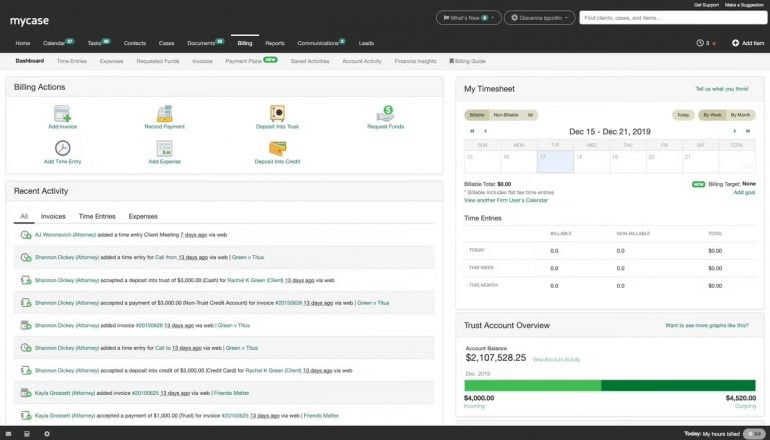
Image: G2
MyCase is comprehensive legal practice management software that combines case management, client communication, billing, and time tracking. Its standout feature is a secure client portal where clients can view case updates, access documents, and make payments.
Best for: Firms that prioritize client communication and want a secure portal alongside time tracking and billing.
Platform: Web, iOS, Android.
Tracking type: Manual (timers with Smart Time Finder prompts).
Price: Free 10-day trial. Starting at $39/user/mo (billed annually).
Rating: 4.6/5 on Capterra.
Legal-specific features: Smart Time Finder, LawPay integration, client portal, AI Writing Assistant, Legal Document AI.
Key features for lawyers:
- Smart Time Finder helps identify billable time that may have fallen through the cracks.
- Automatically track time spent on calls and emails for every case.
- Billable hours seamlessly consolidated into invoices with LawPay payment processing.
- Secure client portal for case updates, document sharing, and payments.
- AI-powered document drafting and analysis tools.
Pros
- Excellent client portal for firm-client communication and payments.
- Smart Time Finder helps recover missed billable time.
- Strong mobile apps for on-the-go case management.
- AI capabilities for document drafting and analysis.
Cons
- No fully automatic time tracking — relies on prompts and manual entry.
- Pricing may not be worth it for solo users unless leveraging all features.
- Customization options can be limited for specific practice areas.
8. CARET Legal — Best for Mid-to-Large Law Firms
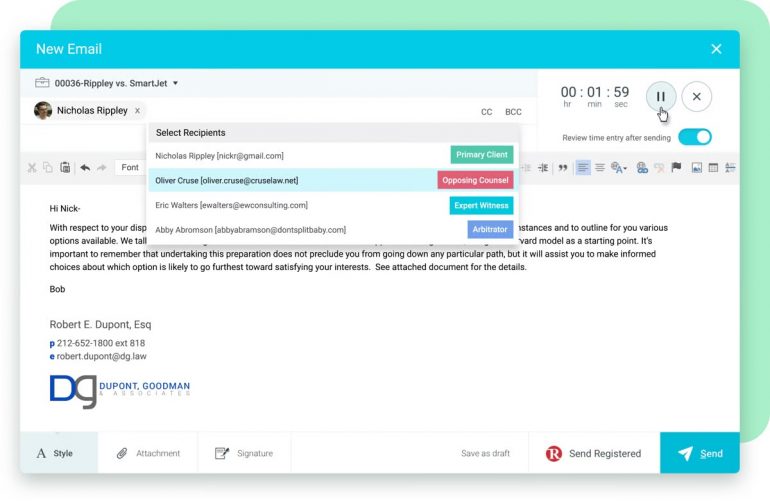
Image: G2
CARET Legal (formerly Zola Suite) is a comprehensive legal practice management platform designed for firms that need enterprise-grade compliance features including LEDES codes, digital rate cards, and advanced time entry rules.
Best for: Mid-to-large firms with enterprise compliance requirements and corporate clients who demand LEDES billing.
Platform: Web, iOS, Android.
Tracking type: Manual (automatic timers for emails and calls, task-to-time-entry conversion).
Price: Free trial. Starting at approximately $79/user/mo (contact CARET Legal for current pricing).
Rating: 4.5/5 on G2.
Legal-specific features: LEDES codes, UTBMS code sets, digital rate cards, time entry compliance rules, trust accounting, PayNow feature.
Key features for lawyers:
- Set automatic timers for emails and phone calls; convert tasks and activities to time entries.
- Digital rate cards for assigning custom billing rates to any matter, with user rate discounts.
- Time entry rules to drive compliance with less oversight.
- Bulk invoice preparation with direct payment via PayNow.
- 24/7 support with unlimited on-demand training.
Pros
- Enterprise-grade compliance features (LEDES, UTBMS, rate cards).
- 24/7 support with unlimited training — valuable for onboarding.
- Strong time entry compliance rules reduce billing errors.
- Intuitive interface for recording billable hours.
Cons
- Only enterprise pricing — expensive for solo and small firms.
- Not a scalable solution for firms that may shrink or grow significantly.
- Manual time tracking — no passive or automatic capture.
9. Toggl Track — Best Free Time Tracker for Lawyers
Toggl Track is one of the most popular general-purpose time tracking tools, offering a generous free plan that supports up to 5 users with unlimited projects and clients. While it lacks legal-specific features like trust accounting or LEDES export, its simplicity and cross-platform availability make it a solid choice for lawyers who need basic time tracking without the overhead of a practice management suite.
Best for: Solo attorneys and small firms that need a free or low-cost time tracker with minimal setup.
Platform: Web, Mac, Windows, Linux, iOS, Android, browser extensions.
Tracking type: Manual (start/stop timers with some background tracking in paid plans).
Price: Free (up to 5 users). Starter $9/user/mo, Premium $18/user/mo (billed annually). 30-day free trial of paid features.
Rating: 4.6/5 on G2.
Legal-specific features: Billable rates (paid plans), project and client tracking, idle detection.
Key features for lawyers:
- Simple one-click timer that works across web, desktop, and mobile.
- Chrome extension that adds Toggl’s timer button to almost every web app you use.
- Idle detection alerts you when a timer is running but you’re away from your computer.
- Project and client tracking with detailed reporting and CSV/PDF export.
Pros
- Best-in-class free tier — 5 users, unlimited projects, full time tracking features.
- Extremely easy to set up and use with a minimal learning curve.
- Available on every major platform including Linux.
- 30-day trial of paid features (longer than most competitors).
Cons
- No legal-specific features — no trust accounting, LEDES, UTBMS, or billing increments.
- No automatic time tracking (paid plans offer basic background tracking, but it’s limited).
- Invoicing is still in beta with limited functionality.
- Free accounts without activity for 6 months are deleted.
10. Clockify — Best Budget Option for Cost-Conscious Firms
Clockify is a free time tracking tool that supports unlimited users on its free plan — making it the most generous free tier in the category. While it’s not built for legal work specifically, its low cost and solid core features make it an option for firms watching their software budget.
Best for: Firms that need the cheapest possible time tracking with unlimited users.
Platform: Web, Mac, Windows, Linux, iOS, Android, browser extensions.
Tracking type: Manual (start/stop timers, manual entries, timesheets).
Price: Free (unlimited users). Basic $3.99/user/mo, Standard $5.49/user/mo, Pro $7.99/user/mo, Enterprise $11.99/user/mo (billed annually).
Rating: 4.8/5 on Capterra.
Legal-specific features: Billable rates, invoicing (paid plans), idle detection.
Key features for lawyers:
- Unlimited users, projects, and reports on the free plan.
- Start/stop timers, manual entries, and timesheet views.
- Billable rates and basic invoicing available on paid plans.
- Browser extensions and desktop apps for cross-platform tracking.
Pros
- Unlimited users on the free plan — unmatched for large teams on a budget.
- Paid plans are among the cheapest in the market.
- Cross-platform availability with native apps and browser extensions.
Cons
- No legal-specific features — no LEDES, UTBMS, trust accounting, or compliance tools.
- No automatic time tracking.
- Free plan lacks timesheet locking — users can edit old entries, which is a liability for firms needing audit trails.
- Essential features like invoicing and approvals are locked behind paid plans.
Time Tracking for Solo Attorneys vs. Small Law Firms
Solo practitioners and small law firms have different requirements, and the right lawyer time tracking software depends on your firm’s size and workflow.
Solo Attorneys (1 Person)
Solo practitioners need a tool that minimizes administrative overhead — you’re the lawyer, the office manager, and the billing department all in one. The ideal solution:
- Automatic tracking is critical. You can’t afford to lose billable time to forgotten timers when you’re the only revenue generator. Timing is the strongest option here for Mac users.
- Affordable pricing matters. Tools like Toggl Track (free) or Bill4Time (approximately $39/mo) keep software costs low.
- Simple invoicing. You may not need full practice management. A standalone tracker paired with invoicing software (or a legal billing tool like TimeSolv) may be more cost-effective than an all-in-one suite.
- Mobile access. Court appearances, client meetings, and depositions happen away from your desk. Your tracker needs reliable mobile time entry.
Small Law Firms (2–10 People)
Small firms need team features, shared billing views, and more structured workflows:
- Practice management becomes valuable. When multiple attorneys share matters, tools like Clio, PracticePanther, or Rocket Matter help coordinate case workloads and billing.
- Trust accounting compliance. With multiple clients and attorneys, IOLTA trust accounting features become essential — most practice management suites include this.
- Per-user pricing adds up. A 5-person firm using Clio at approximately $89/user/month pays roughly $445/month. Compare this with Timing at $16/user/month ($80/month total) paired with a dedicated billing tool.
- LEDES and UTBMS requirements. If your firm works with corporate clients or insurance companies, you may need tools that support standardized electronic billing formats. Clio, Bill4Time, TimeSolv, and CARET Legal all offer this.
LEDES Billing and UTBMS Codes: What Lawyers Need to Know
If your firm works with corporate legal departments or insurance companies, you’ll likely encounter requirements for LEDES (Legal Electronic Data Exchange Standard) billing and UTBMS (Uniform Task-Based Management System) codes.
LEDES is a standardized file format for submitting electronic legal invoices. It structures your billing data — dates, timekeeper information, task descriptions, units, and costs — into a format that corporate e-billing systems can process automatically. Invoices that don’t conform to LEDES requirements will be rejected.
UTBMS codes categorize the type of legal work performed. Each code consists of a letter and three digits (e.g., L110 for “Fact Investigation/Development”), and they roll up into phases for high-level spend analysis. The most common code sets cover litigation, counseling, intellectual property, and bankruptcy.
Among the tools in this guide, Clio, TimeSolv, Bill4Time, and CARET Legal all support LEDES export and UTBMS codes natively. If you use a standalone time tracker like Timing or Toggl, you’d handle LEDES export through your billing or practice management software.
Choosing the Right Lawyer Time Tracking Software for Your Firm
Accurate and detailed timekeeping is essential in modern legal practice. The right lawyer time tracking software can help you avoid underbilling, reduce time spent on administrative tasks, and maintain the contemporaneous records that ABA guidelines recommend.
Among the tools reviewed, Timing stands out with its automatic tracking capabilities. Unlike the practice management suites and manual timer apps that dominate legal tech, Timing seamlessly integrates into your workflow to capture every billable second — including the small tasks that manual tracking consistently misses. With report rounding for 6-minute increments, billing status tracking, and AI summaries for generating time entry narratives, it’s purpose-built for the billing workflows lawyers depend on.
If you need full practice management alongside time tracking, Clio is the industry standard. If you need dedicated legal billing with LEDES compliance at a reasonable price, TimeSolv and Bill4Time are strong choices. And if you need a free starting point, Toggl Track offers the best free tier in the market.
Experience the benefits of automatic time tracking firsthand. Start your free 30-day trial of Timing today, and see how it can transform your practice by eliminating the hassle of manual time entry and maximizing your billable hours.
Frequently Asked Questions: Lawyer Time Tracking Software
How Much Revenue Do Lawyers Lose from Delayed Time Entries?
According to research cited by the American Bar Association, lawyers lose approximately 10% of billable time when entries are recorded the same day, 25% after 24 hours, and 50–70% if delayed by a week. For a lawyer billing $350/hour and targeting 1,800 billable hours per year, even a 5% loss in captured time represents over $31,000 in annual lost revenue.
What Is the Best Time Tracking Software for Solo Attorneys?
For solo attorneys on Mac, Timing is the best choice because it tracks time automatically without requiring you to start and stop timers — critical when you’re handling every aspect of your practice. For solo attorneys who need a free option, Toggl Track offers a generous free plan with unlimited projects. If you also need legal billing features like trust accounting and LEDES export, Bill4Time starting at approximately $39/month is the most affordable legal-specific option.
Is Automatic Time Tracking ABA Compliant?
Yes. The ABA does not mandate a specific time-tracking method — ABA Model Rule 1.5 requires only that fees be “reasonable” and supported by accurate records. Automatic time tracking actually supports compliance better than manual methods because it creates a continuous, objective record of work activity rather than relying on memory-based reconstruction, which is where billing errors and omissions occur.
What Are the ABA Requirements for Time Tracking?
ABA Model Rule 1.5 requires that lawyers charge only “reasonable” fees and communicate the basis of billing to clients. ABA Formal Opinion 93-379 further prohibits billing more time than actually spent, double-billing clients, and charging for reused work product as if newly created. While no ABA rule explicitly mandates contemporaneous timekeeping, bar associations and courts consistently recognize it as the best practice for defending fees against challenges.
How Does Automatic Time Tracking Work for Law Firms?
Automatic time tracking software runs silently in the background on your computer, recording which applications, documents, websites, and calendar events you spend time on. At the end of the day, you review the captured activity and assign it to the correct client matters or projects. For lawyers, this means every brief you drafted, every legal research session, and every client email is captured — even tasks too short to warrant starting a manual timer.
What Is the Difference Between Practice Management and Standalone Time Tracking?
Practice management suites like Clio, PracticePanther, and MyCase bundle time tracking with case management, document storage, client intake, and billing into one platform. Standalone time trackers like Timing, Toggl, and Clockify focus specifically on capturing and reporting time, and are typically more affordable. Many firms pair a standalone tracker with a separate billing tool. The right choice depends on whether you need the full suite of practice management features or primarily need accurate time capture.
Can Time Tracking Software Help with LEDES Billing?
Yes, but not all time trackers support it. LEDES (Legal Electronic Data Exchange Standard) is a specific format required by many corporate legal departments for electronic invoice submission. Among the tools in this guide, Clio, TimeSolv, Bill4Time, and CARET Legal all offer native LEDES export with UTBMS code support. If you use a standalone tracker like Timing or Toggl, you would export your time data and handle LEDES formatting through your billing software.
What Is the Best Free Time Tracking App for Lawyers?
Toggl Track offers the best free time tracking experience for lawyers, with support for up to 5 users, unlimited projects and clients, cross-platform apps, and idle detection. Clockify is an alternative if you need unlimited users on the free plan, though it lacks timesheet locking. Neither tool includes legal-specific features like trust accounting or LEDES export on their free plans.
How Do 6-Minute Billing Increments Work?
Most law firms bill in 6-minute increments, which represent one-tenth of an hour (0.1). Every task is logged and rounded to the nearest 6-minute block. For example, a 3-minute phone call is billed as 0.1 hours, and a 42-minute research session becomes 0.7 hours. This increment is multiplied by the attorney’s hourly rate to calculate the fee. Time tracking software with report rounding features, like Timing, can automatically convert tracked time into 6-minute increments for your invoices.
Is Timing Good for Lawyers?
Timing is an excellent choice for lawyers who use Mac. Its automatic tracking captures every document, website, and application you work on — meaning no billable minute goes unrecorded, even for short tasks like client emails or quick legal research. Features specifically useful for lawyers include report rounding for 6-minute billing increments, billing status tracking (Billable → Billed → Paid), AI summaries for writing time entry narratives, and a rules engine that can automatically assign time to the correct client matter based on file paths or websites. The 30-day free trial lets you evaluate it with no commitment. The main limitation is that automatic tracking requires macOS.