
-
Zeitaudit: So finden Sie heraus, wo Ihre Zeit bleibt
 Bild: Studio Republic
Wo bleiben nur die Stunden? Warum haben Sie das Gefühl, den ganzen Tag konzentriert gearbeitet zu haben – und doch nur einen einzigen Punkt auf Ihrer To-do-Liste abgehakt? Hat diese Aufgabe wirklich nur ein paar Stunden gedauert, wie geplant? Oder waren es vielleicht mehr? Genau zu wissen, wie Sie Ihre Zeit an einem beliebigen Tag verbringen, ist gar nicht so einfach. Zum Glück hilft ein Zeitaudit.
Ein Zeitaudit bedeutet, die Stunden und Minuten Ihres Arbeitstags zu protokollieren. Es macht sichtbar, wofür Sie Ihre Zeit aufwenden, und liefert wertvolle Einblicke, mit denen Sie Fokus und Produktivität steigern, Burnout vorbeugen und Ihr Geschäft besser führen.
In diesem Artikel beleuchten wir die wichtigsten Aspekte von Zeitaudits – ihre Vorteile und wie Sie eines durchführen.
-
Dictation on Mac: How to Use Talk-to-Text & the Best Dictation Apps (2026)

Image: MART PRODUCTION
If efficiency and productivity are high on your list of priorities, you should be talking to your Mac, not typing on it. In recent years, dictation on Mac has evolved from a novelty feature to an essential time hack. Apple Dictation comes built into every Mac, and today everything from simple to-do notes to large emails and reports can be drafted with dictation software.
Here, we help you navigate this growing trend. How do you enable Apple Dictation? Should you stick with the built-in tool or invest in a third-party solution? And what are some of the best Mac dictation apps on the market?
Let’s get started.
-
Time Management Matrix: What It Is, How It Works, and Examples
 Image: ChatGPT
The time management matrix is one of the most effective prioritization frameworks available — and if you’ve been struggling to separate what truly matters from what just feels urgent, it might be exactly what you need in 2026. Also known as the Eisenhower Matrix, this simple four-quadrant grid helps you organize every task based on its urgency and importance.
Take a look at your to-do list. It probably holds pesky chores of little value, a few must-get-done-today tasks, medium-sized jobs that need planning, and heavy-duty projects that are time and resource intensive. Whether you manage to tackle the right activities in the right order depends on how you prioritize. The time management matrix gives you a clear, repeatable system for making those decisions — helping you focus on the activities that drive your personal and professional success, while identifying and reducing the time spent on those that get in the way.
Here, we define what a time management matrix is, explore its advantages and features, and offer a step-by-step guide on creating one of your own.
TL;DR: Time Management Matrix in 2026
The time management matrix (also known as the Eisenhower Matrix or Covey Matrix) is a four-quadrant framework that categorizes every task by two criteria: urgency and importance. Quadrant 1 holds urgent and important tasks you must do now. Quadrant 2 holds important but not urgent tasks — the key to long-term success. Quadrant 3 holds urgent but unimportant tasks to delegate. Quadrant 4 holds neither urgent nor important tasks to eliminate.
- The matrix helps you shift from reactive firefighting to proactive planning
- Spending more time in Quadrant 2 is the single biggest lever for productivity
- Pair the matrix with automatic time tracking to see where your time actually goes
- Works for freelancers, solopreneurs, and small teams alike
-
Developer Time Tracking: Stay “In the Zone” with These Top 10 Apps

Image: Olia DanilevichDeveloper time tracking offers more than just a way to log billable hours. It provides critical insights into how you work, where your time goes, and how to optimize your productivity. The right tool should do this by tracking your time consistently and accurately, and staying out of the way so that you focus on what you love most: coding.
But with so many options available, finding the right time tracking software for developers means understanding your specific needs and workflow challenges. Here, we’ll explore the time tracking options for various developer scenarios, from freelancers and entrepreneurs to agencies and in-house teams, before listing the top 10 apps you should consider.
Read More… -
Mac Trackpad Gestures: Swipe Your Way to a Smoother Work Experience
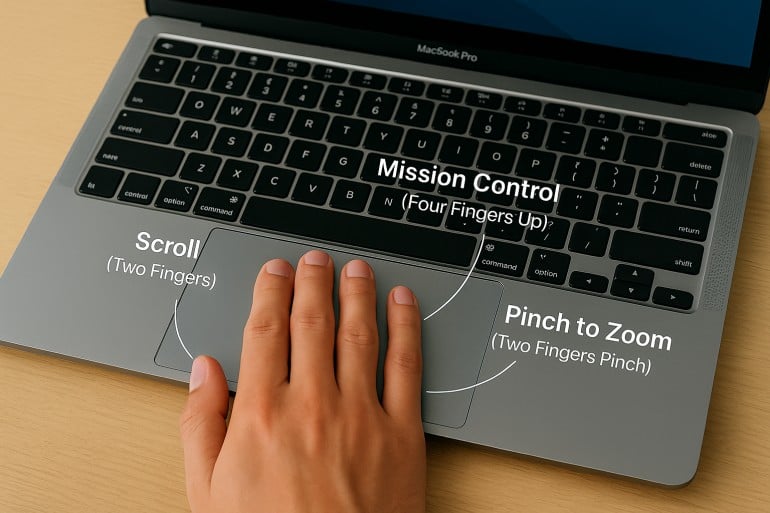 Image created by ChatGPT
TL;DR: Mac Trackpad Gestures & Magic Mouse Gestures
Mac trackpad gestures let you navigate, multitask, and control your Mac with simple swipes, taps, and pinches. Key gestures include two-finger scrolling and right-clicking, pinch-to-zoom, four-finger swipe up for Mission Control, and four-finger swipe left/right to switch between Spaces. The Magic Mouse supports many of the same gestures on its touch-sensitive surface, including scrolling, swiping between pages, and accessing Mission Control. All gestures can be customized in System Settings > Trackpad (or System Settings > Mouse for Magic Mouse).
Are you using Mac trackpad gestures to the best of your ability? Besides navigation, there are more than a dozen built-in and custom multi-touch gestures that can make your workflow and browsing experience more intuitive, efficient, and personal.
A well-placed tap or swipe can instantly perform a task, saving you time from navigating menus, minimizing apps, and executing multi-step commands.
In this guide, you’ll find a comprehensive walkthrough of trackpad gestures for Mac, plus a complete list of Magic Mouse gestures. From basics to advanced tips, learn how to customize commands to fit your workflow.
Read More… -
Best Mac Apps in 2026: 50+ Essential Tools We Use and Recommend

Image: Olia DanilevichIf you want to transform your Mac from a capable computer to a productivity powerhouse in 2026, you’re in the right place. We’ve curated a list of the best Mac apps to revolutionize how you work, without the need to upgrade any of your hardware.
From sophisticated time tracking tools and intuitive project management solutions, to powerful email clients and innovative note-taking apps, each recommendation has been carefully selected to solve real problems and enhance your Mac experience. Our list includes reviews of large and established apps, some beloved classics, and a few hidden gems you may not have heard of before.
Whether you’re a creative freelancer, a small business owner, or an ordinary Mac user eager to unleash your machine’s full potential, you’re sure to find valuable solutions in our comprehensive guide to the best Mac apps.
Let’s get started.
Read More… -
17 Cool Mac System Settings to Personalize Your Mac
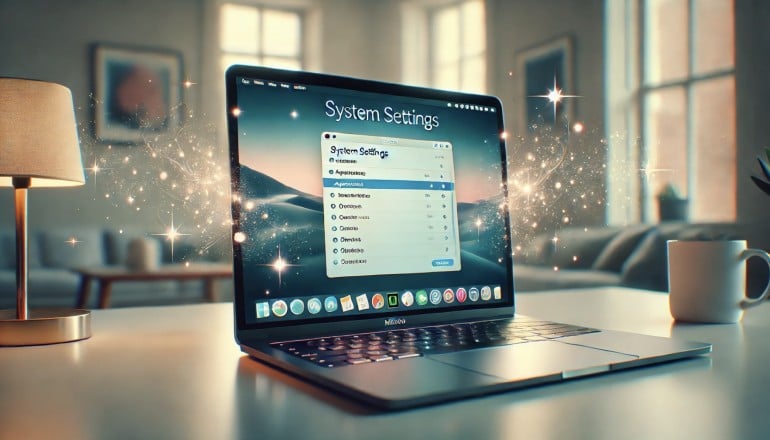
Image generated by Dall-E
Your Mac is more than just a computer — it’s your digital home. Your workspace, creative studio, and productivity hub all rolled into one. While its out-of-the-box experience is impressive, customizing your Mac System Settings can transform it into a finely-tuned instrument that anticipates your needs and works the way you do.
Your machine’s System Settings (formerly called System Preferences) is your Mac’s control center. It’s the central hub where you can configure virtually every aspect of your computer so that it works in a way that feels familiar and intuitive.
Depending on your personal preferences, and perhaps on the kind of work you do, you’ll likely have different needs to those around you. For example, you might hate being interrupted by notifications, beeps and pings. Or maybe you don’t like the way your Mac’s trackpad has been pre-programmed — does it scroll the wrong way? If you regularly edit photographs, you might be selective about the brightness of your display. All of these features can be adjusted to your liking in System Settings.
Here, we’ll explore 17 settings that can help you personalize your Mac. Take the time to make these changes, and you’re likely to work more efficiently and more productively.
-
How to Backup Your MacBook: Top 7 App Reviews and Tips

Image: Generated with Dall-EData loss is a nightmare for everyone. Whether it’s due to system failure, accidental deletion, or even theft, the risks are real.
According to a study by Backblaze, 46% of people lose data each year, 50% of hard drives die within five years, and 15% of households experience theft annually.
Learning how to backup your MacBook is not a luxury but a necessity for safeguarding your professional data. Encrypting your backups is crucial, especially when dealing with sensitive information, as it ensures that even if someone gains access to your backup files, they can’t read the data without the encryption key.
A reliable backup solution helps you quickly recover from unexpected data loss, saving time and protecting sensitive information.
Below, you’ll find a complete overview of how to backup your MacBook with the best backup apps for Mac and why options like iCloud sync are NOT a backup solution.
-
The Best Mac Time Tracking Software for Architects

Image: energepic.com
Architects face the constant challenge of managing complex projects with tight deadlines and balancing creativity with practicality. Poor time management can lead to missed deadlines, budget overruns, and lost opportunities for architects who need to focus on both the big picture and the finer details.
Moreover, architects who work on a Mac need time tracking software that integrates seamlessly into their workflow, offering reliability, security, and ease of use.
With the right time tracking tool, time management becomes effortless and directly impacts the quality of your work, client satisfaction, and your bottom line.
In this article, we’ll discuss why time tracking for architects is essential and the top time tracking apps you can use to get a more accurate picture of how you spend your work day.
Before we start with our top picks, let’s dive into the challenges architects face.
-
The 14 Best Project Management Software for Mac

Image: fauxels
What’s the best project management software for Mac? Unfortunately, there’s no one-size-fits-all answer here. Everyone you speak to is likely to have a preference for the solution that meets their unique requirements.
To help you find the option that works best for you, we’ve put together a detailed list of the 14 best Mac project management tools. Our review provides all the information you need to make the right choice. Whether you’re a freelancer, a manager of a small team, or a business owner looking to scale, our picks will ensure you stay on track and meet your goals.
