
Best Receipt Scanner Apps for Mac in 2026: 7 Picks for Every Workflow

TL;DR: Best Receipt Scanner Apps for Mac in 2026
The best receipt scanner app should cater for Mac users who want a proper desktop workflow, from capturing a receipt to handing it to your accountant. Our review features Mac-native tools like Receipts Space, industry heavyweights like Expensify and accountant favorites like Dext. Consider your most pressing needs and find the solution that’s right for you.
Receipt management tends to be a grudge task. Receipts pile up in wallets, inboxes and the bottom of bags until, one day, an expense report or a tax return forces you to pay attention to them. A good receipt scanner app solves this problem, helping you to scan and extract data in an instant. The best receipt scanner app takes this further by storing, organizing and exporting your information into a useful format. Use the right tool to your advantage, and managing your receipts quickly becomes a breeze.
In this guide, we’ve looked at some of the best receipt scanner apps for Mac users. We’ve explored tools that work well on macOS and iOS, covered the full receipt pipeline from capture to accountant hand-off, and included options at every price point. Each app has its own unique characteristics and benefits so it’s worth taking the time to think about what would best fit your workflow before giving one a try.
Let’s get started.
Table of Contents
TOC
How We Evaluated the Best Receipt Scanner Apps for Mac
In pulling our review together, we evaluated a wide range of receipt scanner apps for Mac. We prioritized native Mac apps that offer easy workflow integration and focused on the criteria that matter most to freelancers, consultants and small business owners, including:
- Optical character recognition (OCR) accuracy and data extraction: How reliably each app pulls the right numbers without requiring you to fix them manually
- Workflow fit: Whether the final output is useful for you and your accountant, and whether it’s formatted for expense reports and tax returns
- Integrations: Integrations with QuickBooks, Xero, FreshBooks, Zapier and email forwarding are enormously useful
- Privacy: Whether local storage is an option and where your financial data lives
- Pricing: With an eye on what makes sense for freelancers and small teams rather than enterprise finance departments
We also looked at both receipt scanners and receipt management apps. A receipt scanner uses OCR to extract merchant, date, total, tax and currency data from a photo or PDF. A receipt management app takes this further by storing, searching, archiving and exporting receipts for invoicing, expense reports or your accountant. They serve slightly different purposes. If you’re looking for a comprehensive solution, you’re after an app that offers both.

Image: Kaboompics
The Best Receipt Scanner Apps for Mac at a Glance
Short on time? Here’s a quick summary of where each app in our list excels. The table below also provides a handy overview.
- Best Mac native receipt and expense app: Receipts Space
- Best freelance and small teams app: Expensify
- Best for working with an accountant: Dext
- Best modern AI alternative for solo operators: SparkReceipt
- Best for digitizing paper receipt backlogs: Shoeboxed
- Best free option for Zoho ecosystem users: Zoho Expense
- Best if you already use QuickBooks: QuickBooks Online
| App | Best for | Mac availability | Capture/OCR | Manage & export | Price | Rating (out of 5) |
|---|---|---|---|---|---|---|
| Receipts Space | Mac-native, privacy-first | Native Mac app | Yes: Auto field recognition | Yes: Dashboard, export, e-invoices | Free and paid for €59.99 | 4.0 (MacUpdate) |
| Apple Continuity Camera and Notes | Free, zero-setup scanning | Built into macOS | Yes: Auto-crop and scan; no data extraction | Limited: Manual filing via Notes, Preview, Finder | Free, included with macOS | N/A |
| Expensify | Freelance & small businesses | Web (Mac browser) & iOS | Yes: SmartScan | Yes: Reports, export, integrations | Free and paid, starting at $5 per month | 4.5 (G2) |
| Dext | Working with an accountant | Web (Mac browser) & iOS | Yes: high-accuracy AI | Yes: Sync to Xero/QBO/Sage | Starting at $25.21 per month, billed annually | 4.6 (G2) |
| SparkReceipt | Modern AI, affordable | Web (Mac browser) & iOS | Yes: AI scan | Yes: Tax reports, QuickBooks Online/Zapier | $16.65 per month, billed annually | 4.8 (Mac App Store) |
| Shoeboxed | Paper receipt backlogs | Web (Mac browser) & iOS | Yes: Human-verified | Yes: IRS-ready archive/export | Starting at $97 per year | 4.4 (G2) |
| Zoho Expense | Zoho ecosystem, free tier | Web (Mac browser) & iOS | Yes: Mobile OCR | Yes: Reports, export, integrations | Free and paid, starting at $3 per month, billed annually | 4.5 (G2) |
| QuickBooks Online | Existing QuickBooks users | Web (Mac browser) & iOS | Yes: Capture | Yes: Attached to your books | Paid plans start at $38 per month | 4.0 (G2) |
| DEVONthink | Document-heavy Mac users | Native Mac app | Yes: Built-in OCR for searchable documents | Yes: Tags, groups, custom metadata, database export | One-time, starting at $99 | 5.0 (Capterra) |
| EagleFiler | Lighter, simpler document archive | Native Mac app | Yes: Live text OCR for shareable PDFs | Yes: Tags, smart folders, notes; standard Finder format | One time, starting at $69.99 | 4.6 (Mac App Store) |
Mac-native Receipt Scanner Apps
Since Mac-native apps are our priority, that’s where we’ll start. Here you’ll find reviews on Receipts Space and our honorable mention, the Apple Continuity Camera and Notes combination.
1. Receipts Space
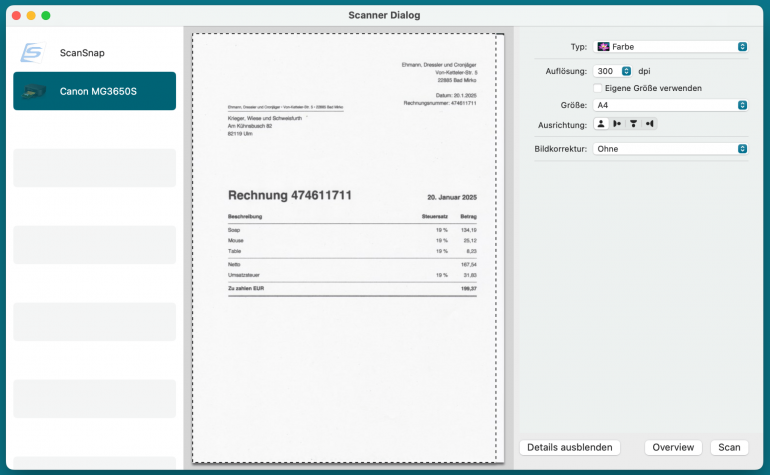
Image: Receipts Space
Best for: Mac users who want a true desktop receipt manager with complete local data control.
Developed by Dirk Holtwick, Receipts Space (with older versions simply called Receipts) is in a category of its own. This native Mac app was built exclusively with Mac users in mind. While most receipt tools are mobile apps you manage from a browser tab, Receipts Space is a fully fledged desktop app that is fast, well-designed, and feels right at home on macOS. Its local-first approach means your financial records stay on your Mac, or in your own iCloud Drive or Dropbox, and never on someone else’s server. OCR automatically pulls merchant, date, total and VAT data and the self-learning classifier gets smarter over time. The clean dashboard makes income and expenses easy to view at a glance. The trade-off is that Receipts Space really is macOS-only, so if you’re part of a mixed-platform team, you might encounter some challenges.
Mac access: Native Mac app (macOS 14.6 or later).
Key features:
- Automatic field recognition with self-learning categorization
- Multi-device sync via your own shared folders: iCloud, Dropbox, NAS
- Import/Export to common accounting formats for straightforward accountant hand-off
- Support for modern e-invoice formats (UBL / CII), alongside PDFs, image and email attachments
- Audit-compliant change history with optional library encryption
Pros:
- A true native Mac app that the performance and design show
- Privacy-first and local-first by default
- Financial dashboard for a clear view of income and expenses
Cons:
- macOS-only, which rules it out for mixed-platform teams
- Narrower integration ecosystem than cloud-first tools; no live sync to QuickBooks or Xero
Pricing: Receipts Space offers a free trial without registration that offers all features, limited to 50 documents with a watermark. The Subscription plan costs €59.99 per year (or $59.99 per year on the Mac App Store).
Honorable Mention: Apple Continuity Camera and Notes — Free, Built-in Receipt Scanning on Mac
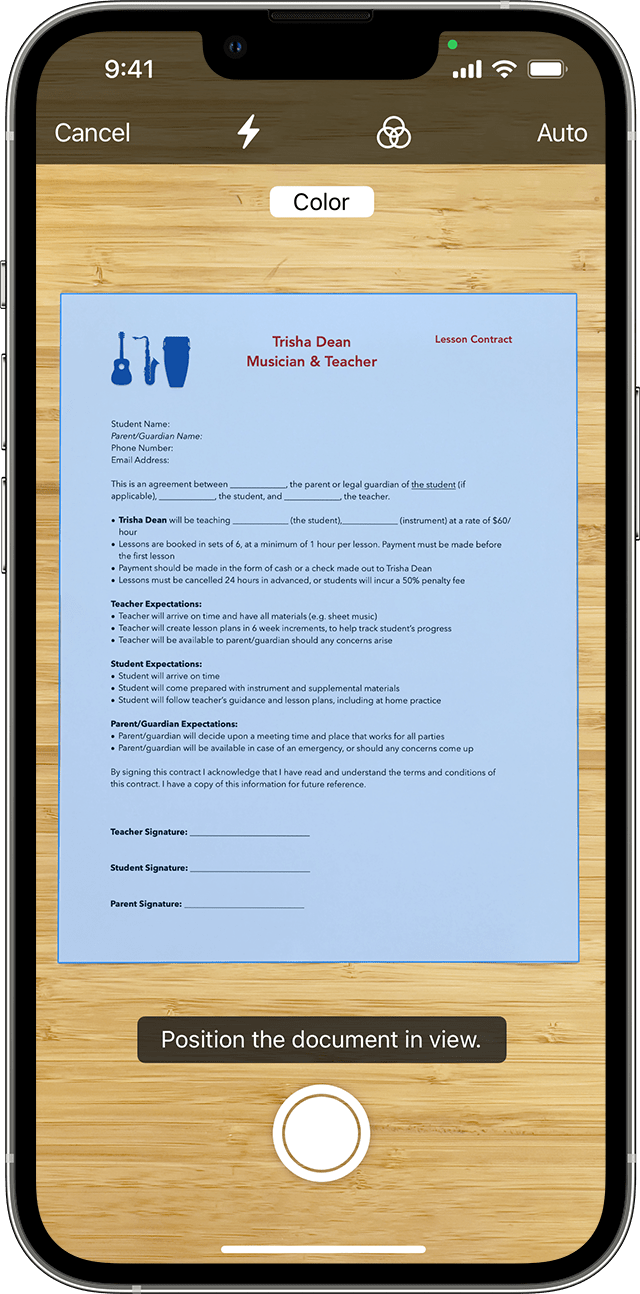
Image: Apple Continuity Camera
If you only deal with a handful of receipts a year, there’s a decent chance you already have everything you need. Apple’s built-in Continuity Camera lets you use your iPhone as a wireless scanner straight from supported Mac apps, including Notes, Mail, Finder, Pages and others. You don’t need to download anything, you don’t need an account, and there are no configuration settings beyond being signed into the same Apple ID on both devices. If you use Continuity Camera in Notes, the scanner auto-crops and flattens the page and saves the result as a PDF you can search with Spotlight, organise into folders and sync via iCloud. Files can stay local unless you choose to store or sync them through iCloud or another folder.
There are very real limitations, though. There’s no OCR data extraction into expense fields, no categorisation, and no way to export to an accountant’s workflow. It’s really a minimum-viable receipt filing system, but if you’re a very low-volume user, it might be adequate.
Mac access: Built into macOS (Mojave 10.14 or later) with an iPhone, iPad or iPod touch running iOS 12 or later.
Pricing: Free, included with macOS.
Cross-platform Receipt Scanner Apps Mac Users Should Know
While not exclusively Mac apps, the remaining apps on our list all work well across the Mac ecosystem.
2. Expensify
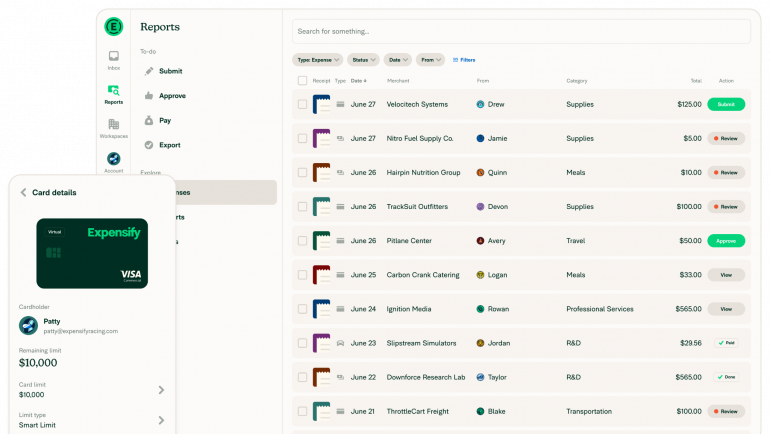
Image: Expensify
Best for: Users who want best-in-class OCR and a workflow their accountant will recognise.
Expensify has been around long enough to become the default answer when someone asks “what do you use to manage your expenses?” And it deserves its place. Its SmartScan technology is the benchmark for receipt OCR. Snap a photo on your iPhone, and Expensify pulls the merchant, date, amount and category with impressive reliability. On your Mac, you manage everything through the web dashboard, which is clean enough for freelancers and powerful enough for a small team needing approval workflows and reimbursements. It connects to all the major accounting platforms, and your accountant has almost certainly seen it before. The catch is that the interface can start to feel cluttered once you’re past the basics.
Mac access: Web app (any Mac browser) and iOS app for SmartScan capture. Receipts scanned on iPhone sync to the Mac web dashboard.
Key features:
- SmartScan OCR captures merchant, date, amount and category from a receipt photo
- Expense report creation, submission and approval workflows
- Mileage tracking and direct credit card import
- Integrations with QuickBooks, Xero, NetSuite, Sage, Gusto and over 45 more
- AI-powered Concierge flags policy violations and automates categorisation
Pros:
- A mature, well-established product that accountants know and trust
- Exceptionally broad integration support across accounting, payroll and travel tools
Cons:
- The interface can feel busy for freelancers who just want to scan a receipt and move on
- Expensify has several corporate features that solo users may find better suited for larger teams
Pricing: Expensify has a free plan that allows you to SmartScan receipts, send and receive money, and chat with coworkers. After that, the Collect plan costs $5 per member per month, and the Control plan comes with a custom pricing solution that starts at $9 per active member per month.
3. Dext
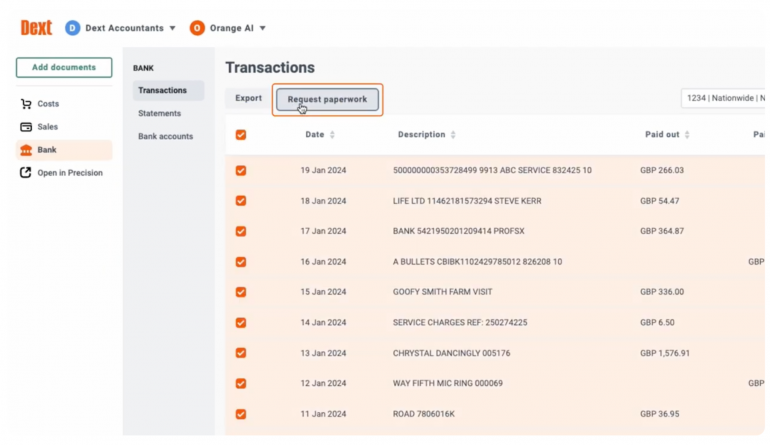
Image: Dext
Best for: Small businesses who work closely with an accountant or bookkeeper.
If Expensify is the household name, Dext is the accountant’s choice. Where most receipt tools ask you to export a spreadsheet and hope your bookkeeper can work with it, Dext is built from the ground up around the accountant-client relationship. It claims 99.9% data extraction accuracy, and its workflow backs that up. Receipts come in via mobile, email or a supplier portal fetch, get categorised automatically, and sync directly into Xero, QuickBooks or Sage without any intermediate step. Small business owners who hand their books to a professional will love working with such a clean pipeline. Unfortunately, however, Dext’s pricing and feature set are shaped around teams with a minimum of five users and with dedicated accounting practices in place. If you’re flying solo without a bookkeeper, another app might suit you better. Take a look at SparkReceipt.
Mac access: Web app (any Mac browser), iOS app and email submission. The web dashboard is the primary desktop interface on Mac.
Key features:
- AI-powered data extraction with a claimed 99.9% accuracy rate
- Direct two-way sync with Xero, QuickBooks and Sage
- Bank statement and credit card import alongside receipt capture
- Document fetching from email inboxes and supplier portals
- Bookkeeper and accountant collaboration built into the core workflow
Pros:
- The go-to tool for accountants; your bookkeeper almost certainly knows it
- Deep, reliable integration with the major bookkeeping platforms
- Clean, well-structured workflow from capture to reconciliation
Cons:
- Pricing and feature framing lean toward small teams with accountants rather than solo operators
- Fewer integrations outside core accounting platforms
Pricing: Dext costs $25.21 (excluding tax) per month, billed annually, for five users and 250 documents. This amounts to $302.50 per year (excluding tax). It scales depending on the number of new users you add or the volume of documents you require.
4. SparkReceipt
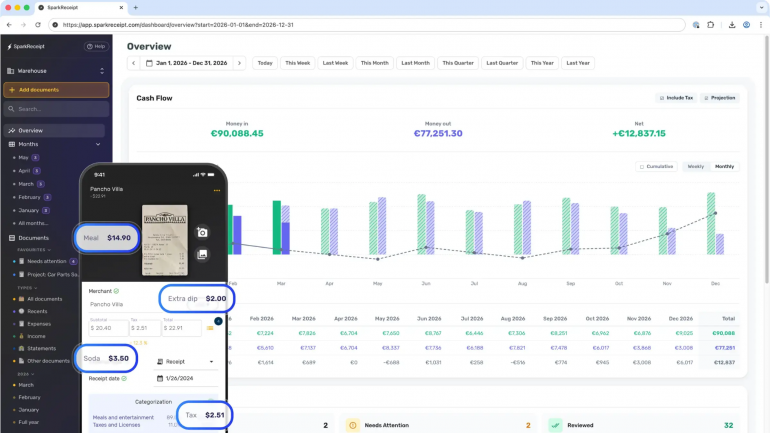
Image: SparkReceipt
Best for: Solopreneurs and freelancers who want capable AI scanning and solid expense management.
SparkReceipt is the newcomer on this list that punches well above its price point. Built specifically for solo operators and small businesses, it skips the complexity that makes tools like Expensify and Dext feel like overkill. Instead, it delivers fast, accurate AI scanning in return. Receipts are processed in 2 to 3 seconds, with vendor, date, total, tax and currency automatically extracted across 190 currencies and in virtually any language. (If your work takes you around the world, SparkReceipt is a strong contender!) Email inbox scanning (Gmail, Outlook and IMAP) pulls in digital receipts automatically, and bank statement matching helps you reconcile before tax season turns stressful. However, it’s worth bearing in mind that SparkReceipt is a younger product with a smaller track record than the established names on this list. This might be important to you if you’re trusting it with years of financial records.
Mac access: Web app (any Mac browser) and iOS app.
Key features:
- AI receipt scanning with 2 to 3 second processing
- Automatic email inbox scanning
- Support for 190 currencies and multiple languages
- Tax-ready report export in CSV, PDF and Excel; direct sync to QuickBooks Online and Xero
- Zapier and Make integrations for custom workflows
Pros:
- Modern AI built for freelancers and small businesses
- Useful for international operators with broad currency and language support
- Clean, focused interface that doesn’t bury you in features you don’t need
Cons:
- Relatively new to the market
- Smaller integration ecosystem than more established tools
Pricing: SparkReceipt has one plan, the Elite plan, which costs $16.65 per month or $199.98 per year, billed annually. Additional users cost $58 per year.
5. Shoeboxed
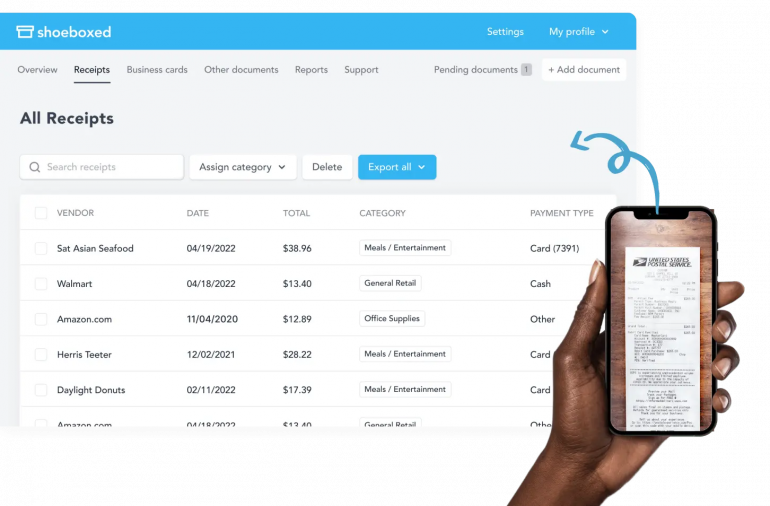
Image: Shoeboxed
Best for: Anyone sitting on a backlog of paper receipts who’d rather mail them off than spend a weekend scanning.
Most receipt apps assume some level of organization: that your receipts arrive digitally, get scanned immediately and flow neatly into a dashboard. Shoeboxed acknowledges that this isn’t always the case. Its standout feature is the Magic Envelope (US only): a pre-paid envelope you stuff with physical receipts and mail to Shoeboxed, who then scans, human-verifies and categorises everything for you. The result is IRS-compliant digital storage without you having to lift a finger (beyond walking to the post box). For day-to-day use on Mac, the web dashboard handles drag-and-drop uploads, Gmail receipt sync (on Pro and Plus), and exports to QuickBooks or Xero. It’s not the most affordable option if you only need basic digital scanning, but for paper-heavy workflows, nothing else comes close.
Mac access: Web dashboard (any Mac browser) and iOS app.
Key features:
- Magic Envelope mail-in scanning: post your physical receipts and Shoeboxed handles the rest with human-verified OCR
- IRS-compliant digital storage with audit-ready reports
- 15-category tax classification for straightforward tax prep
- Gmail receipt sync and drag-and-drop upload from Mac (Pro and Plus)
- QuickBooks Online and Xero integrations (Pro and Plus)
Pros:
- The only realistic solution for a physical receipt backlog, truly in a category of its own
- Human-verified OCR means accuracy you can trust for tax records
- IRS-compliant storage with a track record of holding up under audit
Cons:
- The Magic Envelope service is only available to US-based customers
- Scan limits are tiered and can catch you out
Pricing: Shoeboxed has three plans: Starter, Pro and Plus. Starter costs $97 per year, Pro costs $297 per year and Plus costs $797 per year, all billed annually.
6. Zoho Expense
Image: Zoho Expense
Best for: Freelancers and small teams who want a capable free tier or are already working in the Zoho ecosystem.
One of Zoho Expense’s greatest features is its powerful free plan. Up to three users get receipt OCR, expense tracking, mileage tracking, multi-currency support and approval workflows at no cost. This provides an excellent starting point for a solo freelancer or small team that doesn’t want to commit to a subscription straight away. Beyond the free tier, Zoho Expense is a mature, deeply customisable platform with strong international credentials, per-diem rules, duplicate detection, and integrations that stretch into the broader Zoho suite. If you’re already using Zoho Books or Zoho CRM, the data flows between them without friction. Be aware, though, that the free plan caps receipt autoscans at 20 per month, itemized receipt scanning is Premium-only, and the sheer density of the interface can be a lot to navigate if all you want to do is scan a coffee receipt and move on.
Mac access: Web app (any Mac browser), iOS app and email forwarding to a personalised address.
Key features:
- Free plan for up to three users, including core scanning, mileage and approval workflows
- Duplicate receipt detection and multi-line itemized receipt support (Premium)
- Multilingual support and multi-currency expenses with global tax compliance
- Mileage tracking via GPS and per-diem rules
- Integrations with QuickBooks, Sage and the full Zoho finance suite
Pros:
- Deep customisation and strong international support make it a solid fit for global users
- A mature, well-supported platform with consistent ratings across G2 and Capterra
Cons:
- Free plan is limited to 20 scans a month, which some users might find restrictive
- The interface is feature-dense; solo users who want simplicity may find it exceeds what they need
Pricing: Zoho Expense has a free plan. Its Standard plan costs $3 per user per month and its Premium plan costs $5 per user per month, both billed annually.
Speaking of Zoho, if you’re looking for ways to improve your accounting processes, be sure to check out our guide to the best accounting software for Mac. There, we review Zoho in full, as well as eight other accounting software options.
7. QuickBooks Online
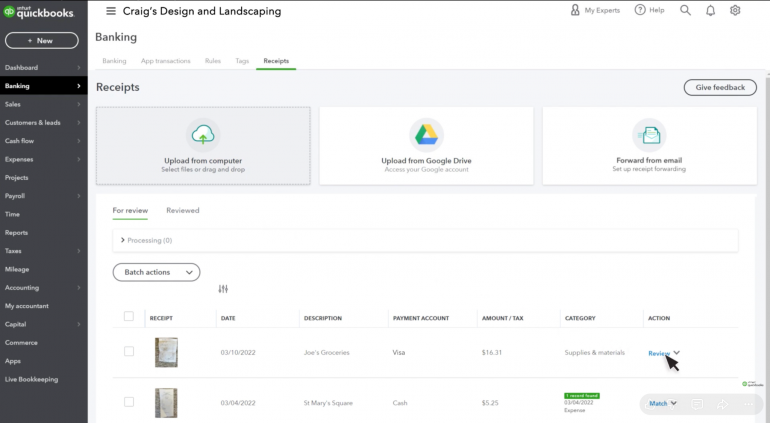
Image: QuickBooks Online
Best for: Mac users who are invested in the QuickBooks Online ecosystem.
If you’re already using QuickBooks Online, its Receipt Capture feature offers one of the most friction-free receipt management experiences you’re likely to have. Snap a receipt on your iPhone, and it syncs to your Mac dashboard automatically, where QuickBooks matches it to an existing expense or creates a new one. There’s no exporting, re-importing or reconciling-and-attaching. And your audit trail is exactly where it needs to be. You can also upload receipt images directly from your Mac browser or forward them via email to your unique QuickBooks address. It’s worth being clear that Receipt Capture is a feature inside accounting software, not a dedicated receipt manager. If you’re not already a QuickBooks Online subscriber, the subscription cost makes it a hard sell as a standalone scanning solution.
Mac access: Web app (any Mac browser) and iOS app for mobile receipt capture. Email forwarding is also available.
Key features:
- Snap receipts on iPhone and sync to the QuickBooks Online dashboard on Mac
- Automatic matching to existing expenses or creating new expense records
- Receipts attach directly to expense records, creating a ready-made audit trail
- Tax-time export with receipts already organised within your books
- Available across QuickBooks Online paid plans
Pros:
- If you’re already on QuickBooks Online, receipt capture is included
- First-party integration means receipts live inside your accounts, not alongside them
- Eliminates the reconcile-and-attach step that standalone receipt tools still require
Cons:
- Receipt capture is a feature of accounting software and subscribing to QuickBooks Online purely for this isn’t cost-effective
- The pricing climbs steeply at higher tiers
Pricing: QuickBooks Online plans start at $38 per month for Simple Start, with Essentials, Plus and Advanced priced at $75, $115 and $275 per month respectively.
Also Consider: Mac Document Archives
The following two options are great if you want a searchable archive to organize and retrieve contracts, statements and receipts. But be aware that they don’t auto-extract expense fields or sync to accounting tools the way the ranked apps do.
DEVONthink
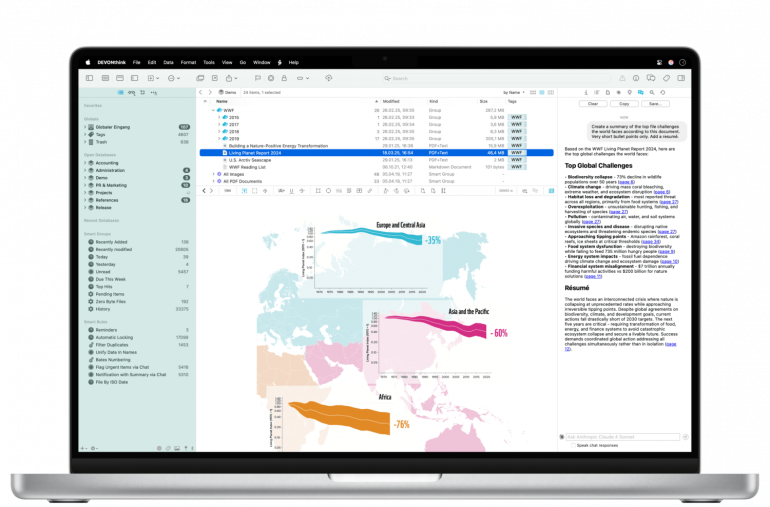
Image: DEVONthink
DEVONthink is less a receipt scanner and more a home for everything on your Mac, including contracts, statements, research and receipts, too. If you love having a paperless office and want a searchable archive rather than a dedicated expense tool, it’s hard to beat. Built-in OCR makes every scanned document searchable, and its powerful tagging, groups and custom metadata mean you can organise receipts exactly as you see fit. It won’t auto-extract expense fields or sync to QuickBooks, but if you’re a document-heavy Mac user who prioritises retrieval and organisation, that’s a reasonable trade. It also integrates with Timing, which makes it a natural fit in a Mac-native billing setup.
Mac access: Native Mac app (macOS Ventura or later), with optional DEVONthink To Go companion for iPhone and iPad.
Pricing: DEVONthink has three tiers. The Standard tier costs $99, the Pro tier costs $199 and the Server tier costs $499.
EagleFiler
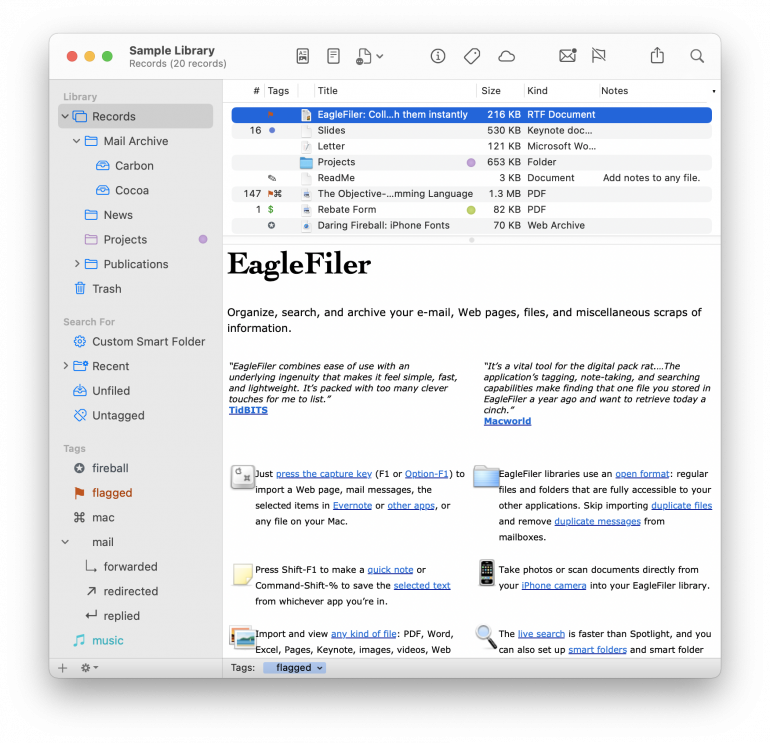
Image: EagleFiler
EagleFiler is the lighter, leaner alternative to DEVONthink, a native Mac filing cabinet that stores, tags and searches any file you throw at it, receipts included. Live Text OCR means scanned PDFs are fully searchable; smart folders, tags, and notes handle the organisation; and the live search is faster than Spotlight. Libraries are stored in standard Finder format, so your files are never locked into a proprietary system. Like DEVONthink, it won’t extract expense fields or talk to your accounting software, but if you want a tidy, searchable home for financial documents and everything else, it’s a well-priced, actively maintained option.
Mac access: Native Mac app (macOS 10.13 or later).
Pricing: EagleFiler costs $69.99 for one user, $111.98 for a family or two users, $349.90 for 10 users or Macs, and $1,050.00 for 50 users or Macs.
Reading E-invoices on Mac: GrandTotal E-Invoice Viewer
E-invoicing is becoming standard practice, which means more Mac users are receiving XML files they can’t open. The GrandTotal E-Invoice Viewer solves this problem nicely. Drop in a UBL or CII XML file and the invoice viewer converts it into a clear, readable document showing supplier, customer, line items, taxes and payment details. It works in-browser or as a free macOS download without needing an account or subscription, and with no data leaving your machine. All processing happens locally, which makes it a good fit for privacy-conscious users already using local-first tools like Receipts Space. It’s made by Media Atelier, the same developer behind GrandTotal, so if you’re using GrandTotal for invoicing and Receipts Space for expenses, this slots into the same Mac-native billing workflow at no extra cost.
Read more: Billing time with GrandTotal and Timing
How to Choose the Right Receipt Scanner App for Your Mac
The best receipt scanner app is the one that fits how you work. Here, we rank our apps one more time, based on the problem you’re trying to solve.
You want a true Mac-native app with full local data control
Receipts Space is the most complete option: a proper desktop app with local-first storage, automatic field extraction and an expense dashboard.
You need a free, zero-setup option for a handful of receipts a year
Apple’s built-in Continuity Camera and Notes costs nothing and requires no account. It won’t extract data into expense fields, but for low-volume users it’s a perfectly reasonable starting point.
You want the most established option with the widest integration support
Expensify is the name most accountants and finance tools recognise. It comes with a free individual plan and connections to virtually every accounting platform you might use.
You’re already using QuickBooks or Zoho
Stick with what you have. QuickBooks Online’s built-in receipt capture means receipts attach directly to your transactions — no extra tool needed. And Zoho Expense integrates seamlessly with the Zoho ecosystem. The latter also offers one of the more capable free tiers in our list.
You work closely with an accountant or bookkeeper
Dext is your best option here. It’s the tool most bookkeepers already know, and its data flows directly into the major platforms without any intermediate steps.
You’re a freelancer who wants modern AI scanning
SparkReceipt strikes the right balance: fast AI extraction, a clean interface, and pricing built for one-person businesses rather than finance teams.
You have a backlog of paper receipts to deal with
Shoeboxed’s Magic Envelope service lets you post your physical receipts and have them scanned, categorised and stored for you. It’s the only realistic solution if you’re staring down a drawer full of paper. This service is only available in the US, however.
You want a free tier with real functionality
Zoho Expense’s free plan covers up to three users with receipt OCR, mileage tracking, and approval workflows — more capable than most free tiers in this category.
Pair your Receipt Scanner with Timing for a Complete Mac Billing Workflow
A receipt scanner captures what you spent. But that’s only half the billing picture. The other half is the time you spent earning it, which for many freelancers, consultants and small teams, comes down to what you spend your time on. Without accurate time tracking, you’re likely to resort to guessing what to invoice each client. The automatic time tracking solution Timing is designed to help with exactly that.
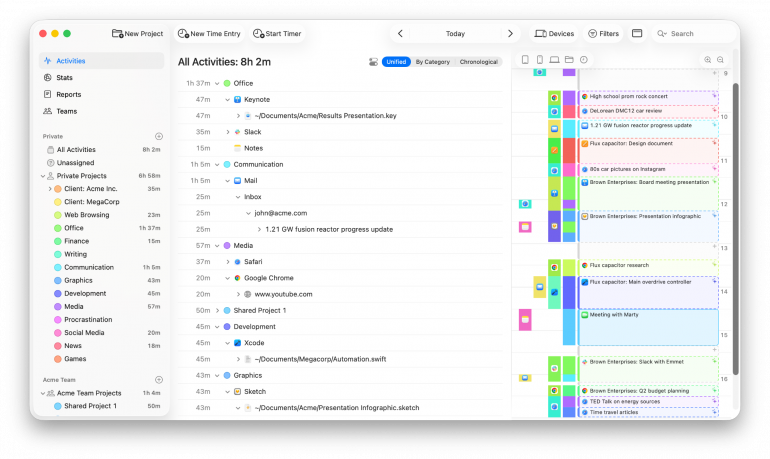
Timing records every app, website, document, phone call and calendar event you use. It runs in the background while you work, building a complete picture of your working day automatically. Here’s how it fits alongside the tools in this guide:
- Automatic time tracking: Timing captures your activity across every app and project without any manual input, so your billable hours are accounted for whether or not you remembered to log them.
- Per-client and per-project organisation: Through the rules functionality, you can categorize any tracked time by client or project. That way, when invoicing day arrives, your hours line up with your scanned receipts on a per-project basis.
- AI summaries: Timing’s AI summaries turn raw activity into plain-English descriptions of what you worked on. This can be useful for line items on a client invoice or backing up an expense report.
- Professional exports: Export tracked time as PDF, XLSX, CSV or HTML, the same kind of client-ready output most receipt apps produce for expenses. Both sides of the bill, in one place.
- GrandTotal integration: Auto-import tracked hours into invoices via the GrandTotal plugin (requires Timing Connect), then attach your scanned receipts as expense line items for a Mac-native billing pipeline. GrandTotal’s developer also makes the free E-Invoice Viewer covered above, which is a handy addition if your clients are sending machine-readable invoices.
- Zapier, Web API and AppleScript: For more complex setups, connect Timing to QuickBooks, Xero, FreshBooks or your receipt scanner of choice. This amounts to the same integration layer most of the apps in this guide rely on.
- Privacy-friendly by default: Timing keeps your activity data on your Mac unless you choose to sync. This is a natural pairing for anyone who’d rather their financial and work data stayed off someone else’s server.
Ultimately, if you run your receipt scanner app and Timing side by side, you’re well on your way to making your Mac a self-documenting bookkeeping machine.
Summary: Why a Mac-first Receipt Scanner Workflow Matters
Most receipt scanner roundups are built around mobile-first tools, leaving Mac users to figure out how a phone-centric app fits into a desktop workflow. The apps in this guide are chosen with that in mind. We’ve prioritised tools that work well on macOS, whether that means a native Mac app with local data control, a web dashboard that pairs cleanly with iOS, or integrations that slot into the accounting tools already open on your Mac.
The right choice depends on how you work. For a true Mac-native experience, Receipts Space leads the pack. If you want broad integrations and a strong track record, Expensify is the safe choice. For accountant-led workflows, Dext. Solo operators who want modern AI on a sensible budget should look at SparkReceipt. For paper receipt backlogs, Shoeboxed. Zoho Expense delivers a capable free tier. And if you’re already on QuickBooks, its built-in receipt capture removes a tool from your stack entirely.
Whichever app you choose, remember that it only covers half of your billing workflow. The other half, tracking the time you bill for, is Timing’s responsibility. Built natively for macOS, Timing ensures that your billable hours are as well-organised as your receipts. Try Timing free for 30 days and see how it fits alongside your receipt scanner of choice.
Frequently Asked Questions: Receipt Scanner Apps for Mac
Is There a Native Mac Receipt Scanner App?
Yes, Receipts Space, the newer version of Receipts, is the most complete Mac-native option. It combines receipt scanning, automatic field extraction and an expense dashboard in one macOS app. And Apple’s built-in Continuity Camera and Notes workflow is a free option worth considering.
What’s the Difference Between a Receipt Scanner and a Receipt Management App?
A receipt scanner captures data using OCR to pull merchant, date, total and tax information off a photo or PDF. A receipt management app does that and stores, organizes, searches, archives and exports your receipts for invoicing, expense reports or your accountant.
What’s the Best Free Receipt Scanner for Mac?
Apple’s Continuity Camera and Notes is a totally zero-cost option, but its functionality is limited. You could opt for Zoho Expense’s free tier if you need OCR and categorization, or Expensify’s free individual plan if you want SmartScan accuracy.
Do Receipt Scanner Apps Work with QuickBooks or Xero?
Yes, most receipt scanner apps work with major accounting software. Expensify, Dext, SparkReceipt, Shoeboxed (Pro and above), Zoho Expense and QuickBooks Online’s built-in capture all sync receipts to QuickBooks. Dext is a standard for Xero.
Are Receipt Scanning Apps IRS-compliant for Tax Records?
The IRS accepts digital images of receipts as long as they’re clear, complete and stored reliably. Shoeboxed explicitly markets IRS-approved digital storage, and QuickBooks Online and Expensify generate audit-ready records. Always retain the originals for a defensible period if you’re unsure or chat to your tax advisor.