
-
Why Do I Get Easily Distracted? 8 Tips to Help You Focus
 Image: Nubelson Fernandes
Short Answer: You get easily distracted due to internal factors (stress, fatigue, hunger, mental health conditions) or external factors (phone notifications, workplace interruptions, background noise). Research shows we spend 47% of our time mind-wandering and switch tasks every 3 minutes on average. The fix: identify your specific triggers, then use targeted strategies like airplane mode, scheduled email checks, website blockers, and automatic time tracking to stay focused.
You open your laptop, sift through your priorities, and get started with your workday. Things begin smoothly, and you sense that you likely have a full, productive day ahead. Then, your phone pings with a text. Four emails arrive in a flurry. And you decide to check your social media feed, just for a minute. Before you know it, the day is gone. And with only a handful of items successfully ticked off your to-do list, you’re left asking yourself: “Why do I get easily distracted?”
You’re not alone if you get distracted from time to time. In fact, according to a Harvard study, most people spend 47% of their time thinking about something else. And in the workplace, the typical office worker gets interrupted or changes tasks every three minutes. Since it can take over 23 minutes to get back in the zone after a distraction, this makes for disjointed and disrupted workdays.
The consequences of this are far-reaching. Distractions make it difficult to stay focused, invest in deep work, and be productive. If you don’t put steps in place to address your distractions, they can ultimately impact your success.
Let’s take a look at why you might get distracted easily, and what tips you can use to limit your distractions.
-
Setting Work Boundaries: 7 Steps for Better Work Satisfaction
 Image: CoWomen
Boundaries refer to the limits we set for ourselves. They’re a line in the sand that indicates we’re prepared to go so far and no further. Boundaries are important in all aspects of our life, including at work. Work boundaries help us to stay focused and productive, establish work-life balance, maintain constructive working relationships, boost work satisfaction, and prevent burnout.
If you battle to communicate your needs at work, if the lines between your professional and personal lives regularly blur, or if you constantly feel overwhelmed or exhausted, it’s worth paying attention to the boundaries you have in place. Are they strong enough? Do you need to renegotiate or reinforce them? Examining your boundaries critically can help you stay on track mentally, emotionally and physically.
Here, we explore the different types of boundaries at work. And we offer seven steps that will help you keep good boundaries in place — and reap the rewards.
-
Introducing Timing 2023.1: Analyze Your iPhone and iPad Usage with Timing!
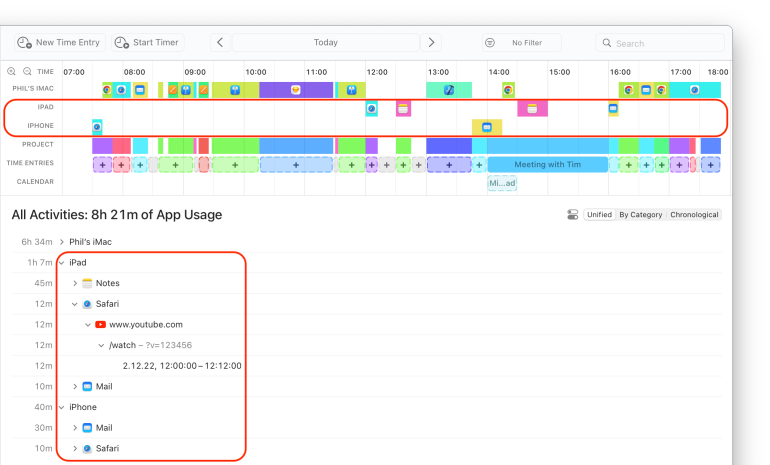
Timing has always been a great tool to keep track of how you spend time on your Mac, but we know that many of you also use your mobile devices for work and personal use. Up until now, however, it has not been possible to collect your iPhone and iPad usage in the same way as your Mac usage.
But this changes today: We are excited to announce Timing 2023.1, which introduces a new feature that a lot of you have been asking for: Timing can now import your iPhone and iPad usage from Screen Time!
This feature, available in the Expert and Connect editions of Timing, lets you manage your time spent on mobile devices just like your Mac usage, with the full functionality of Timing’s timeline and activity list. Even Timing’s rules are available to automatically categorize your mobile device usage.
Using Timing to display your mobile activity has several advantages over the limited device usage view in the iOS and macOS system settings:
- A timeline that shows exactly when you used each device, and for what. No more guesswork, as opposed to Screen Time’s “hourly” granularity!
- Review any time range you want, rather than being limited to Screen Time’s day/week views.
- Archive Screen Time data for longer than the four weeks Apple allows.
- Categorize your mobile activities into projects using drag-and-drop.
- Timing can show even the full URLs of the websites you visited in Mobile Safari.
- You can quickly create manual time entries to annotate and categorize whole blocks of your mobile activity at once.
In addition to this new integration, Timing 2023.1 also features plenty of usability improvements. You can find an overview of all the changes in our release notes.
Read on for more information on how how to set up the integration, and what to expect from it!
-
Introducing Timing 2021.6: All-New Activities Screen and Plenty of Usability Improvements
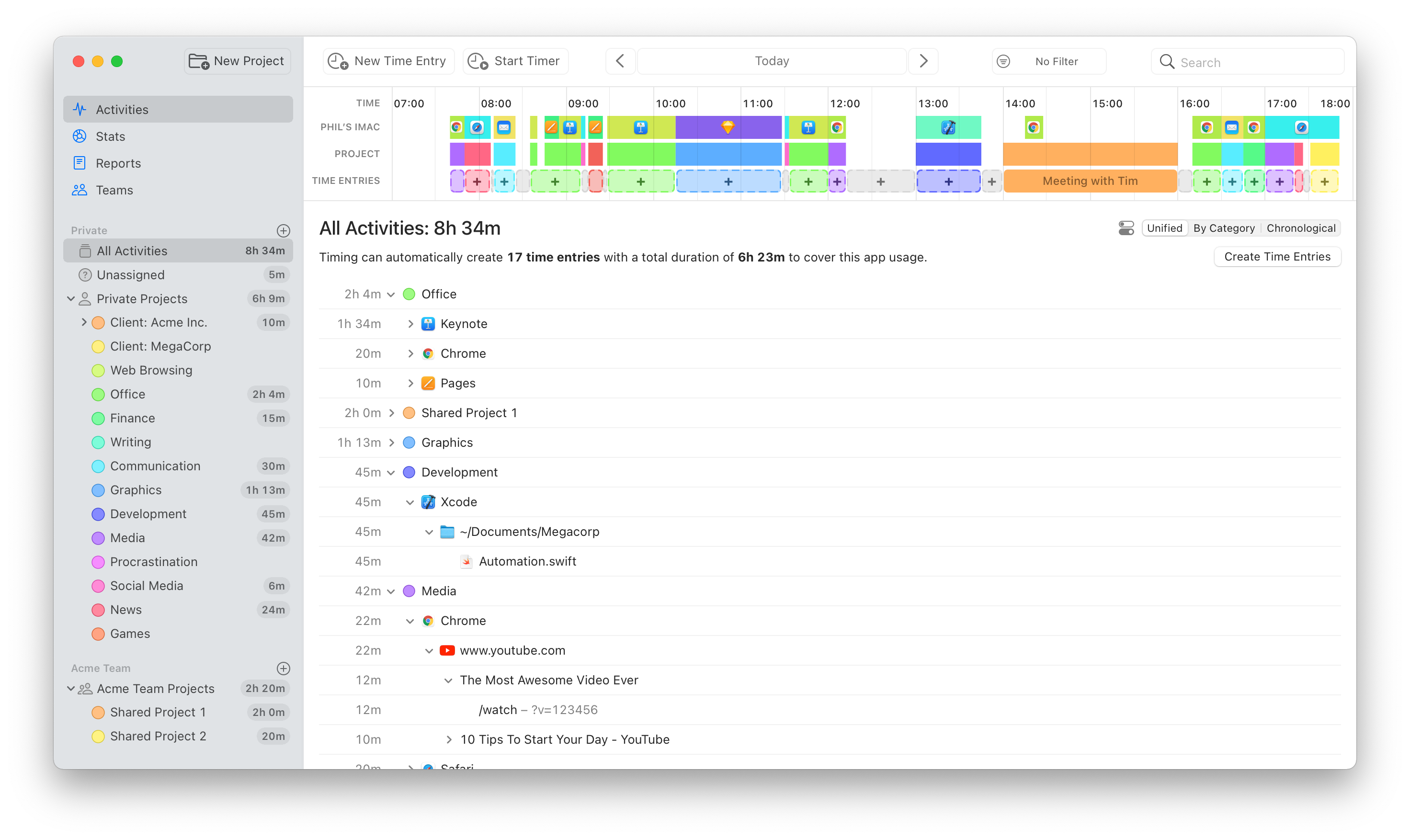
We have just released Timing 2021.6, which replaces the “Review” and “Details” screens with one unified “Activities” screen. We believe that this screen combines the best of both worlds, but we would love to hear your thoughts on it, too.
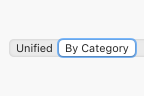
If you preferred the old “Review” screen, don’t worry; the contents of the “Review” screen are still available by selecting the “By Category” mode on the new “Activities” screen:
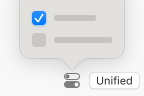
In addition, you can customize the appearance of the Activities screen by clicking the button next to the mode picker:
But that’s not all! The new version also introduces a ton of usability improvements that should streamline your time-tracking workflow even more:
- You can now start and stop timers right from the toolbar of the main Timing app.
- You can now also start timers via the right click context menu of a project.
- On macOS Big Sur, toolbar buttons now show labels next to their icons to make their purpose more clear.
- We have completely reworked the app’s onboarding. If you would like to give the new onboarding a try, you can access it via the “Replay Introduction” item in the “Help” menu. Maybe you’ll learn a trick or two that you didn’t know about yet!
- Timing will now warn when creating a time entry causes other entries to get overwritten.
- Slightly increased the width of time entry editors, giving you more space to enter details.
- When starting a new timer, Timing will now suggest the most recently used project by default.
- By default, Timing will stop any running timers when your Mac goes to sleep or when you quit the Timing tracker app. You can now customize this behavior in the app’s “Tracking” preferences.
And that’s just an excerpt of the full release notes.
Conclusion
That’s it for today! Feel free to let us know what you think of this bulletin, and take care!
-
Timing June 2021 Update: Mac and Web App Updates, Pricing Strategy, and Documentation Improvements
To help you get the most value out of Timing, here’s a quick update on what we’ve been working on for you recently:
Timing 2021.4: Quality of Life Improvements
We have recently released Timing 2021.4 with plenty of tweaks that make it even more convenient to use.
Here’s a summary of the changes:
- We have made the timeline easier to use. You can now more easily add tasks and adjust their lengths, even for times when Timing has not yet tracked any data for you.
- We have re-worked the preferences to make them more accessible and useful.
- Call tracking is now available for many more apps. In case this causes false positives for you, the "Call ended" notification now includes an option to notify us about them.
- You now have more suggestions to choose from when creating a task, and you can easily round their start and end times via the +5/-5 buttons.
- Timing will now track window titles of Progressive Web Apps (PWAs) in Chromium-based browsers (except Brave).
There’s even more in this update; you can find the full list in therelease notes on our website.
We are planning to add even more improvements and interface simplifications over the course of the summer. If there is a particular thing that you would like to see streamlined, please let us know!
Web App: Better Project Grouping in Reports
The Timing web app is a great solution for starting and stopping timers on the go as well as viewing your team’s time entries.
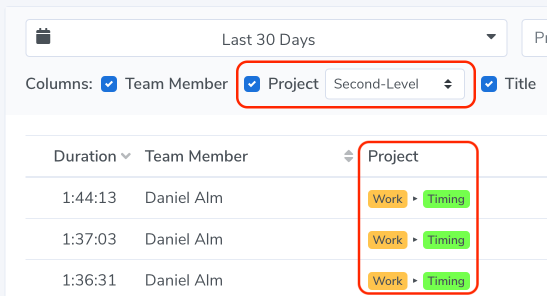
However, its reporting had up to now been limited to grouping times by each project, no matter how “deep” those projects were in the project hierarchy. For example, if you had two sub-projects called “Research”, there was no telling which actual parent project times in either of these two sub-projects belonged to.
With this update, you can now have the web app group by the top one or two project levels instead, which indicates the overall area of work these times belong to:
-
Are You Prepared for the EU’s New Time Tracking Regulations?
Is your company meeting the new time tracking requirements set by the European court?
On May 14, 2019, the European Court of Justice ruled that European member states “must require employers to set up an objective, reliable and accessible system enabling the duration of time worked each day by each worker to be measured.”
The ruling comes after a lawsuit by the Comisiones Obreras (CCOO), a Spanish trade union, against Deutsche Bank. CCOO requested the German bank set up a system for tracking time each day, to help ensure labor laws were being met. Deutsche Bank argued against recording time due to the fact that Spanish law didn’t require it.
Ultimately ECJ decided that, “…in the absence of a system enabling the duration of time worked each day by each worker to be measured, it is not possible to determine, objectively and reliably, either the number of hours worked and when that work was done, or the number of hours of overtime worked, which makes it excessively difficult, if not impossible in practice, for workers to ensure that their rights are complied with.”
This measure is essential to ensure the maximum weekly working time — including overtime and rest periods have been complied with. This protects both employers and workers by verifying whether those rights are complied with.
Now that employees are responsible for tracking their time, are you worried about how your team will comply? Timing is the ideal solution!
Read More… -
Time Scarcity Can Be Beaten! Here’s How to Break Free

Do you say ‘I don’t have time’ too much? Here’s how to manage your time better with a change in mindset, and Mac productivity apps that will restore the hours in your day.
It’s already July. Where has the year gone? For that matter, do you remember the millenium? Children born in the Millenium will now be graduating from high school and heading off to college. Where has the time gone?
“I don’t have time” is said way. Too. Much. Period. Yet we all have 24 hours in the day, so how do some people seem to have so much more?
Statistics are now showing us how “I don’t have time” is just blatantly wrong. We work less than we used to, and we have more free time. Yet that is far from the experience of most people.
But why? There’s one simple explanation, which is that we’re spending too much time on our screens, even when we’re not working. In a 2017 Ted Talk, psychologist Adam Alter analysed why our screens are stealing our time, and the reasons why this isn’t good for our mental health.
It goes beyond our screens though. Being busy has become fashionable, a badge of success. It used to be that having made it meant that you had leisure time. Now, it seems that the wealthy and successful have more jam-packed schedules than any of us.
So how do you break out of this culture where being busy is a status symbol, and develop a mindset of time abundance, rather than poverty. From work time apps and Mac productivity apps to a change in the words you use in daily life, here are some ways to reclaim the hours in your day.
Read More → -
9 Entrepreneurs Share Weird Ways They Manage Time Effectively

Tired of the same old tips for how to manage time? We asked productivity experts to weigh in with what they consider their ‘weirdest’ tips.
Want to be more productive? Get up earlier, work in small bursts, exercise, and drink water. If I had a dollar for every article on the internet telling me to do these, I’d be richer than a Kardashian.
What about the things that you don’t hear constantly: the experiments, and the personal discoveries? The Eureka moments when those of us desperate to eke more time out of our day realize if I do this small thing I work so much better!
Employing some lesser-known hacks might be what you need to transition from stress-preneur to entrepreneur. Don’t worry, though, we’re only advocating legal techniques, unlike micro-dosing LSD which is currently the trending productivity hack in Silicon Valley.
To find some brand new productivity hacks, we asked some experts what they do to get the most from their day. Think you know it all already? You’re about to find out.
Read More → -
Procrastinator? How to Manage Your Time With Micro-Progress

There’s a new craze on the block called micro-progress, to help you just get stuff done and feel happier while you do so.
I’m about to say something you’ll hate.
You are not short of time. You have time. If you really wanted to, you could fit everything into your day. Exercise, work, a social life, healthy eating — all of it.
What was your reaction? Did you make an excuse, or start formulating ‘reasons’, for why you legitimately have no time? If so, then you need to take that excuse out of your vocabulary. Now. It’s as much of a procrastination aid as cat videos … but with more guilt, and less fluff.
If you want to procrastinate less — and do more — then you don’t need a grand master plan of how to manage your time. Actually, you need the opposite. It’s tempting to try and set yourself grand, unachievable goals, and then either never start of give up early on. Because changing enough to fulfil these lofty goals requires too many lifestyle changes.
It’s not that you don’t have time. It’s that it’s not a priority to change your entire schedule and current set of habits to create the time. Or as entrepreneur coach Peter Shankman puts it:
“If you want something to be a priority in your life, you make the time for it at the expense of something you deem not as important. It’s truly that simple.”
Which is great, but again, what if that’s too much friction? What if you still procrastinate and don’t have time? How do you get out of this loop?
If you’re thinking that this is just another article to guilt you into feeling bad about not doing enough with your day, then don’t worry. Micro-progress is a feel good method of becoming more productive, and using your time better. Better still, it’s something you can accomplish easily with a Mac productivity app — so no fancy equipment is required.
Whether you want to develop a new app, launch a new business, get fitter, or just do more with your day, tracking what you’re doing in terms of micro-progress is bound to change how you’re managing your time.
Read More → -
From Time Tracking Apps to Marketing — Where and Why Freelancers Should Invest
When I used to work as a marketing consultant for a digital marketing company, I would talk to dozens of freelancers and SMEs every week. The main reason I heard constantly for not buying services was: “I just don’t have the money right now, I’m just starting out/short on funds.”
Often, they would promise to ring me back the moment they had a few sales, or had found that investor, or the moment high season began.
You won’t be shocked when I tell you that call rarely came, and I didn’t wait for it.
Does that sound familiar? If you’re just starting out as a freelancer, every cent you make is to put food on your table — so investing it back in yourself and your new business might be the furthest thing from your mind. The key thing is, it’s just that — an investment.
Take timekeeping software for your Mac, for instance. You could just use a clock, but you won’t get the same benefits of knowing where your time has gone. When money is so limited, though, you have to be extremely careful about just how you invest it… and just using a clock seems more appealing, but could cost you money in the long run. Whether it’s thousands of dollars on paid advertising, or fifty dollars on a time tracking app, the decision about where to put your money for the best return on investment is never an easy one.
With years of experience of marketing, tools and apps, we’re here to break down what you should invest in, why, and when’s the right time to do so.
Read More →
