
PDF Expert 自动时间追踪……
……以及所有其他应用!
Timing 追踪你阅读和编辑 PDF 文档的每一秒,无需手动开启和停止计时器。
你可以精确查看每个 PDF 文档 花费了多少时间,并通过拖放轻松分类。
下载 Timing 应用,立即开始追踪你在 Readdle PDF Expert 中的时间!
免费试用 Timing 30 天,无需信用卡。
Track time in Readdle PDF Expert
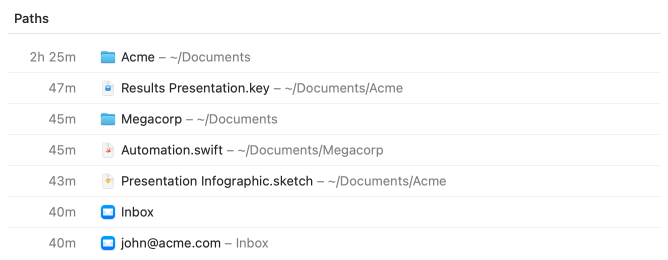
Here's an example of the information Timing records in various document-based apps such as Apple Keynote. Notice how Timing tracks how much time you spend on each individual file.
Other office apps such as Microsoft Word, Excel and Apple Pages are also supported. And all of this information is only visible to you, of course.
We have dedicated pages on why Timing is the ideal time-tracking app for remote workers and how Timing helps lawyers track billable hours!
Assign your time to projects.
Simply assign your time via drag and drop, then use the timeline's smart suggestions to combine blocks of time that belong together.
You have never accounted for so much time with so few clicks!
Manual time entries: Giving you full control.
Not all your work happens in front of the computer. Timing’s interactive timeline makes it easy to add “offline time” such as meetings with just a few clicks.
And when you want to focus on a specific task, Timing lets you start and stop timers just like any other time tracking app.
Privacy-friendly time tracking for teams.
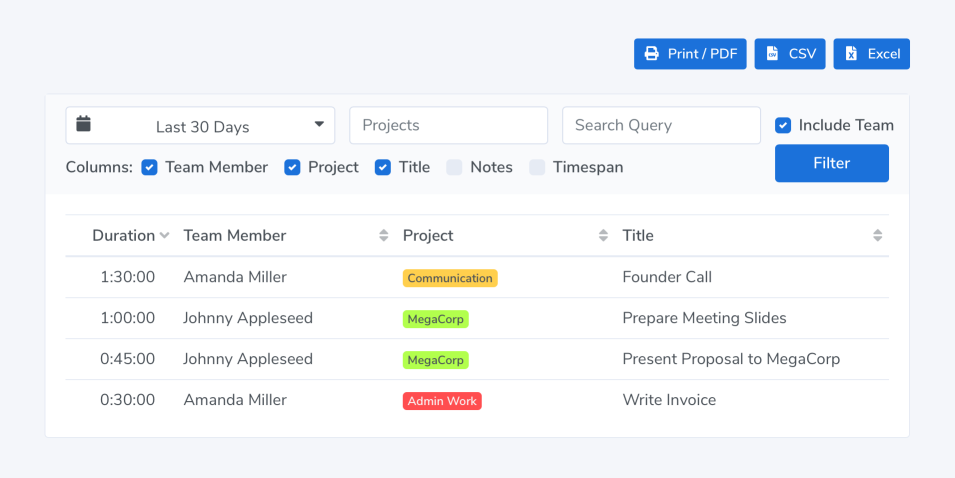
Timing also supports working in groups. Your team members can report time towards shared projects; you view their reports in the Timing web app. No personal times or private details are shared.
常见问题
要了解你在 Readdle PDF Expert 中花费了多少时间,你可以安装 Timing 应用。 该应用会自动追踪你在 PDF Expert 和所有其他应用中阅读和编辑 PDF 文档所花费的时间, 让你清楚了解 PDF Expert 的时间去向。
追踪 Readdle PDF Expert 中的时间非常简单。只需下载 Timing 应用 并安装。Timing 会在后台运行,自动追踪你在 PDF Expert 中阅读和编辑 PDF 文档花费的时间。无需手动开启或停止计时器!
你不需要安装任何插件或扩展来追踪 Readdle PDF Expert 中的时间。 Timing 应用会定期查询 PDF Expert 应用以了解你正在做什么, 并记录对应的时间——完全不需要安装插件!
Timing 通过定期检查你在 Readdle PDF Expert 中的操作来记录时间。 它会将这些时间记录到当前打开的 PDF 文档。 这无需安装任何扩展或插件;只需 下载并安装 Timing 应用,其余一切自动完成!