
-
The Best Apps for Time Management on Mac in 2026: A 4-Stage Toolkit
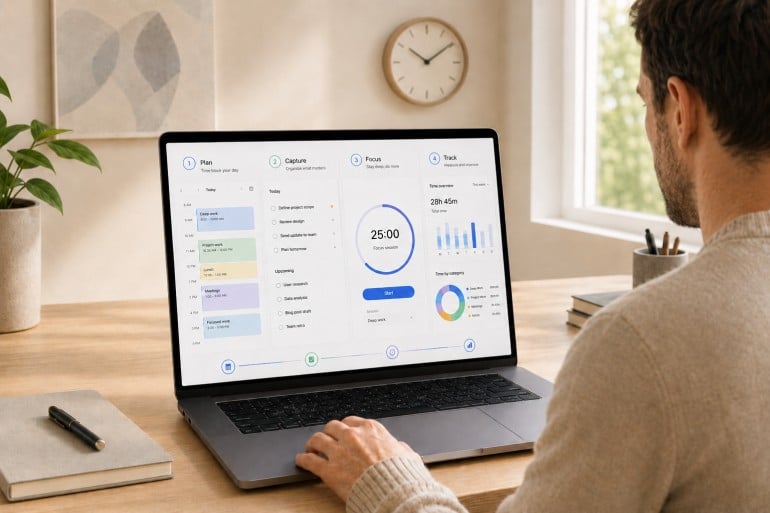
Image: Generated with ChatGPT
Most “best time management apps” lists pick fifteen random apps and rank them as if they’re solving the same problem. They aren’t. Time management isn’t one job. It’s four. The best apps for time management on Mac are the ones that fit cleanly into the four stages of a workday: plan, capture, focus, and track.
Mac users assemble their stack from specialists for a reason. The right calendar won’t make your day distraction-free. The strictest distraction blocker still won’t tell you where last Tuesday actually went. Each stage answers a different question, and trying to cover all four with one app usually means doing all four poorly. If you’re already looking at your habits, our guides on time management tips and how to limit distractions are good companion reads.
This guide is a curated stack rather than a feature list. We reviewed thirteen of the strongest apps for time management on Mac across the four stages, drawing on deep dives we’ve published this year on calendar apps, Pomodoro timers, distraction blockers, and time tracking apps.
-
The 11 Best Calendar Apps for Mac in 2026
Image: Generated with Dall-EWhether you’re arranging work meetings or personal engagements, having the best calendar app for Mac is critical to managing your time effectively. The right calendar app can help you organize your schedule, improve your productivity, and collaborate well with others. It’s an essential value-add in maintaining control of your time and spending it wisely.
But with so many calendar apps on the market in 2026, how do you find the one that’s right for you? We’ve drawn up a list of the eleven best calendar apps for Mac and MacBook — including several free options. Each app has a few important characteristics that we recommend you look out for, as well as a couple of defining features that separate them from the rest. Whether you’re a freelancer, a small business owner, or part of a larger team, there’s a calendar app here that fits your workflow.
-
Die 11 besten Kalender-Apps für Mac – Vergleich 2026
Bild: Erstellt mit Dall-EOb Sie geschäftliche Meetings oder private Termine organisieren – die beste Kalender-App für Mac ist entscheidend für effektives Zeitmanagement. Die richtige Kalender-App hilft Ihnen dabei, Ihren Zeitplan zu organisieren, Ihre Produktivität zu steigern und effizient mit anderen zusammenzuarbeiten. Sie ist ein unverzichtbares Werkzeug, um die Kontrolle über Ihre Zeit zu behalten und sie sinnvoll zu nutzen.
Aber wie finden Sie bei der Vielzahl an Kalender-Apps auf dem Markt in 2026 die richtige für sich? Wir haben eine Liste der elf besten Kalender-Apps für Mac und MacBook zusammengestellt – darunter auch mehrere kostenlose Optionen. Jede App verfügt über wichtige Eigenschaften, auf die Sie achten sollten, sowie einige besondere Funktionen, die sie von den anderen unterscheiden. Egal ob Sie Freelancer, Kleinunternehmer oder Teil eines größeren Teams sind – hier finden Sie die passende Kalender-App für Ihren Workflow.
-
The 15 Best Mac Productivity Apps in 2026

Image: Generated with Dall-EAs a Mac user, you’re likely tech-savvy, quality-conscious, and expect high performance from your tools. With increasing demands for efficiency, remote work, and task management, finding the best productivity apps for Mac is essential to optimizing your workflow and making the most of macOS’s seamless integration.
Mac apps aren’t just about functionality—they are designed to feel native, leveraging Apple’s robust system capabilities to deliver unmatched stability, performance, and a refined user experience. Alongside these powerful apps, mastering Mac keyboard shortcuts can further boost your efficiency, helping you execute tasks swiftly and navigate your Mac with ease.
The growing ecosystem of Mac productivity apps makes it easier than ever to build a personalized tech stack that supercharges your workflow. Innovative tools like Timing’s automatic call tracking and Screen Time tracking across devices, or BetterTouchTool’s Mac window management, allow you to customize your setup, making your workday smoother and more intuitive.
To help you navigate the best options, here’s our curated list of the best productivity apps for Mac in 2026 that will elevate your efficiency and help you work smarter.
-
Mac-Trackpad-Gesten: Schneller und flüssiger arbeiten
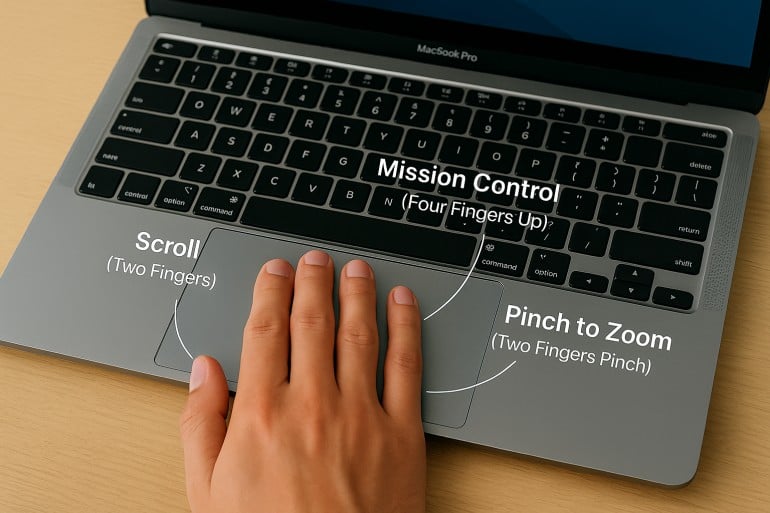 Bild erstellt von ChatGPT
Kurze Antwort: Mit Mac‑Trackpad‑Gesten navigieren, multitasken und steuern Sie Ihren Mac durch einfaches Wischen, Tippen und Zusammenziehen. Wichtige Gesten: Zwei‑Finger‑Scrollen und Rechtsklick, Pinch‑to‑Zoom, Vier‑Finger‑Wisch nach oben für Mission Control und Vier‑Finger‑Wisch nach links/rechts zum Wechseln zwischen Spaces. Alle Gesten lassen sich unter Systemeinstellungen > Trackpad anpassen.
Nutzen Sie Mac‑Trackpad‑Gesten bereits optimal? Neben der Navigation gibt es über ein Dutzend integrierte und benutzerdefinierte Multi‑Touch‑Gesten, die Ihren Workflow und Ihr Surferlebnis intuitiver, effizienter und persönlicher machen.
Ein gezieltes Tippen oder Wischen kann Aufgaben sofort ausführen und Ihnen die Navigation durch Menüs, das Minimieren von Apps und mehrstufige Befehle ersparen – und damit Zeit sparen.
In diesem Leitfaden finden Sie eine umfassende Einführung in Trackpad‑Gesten für den Mac – inklusive eines Abschnitts zu Magic‑Mouse‑Gesten. Von den Grundlagen bis zu fortgeschrittenen Tipps: Erfahren Sie, wie Sie Befehle an Ihren Workflow anpassen.
Read More… -
Mac Trackpad Gestures: Swipe Your Way to a Smoother Work Experience
Image created by ChatGPTTL;DR: Mac Trackpad Gestures & Magic Mouse Gestures
Mac trackpad gestures let you navigate, multitask, and control your Mac with simple swipes, taps, and pinches. Key gestures include two-finger scrolling and right-clicking, pinch-to-zoom, four-finger swipe up for Mission Control, and four-finger swipe left/right to switch between Spaces. The Magic Mouse supports many of the same gestures on its touch-sensitive surface, including scrolling, swiping between pages, and accessing Mission Control. All gestures can be customized in System Settings > Trackpad (or System Settings > Mouse for Magic Mouse).
Are you using Mac trackpad gestures to the best of your ability? Besides navigation, there are more than a dozen built-in and custom multi-touch gestures that can make your workflow and browsing experience more intuitive, efficient, and personal.
A well-placed tap or swipe can instantly perform a task, saving you time from navigating menus, minimizing apps, and executing multi-step commands.
In this guide, you’ll find a comprehensive walkthrough of trackpad gestures for Mac, plus a complete list of Magic Mouse gestures. From basics to advanced tips, learn how to customize commands to fit your workflow.
Read More… -
Time Constraints: 8 Pro Tips to Help You Manage Tight Deadlines

Image: Antoni ShkrabaOur professional lives are governed by one time constraint after another. Client and self-imposed deadlines, access to resources, and our operational processes influence what we prioritize when. This isn’t necessarily a bad thing. It’s an inevitability. Every task has to be completed at some point. And if we can plan our schedules realistically and manage our workloads effectively, we can leverage these limitations properly,
Here, we offer eight useful strategies to help you navigate demanding deadlines. Their intention is to reduce the potential negative effects of time constraints, such as stress, decreasing work quality, and an inability to think creatively. And instead ensure you structure your time in a way that helps you feel in control, focused and productive.
-
The Flowtime Technique: Find Your Flow for a More Productive and Enjoyable Workday

Image: Andrea PiacquadioHave you ever felt so immersed in a task, so wholly focused, that the minutes slip by unnoticed? Rather than watching the clock, anxious that you’re not working as productively as you should, or eagerly anticipating your next break, you simply lose yourself in your work? The world around you disappears. The project you’re working on is all there is. Now, what if there was a time management strategy that helped you lean into this state of flow? Enter the Flowtime technique.
The Flowtime technique encourages you to get in the flow. It’s all about working in a deep, focused way, and taking breaks when your body and mind give you the necessary cues, rather than at specific intervals. It’s also known as the “Flowmodoro” because it’s related to the Pomodoro technique, though it differs in some important ways.
Here, we’ll discuss what Flowtime is all about, compare it to the Pomodoro technique, and offer a step-by-step guide on how to implement it into your daily life to improve your productivity and work satisfaction.
-
Work Journal: What It Is and Why You Should Keep One

Image: Generated with Dall-EA work journal is the secret one-two punch of time management tools. It can help you uncover inefficiencies, boost your productivity, and give you a data-driven blueprint for your career growth.
At its core, a work journal serves as your personal log for daily work activities, achievements, and observations.
But it’s more than just a list of tasks.
It’s a straightforward method to document your progress, reflect on your experiences, and spot opportunities you might otherwise miss.
Dedicating a little time to your work journal each day can become a powerful habit that can give you a leg up in your career.
With a variety of approaches to choose from, keeping a work journal is a flexible practice that can fit anyone’s style and work routine.
-
The Modern Freelancer: Freelance Time Tracking Tips, Tricks & Tools
 Image: Generated with Dall-E
Freelance time tracking is the backbone of a profitable freelancing business — yet most freelancers struggle to do it well.
How often do you find yourself:- Undercharging for projects because you lost track of hours
- Overwhelmed by your to-do list
- Guesstimating your hours on invoices
Research shows that 80% of manually updated timesheets contain errors, and delayed time entries can cost professionals up to 70% of their billable revenue.
What you need is a proper freelance time tracking system — one that helps you work smarter, not harder.
Whether you’ve tried time-tracking solutions in the past or you’re just getting started, you’re in the right place.
Below, you’ll find proven freelance time tracking methods, common pitfalls, and tools to make sure no billable minute gets left behind.
Read More…
