
9 Best RescueTime Alternatives in 2026 [Tested & Compared]
The best RescueTime alternative is Timing, which automatically tracks every app, document, and website you use on your Mac and lets you assign time to specific projects and clients for accurate billing — something RescueTime simply cannot do. But Timing is not the only option: depending on your workflow, platform, and budget, other tools may be a better fit.
In this guide, we compare nine of the best RescueTime alternatives side by side — covering features, pricing, privacy, and real user feedback — so you can find the right time tracker for the way you actually work.
Last reviewed and updated: March 11, 2026
TL;DR: Best RescueTime Alternatives in 2026
- Timing — Best overall for Mac users. Automatic document-level tracking, AI summaries, Screen Time import, billing status tracking, and a 30-day free trial.
- Toggl Track — Best free manual tracker. Generous free plan for up to 5 users, intuitive interface, and wide platform support.
- Rize — Best for individual productivity. AI-powered focus coaching, distraction tracking, and automatic categorization.
Table of Contents
TOC
Why Look for a RescueTime Alternative?
RescueTime is a solid productivity-tracking tool, but it was designed to answer “Where did my time go?” — not “How much should I bill this client?” That distinction matters. Here are the most common reasons people look for an alternative:
- Category-only tracking, not project-level: RescueTime classifies time by app or website category (e.g., “Design” or “Communication”), but it cannot assign time to specific clients, projects, or tasks. If you bill time accurately, you need more granularity than that.
- No billing or invoicing export: RescueTime does not let you export hours as timesheets or invoices. Freelancers and agencies who need to create and track invoices will need a separate tool — or a tracker that handles this natively.
- Limited free plan: RescueTime Lite still exists but is not prominently displayed on their pricing page and is limited to basic screen time tracking and simple productivity reports. Many users who relied on the old free plan have been looking for alternatives.
- Weak mobile experience: RescueTime’s mobile apps have low ratings (2.7/5 on iOS, 3.3/5 on Android), with reports of syncing issues and data loss.
- No AI features: RescueTime has not added AI-powered summaries, smart categorization, or automated timesheet generation — features that competitors have shipped since 2024.
- Outdated interface: Multiple reviewers on G2 and Capterra describe RescueTime’s design as “outdated” and “confusing,” especially compared to modern Mac-native alternatives.
If you are a freelancer, consultant, or small team that needs to track billable hours — not just monitor productivity — a dedicated time tracking tool will serve you better.
How We Evaluated These RescueTime Alternatives
As the developers of Timing, we have been building and refining Mac time tracking software since 2011. To create this comparison, we evaluated each alternative based on tracking accuracy, project-level granularity, platform support, privacy approach, reporting and export capabilities, AI features, and pricing. We also reviewed user feedback from Capterra, G2, Product Hunt, and the Mac App Store to supplement our firsthand experience.
Quick Comparison: All RescueTime Alternatives at a Glance
| Tool | Platform | Tracking Type | Screenshots | Starting Price | Free Plan | Best For | Rating |
|---|---|---|---|---|---|---|---|
| Timing | macOS | Automatic | No | $9/mo | 30-day trial | Automatic Mac time tracking with AI | 4.8/5 (Capterra) |
| Toggl Track | All platforms | Manual | No | Free / approximately $9/user/mo | Yes (5 users) | Free manual time tracking | 4.6/5 (G2) |
| Timely | All platforms | Automatic | No | $9/user/mo | 14-day trial | AI-assisted team tracking | 4.8/5 (G2) |
| Rize | macOS, Windows | Automatic | No | approximately $9.99/mo | Yes (limited) | AI productivity coaching | 4.7/5 (Product Hunt) |
| Clockify | All platforms | Manual | No | Free / $3.99/user/mo | Yes (unlimited users) | Free team time tracking | 4.8/5 (Capterra) |
| DeskTime | All platforms | Automatic | Yes | approximately $6/user/mo | Lite (1 user) + 14-day trial | Employee productivity monitoring | 4.5/5 (Capterra) |
| Time Doctor | All platforms | Manual + Auto | Yes | approximately $7/user/mo | 14-day trial | Employee monitoring & payroll | 4.5/5 (Capterra) |
| ActivTrak | macOS, Windows, Chrome OS, Web | Automatic | Paid add-on | Free / approximately $10/user/mo | Yes (limited) | Enterprise workforce analytics | 4.6/5 (Capterra) |
| Chrometa | Windows, macOS, Android | Automatic | Paid plans | $19/user/mo | 30-day trial | Lawyers & professional services | 4.3/5 (Capterra) |
All prices shown reflect annual billing rates unless otherwise noted and were verified as of March 2026. Monthly billing is typically 10–20% higher. Visit each tool’s pricing page for the most current rates.
The 9 Best RescueTime Alternatives in 2026
1. Timing — Best Automatic RescueTime Alternative for Mac
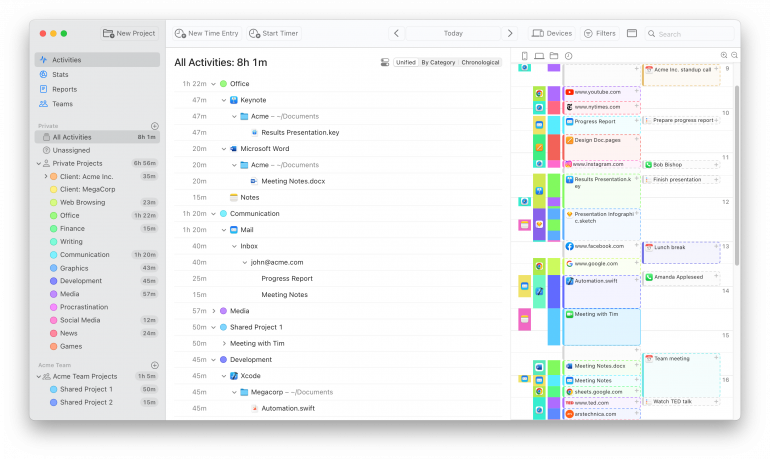
Timing is the best RescueTime alternative for Mac users who need to track billable hours accurately. Unlike RescueTime’s category-level tracking, Timing records every app, document, file path, and website URL — then lets you assign that time to specific projects and clients with a few clicks. It combines the convenience of automatic tracking with the precision of manual time entry, so you never miss a billable minute.
Best for: Freelancers, consultants, lawyers, developers, and small teams on Mac who need automatic, project-level time tracking.
Platform: macOS (native app) + web app companion for timers on any device.
Tracking type: Automatic + manual.
Price: 30-day free trial (no credit card required). Professional $108/yr (~$9/mo), Expert $132/yr (~$11/mo), Connect $192/yr (~$16/mo).
Rating: 4.8/5 on Capterra (141+ reviews).
Key Features
- Document-level automatic tracking: Timing records not just which app you used, but which specific file, email subject, or URL — giving you the granularity RescueTime lacks.
- AI Summaries: Generates natural-language summaries of your workday using AI, making end-of-day review effortless (Expert tier and above).
- Screen Time import: The only third-party Mac app that imports iPhone and iPad usage from Apple’s Screen Time, giving you a complete picture across all your devices.
- Automatic meeting detection: Detects when video or voice calls end (Zoom, Teams, Slack, Meet, FaceTime) and prompts you to log the time — because meetings are often billable hours.
- Phone call import: Automatically imports iPhone call logs so you can account for client calls.
- Billing status lifecycle: Mark time entries as Not Billable, Billable, Billed, or Paid — track outstanding invoices directly in your time tracker.
- Smart rules engine: Learns from your manual assignments and auto-categorizes future activities. Supports day-of-week rules, OR conditions, and path/URL pattern matching.
- Report rounding: Round up, down, or to the nearest interval (1–60 minutes) for clean timesheets.
- Privacy by design: Data stays on your Mac by default. No screenshots, no keystroke logging. Team features show only aggregate project time, never personal app usage.
- Integrations: Calendar, Apple Reminders, ClickUp, Linear, Zapier, GrandTotal (invoicing), and a Web API for custom integrations.
Pros
- Automatic tracking at the document level — far more granular than RescueTime’s category-based approach.
- AI summaries, Screen Time import, and automatic meeting detection are unique features no other Mac tracker offers.
- Native macOS app — fast, lightweight, not an Electron wrapper. Active development since 2011 with 12–14 releases per year.
- 30-day free trial is considerably longer than the 7- or 14-day trials most apps offer.
- Privacy-first: no screenshots, no keystroke logging, local data storage by default.
Cons
- Mac-only for automatic tracking (the web app lets you start/stop timers from any device, but background tracking requires macOS).
- No native invoicing — but integrates with GrandTotal and other billing apps via Zapier.
- No free plan (but the 30-day trial gives you full access to evaluate).
What Users Say
“Timing does a brilliant job of grouping tasks together and automatically assigning ‘keywords’ to add new tasks to groups… you can easily see what activities you spent the most time on — and possibly realize that you’re not focusing on what you thought you were. It makes it easy to group activities and reap the benefits of manual time tracking with the ease of automation.” — Brett Terpstra, MacStories
“Probably the most awesome timing app that I have ever used… really, really simple to set up, simple to configure, simple to convince the team.” — David Foreman, Managing Director at Toast Design
Ready to see how it works? Download Timing’s free 30-day trial — no credit card required.
2. Toggl Track — Best Free Manual RescueTime Alternative
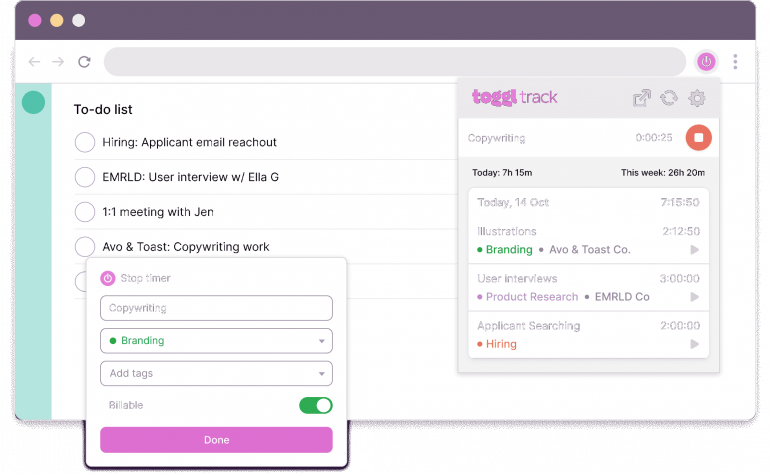
Toggl Track is the best free RescueTime alternative if you prefer manual time tracking. Its free plan supports up to 5 users with unlimited projects, making it a strong choice for freelancers and small teams on a budget. Toggl’s Chrome extension puts a timer button in nearly every web app, and its idle detection helps you correct forgotten timers.
Best for: Freelancers and small teams who want a free, easy-to-use manual timer across all platforms.
Platform: Web, macOS, Windows, Linux, iOS, Android, browser extensions.
Tracking type: Manual (with some automatic background tracking).
Price: Free (up to 5 users). Starter approximately $9/user/mo, Premium approximately $18/user/mo (see Toggl pricing for current rates). 30-day free trial for paid plans.
Rating: 4.6/5 on G2.
Key Features
- One-click timer with minimal required fields — start tracking immediately, add details later.
- 100+ integrations via browser extensions (Asana, Jira, Trello, GitHub, etc.).
- Background tracking that records which apps and websites you visit (can be converted into time entries).
- Project and client management with billable rates and reporting.
- Cross-platform sync across all devices.
Pros
- Generous free plan with unlimited time tracking for up to 5 users.
- Extremely intuitive — widely regarded as the easiest timer app to use.
- Excellent browser extension puts timers directly in your workflow.
- Cross-platform support means everyone on your team can use it regardless of OS.
Cons
- Toggl’s Mac app is not particularly user-friendly — pairing it with Timery (a third-party native Mac client) significantly improves the experience.
- Automated background tracking is rudimentary compared to Timing or RescueTime — it logs apps but lacks document-level detail.
- Still fundamentally a manual tracker: you must remember to start and stop timers, which means you will inevitably miss time.
What Users Say
“Toggl Track is so easy to use, and it has every feature I could possibly want to ensure I’m accounting for and billing for every bit of my time appropriately.” — President, small business on G2
3. Timely — Best RescueTime Alternative for Teams with AI
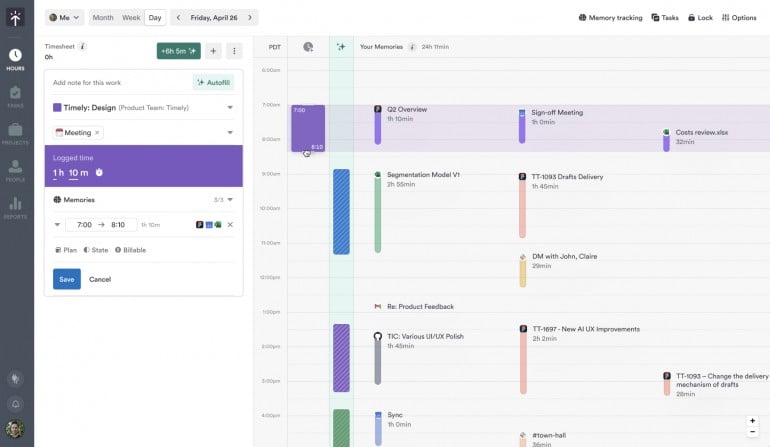
Timely is a strong RescueTime alternative for cross-platform teams that want AI-assisted automatic tracking. Its Memory feature records your work activities in the background, and its AI Timesheet Assistant learns your habits to draft timesheets automatically. Timely also includes project budgeting, capacity planning, and team dashboards.
Best for: Teams and agencies that need automatic tracking with project budgeting across multiple platforms.
Platform: Web, macOS, Windows, iOS, Android.
Tracking type: Automatic.
Price: Starter $9/user/mo, Premium $16/user/mo, Unlimited $22/user/mo (billed annually). 14-day free trial.
Rating: 4.8/5 on G2.
Key Features
- Memory feature records app, website, and document activity in the background across platforms.
- AI Timesheet Assistant learns your patterns and auto-drafts timesheets.
- Project budgets with alerts when you are approaching limits.
- Team dashboards showing capacity and utilization.
- Flexible billable rate configuration per project, team, or user.
Pros
- Cross-platform automatic tracking (unlike Timing, which is Mac-only).
- Strong project management and budgeting features built in.
- AI-powered timesheet drafting reduces end-of-day admin.
- Users can control what data is visible to managers.
Cons
- Timely does not show when you performed certain tasks — it lacks a detailed interactive timeline.
- The AI can occasionally miscategorize time, requiring manual corrections.
- The Starter plan is limited to 3 teams and lacks third-party integrations.
- No free plan available.
What Users Say
“I began using Timely when I started my job as an analyst. I work with many applications on my laptop, and Timely helps me track how much time I spend on any application. It means so much to me that I can manage my time very well.” — Brand protection analyst on G2
4. Rize — Best RescueTime Alternative for Individual Productivity
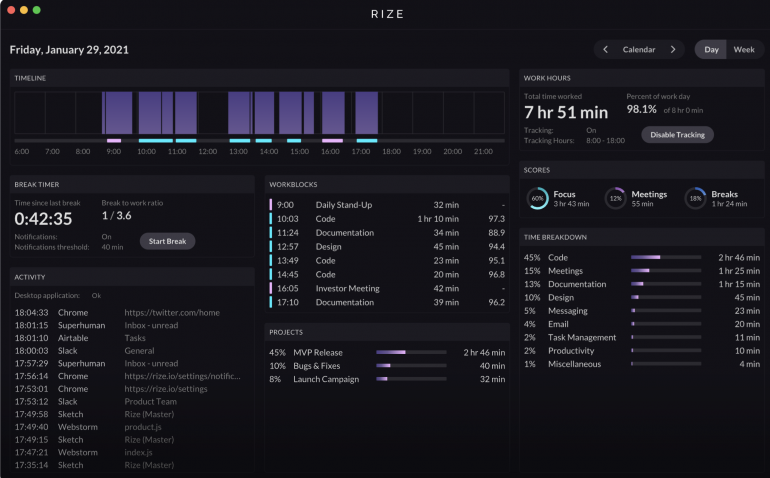
Rize is the closest direct competitor to RescueTime in terms of philosophy — it focuses on productivity optimization and habit building rather than billing. Rize uses AI to automatically categorize your activities, provides an AI productivity coach, and sends distraction warnings and break reminders. If you liked RescueTime’s focus on productivity insights but want smarter AI features, Rize is the natural upgrade.
Best for: Individuals who want AI-powered productivity coaching and automatic time tracking without billing complexity.
Platform: macOS, Windows (desktop only — no web or mobile app).
Tracking type: Automatic.
Price: Limited free plan plus 7-day trial of paid features. Basic $9.99/mo, Professional $14.99/mo (billed annually).
Rating: 4.7/5 on Product Hunt.
Key Features
- AI-powered automatic categorization that learns your patterns within a week.
- AI productivity coach with personalized focus recommendations.
- Distraction detection and context-switching alerts.
- Scientifically-backed break reminders (Pomodoro-compatible).
- Focus music to enhance concentration.
- Daily and weekly productivity reports delivered by email.
Pros
- AI categorization is impressive — Zoom calls become “Meetings,” Figma becomes “Design” automatically.
- Distraction and context-switching tracking goes beyond what RescueTime offers.
- Limited free plan available, plus 7-day trial of paid features to evaluate.
- Desktop widget provides real-time productivity insights without an internet connection.
Cons
- Desktop only — no web or mobile app.
- Project and client tracking is an afterthought: not powerful enough for serious billing use.
- No team features whatsoever — strictly an individual tool.
- The interface can feel cluttered at times.
What Users Say
“Rize offers a solid foundation for productivity, but falls short of greatness. While its features are useful, the interface can be clunky at times, hindering seamless workflow. With some refinement, Rize has the potential to become a top contender in the productivity software market.” — Abdur Rahman on Product Hunt
5. Clockify — Best Free RescueTime Alternative for Large Teams
Clockify is the most generous free time tracker available, supporting unlimited users and unlimited projects at no cost. While it lacks automatic tracking and Mac-native design, its sheer breadth of free features makes it a compelling option for budget-conscious teams. If you need a free tool that the whole team can use regardless of platform, Clockify delivers.
Best for: Large teams on a budget who need basic time tracking and reporting across all platforms.
Platform: Web, macOS, Windows, Linux, iOS, Android, browser extensions.
Tracking type: Manual.
Price: Free (unlimited users). Basic $3.99/user/mo, Standard $5.49/user/mo, Pro $7.99/user/mo, Enterprise $11.99/user/mo (billed annually). 7-day free trial for paid features.
Rating: 4.8/5 on Capterra.
Key Features
- Unlimited users and projects on the free plan.
- Timer and manual time entry with project/client assignment.
- Basic reporting, billable hours tracking, and team dashboards.
- Invoicing available on paid plans.
- Idle detection, Pomodoro timer, and scheduling tools.
Pros
- The most generous free plan in the time tracking market — unlimited users and projects.
- Wide platform support with apps for every major OS.
- Invoicing and project budgeting available on affordable paid plans.
Cons
- No automatic time tracking — everything is manual.
- The Mac app does not feel native — discerning Mac users may be disappointed by the UI quality.
- Advanced reporting, approvals, and admin controls are locked behind paid plans.
- No AI features.
What Users Say
“Clockify is a great free time tracking tool for those who need basic functionality. The unlimited users feature is a game changer for small businesses. However, it lacks the polish and automation you get with premium tools.” — Verified user on Capterra
6. DeskTime — Best RescueTime Alternative for Employee Productivity Monitoring
DeskTime is an automatic productivity tracker with employee monitoring features, including optional screenshots. Like RescueTime, it categorizes your apps and websites as productive or unproductive and provides productivity scores. Unlike RescueTime, it adds project tracking, invoicing, and team management — though the screenshot feature means it leans more toward employer surveillance than personal productivity.
Best for: Companies and team managers who want employee productivity monitoring with project tracking.
Platform: Web, macOS, Windows, Linux, iOS, Android.
Tracking type: Automatic.
Price: Lite free (1 user). Pro approximately $6/user/mo, Premium approximately $7/user/mo, Enterprise approximately $20/user/mo (billed annually). 14-day free trial for paid plans. See DeskTime pricing for current rates.
Rating: 4.5/5 on Capterra.
Key Features
- Automatic time tracking with URL and app monitoring.
- Productivity scoring (productive vs. unproductive categorization).
- Optional screenshots and document title tracking.
- Project tracking with invoicing capabilities.
- Offline time tracking and third-party integrations.
Pros
- Automatic tracking with productivity scoring — similar to RescueTime but with more team features.
- Project tracking and invoicing built in.
- Cross-platform support including mobile devices.
- Free Lite plan for 1 user, plus 14-day free trial to evaluate all paid features.
Cons
- Automatic screenshots may have a negative effect on employee morale and trust. We do not believe that such methods are conducive to a positive work environment.
- Reporting features are basic compared to dedicated billing tools.
- Primarily designed for employer oversight — may feel invasive for individual freelancers.
What Users Say
“DeskTime is a great tool to monitor your employees’ productivity. The automatic tracking saves a lot of time compared to manual entry, though the screenshots feature can feel intrusive.” — Verified user on G2
7. Time Doctor — Best RescueTime Alternative for Remote Workforce Management
Time Doctor combines time tracking with comprehensive employee monitoring, including screenshots, idle detection, and payroll integration. It is used by companies like KPMG and Ericsson for remote workforce management. However, its surveillance approach — including random desktop screenshots — makes it more suitable for employer oversight than for individual productivity tracking.
Best for: Companies managing remote teams who need time tracking with payroll and employee monitoring.
Platform: Web, macOS, Windows, Linux, iOS, Android.
Tracking type: Manual + some automatic features.
Price: Basic from approximately $7/user/mo, Standard $10/user/mo, Premium $20/user/mo (billed annually). 14-day free trial. No free plan.
Rating: 4.5/5 on Capterra.
Key Features
- Time tracking with distraction alerts and idle detection.
- Optional screenshots and activity monitoring.
- Payroll and invoicing integration.
- Project management with client tracking.
- 60+ third-party integrations (Standard plan and above).
Pros
- Comprehensive employee monitoring with detailed productivity reports.
- Built-in payroll and invoicing features.
- Cross-platform with mobile apps for remote teams.
- Customizable monitoring settings.
Cons
- Automatic screenshots can infringe on privacy — recording personal emails, banking, and other sensitive content during work hours.
- The cheapest plan lacks individual application tracking and most integrations.
- Setup can be confusing for non-technical users.
- The user interface feels dated compared to modern alternatives.
What Users Say
“Time Doctor is helpful for tracking remote employees and managing projects, but the screenshot feature can feel invasive and the UI could use a refresh.” — Verified user on Capterra
8. ActivTrak — Best RescueTime Alternative for Enterprise Workforce Analytics
ActivTrak is a workforce analytics platform designed for larger organizations that want to understand team productivity patterns without micromanaging. It goes beyond simple time tracking with dashboards, website blocking, and detailed productivity analytics. If you are looking for a scaled-up version of RescueTime for an entire organization, ActivTrak fits that niche.
Best for: Mid-size and enterprise companies that need workforce analytics and productivity insights at scale.
Platform: Web, macOS, Windows, Chrome OS.
Tracking type: Automatic.
Price: Free (limited). Essentials approximately $10/user/mo, Essentials Plus $15/user/mo (billed annually). Enterprise pricing on request. 14-day free trial.
Rating: 4.6/5 on Capterra.
Key Features
- Automatic activity tracking with productivity scoring.
- Website categorization (productive vs. unproductive) and optional blocking.
- Team and department-level productivity dashboards.
- Real-time analytics and historical trend analysis.
- Optional screenshot capture (paid add-on, alarm-triggered) for monitoring.
Pros
- Robust productivity analytics at the team and organization level.
- Easy website categorization for productive vs. unproductive classification.
- Free plan available with basic features.
- Strong reporting and dashboard capabilities.
Cons
- Not ideal for small teams or individuals — designed for organizations with 5+ people.
- The platform is complex with a steep learning curve.
- Screenshots and invisible monitoring raise privacy concerns.
- No mobile app.
- Better suited for workforce management than personal productivity or billing.
What Users Say
“ActivTrak provides great insights into team productivity patterns, but the platform is complex and takes time to configure properly. The learning curve is significant.” — Verified user on Capterra
9. Chrometa — Best RescueTime Alternative for Lawyers and Professional Services
Chrometa is an automatic time tracker built specifically for professionals who bill by the hour — especially lawyers, accountants, and architects. It automatically records time spent on emails, documents, and websites, then lets you categorize and export that data for client invoicing. If you need RescueTime’s automatic tracking combined with billing export, Chrometa bridges that gap.
Best for: Lawyers, accountants, architects, and other professionals who need automatic tracking with billing export.
Platform: Windows, macOS, Android.
Tracking type: Automatic.
Price: Standard $19/user/mo, Plus $29/user/mo, Premium $49/user/mo. 30-day free trial.
Rating: 4.3/5 on Capterra.
Key Features
- Automated time tracking for emails, documents, websites, and phone calls.
- Automated work tagging for client and project categorization.
- Invoicing and timesheet export.
- 50+ integrations with legal and billing software.
- Team management with project tracking.
Pros
- Purpose-built for professionals who bill by the hour.
- Automatic tracking with invoicing export — something RescueTime lacks entirely.
- Strong integrations with legal practice management tools.
- 30-day free trial to evaluate fully.
Cons
- Significantly more expensive than other alternatives ($19–$49/user/mo).
- Updates are infrequent — the interface feels dated compared to modern competitors.
- No iOS app (mobile tracking limited to Android).
- Limited to Windows, macOS, and Android.
What Users Say
“Chrometa is excellent at capturing billable time that I would have otherwise lost. The automatic tracking works well for legal work, though the interface could use modernization.” — Verified user on Capterra
Head-to-Head Comparisons: RescueTime vs the Top Alternatives
Timing vs RescueTime: Which Is Better?
If you need to know where your time goes in broad strokes, RescueTime works. If you need to bill for that time, Timing wins. RescueTime tracks app categories; Timing tracks specific documents, URLs, and email subjects — then lets you assign that time to projects and mark entries as Billable, Billed, or Paid. Timing also offers AI summaries, Screen Time import, automatic meeting detection, and phone call import — none of which RescueTime provides. For Mac users who bill clients, Timing is the clear upgrade. Try Timing free for 30 days.
Toggl Track vs RescueTime: Manual vs Automatic
This is a fundamentally different philosophy: RescueTime runs silently and tells you where time went after the fact, while Toggl requires you to actively start and stop timers. Toggl’s advantage is project-level tracking from the start — every timer is tied to a client and project. RescueTime’s advantage is zero effort. The trade-off: Toggl misses any time you forget to track, while RescueTime captures everything but cannot assign it to specific clients. If you want the best of both worlds — automatic tracking with project assignment — consider Timing, which combines automatic capture with project-level granularity.
The Real Cost of Poor Time Tracking
Choosing the right time tracker is not just about features — it is about revenue. Consider these statistics:
- According to research by the American Bar Association, lawyers lose 10–50% of billable revenue when time entries are delayed even by a single day. Same-day entries capture 90% of time; after 24 hours, only 75%; after a week, just 30–50%.
- According to the AffinityLive research study, professionals who log time less than once per week are only 35% accurate in their time records — meaning you could be losing nearly two-thirds of your billable hours to inaccurate recall.
- According to the AffinityLive research study, an estimated $8.8 billion is lost per day in the US due to poor time tracking and improper timekeeping.
An automatic time tracker eliminates these problems by capturing time as it happens — no memory required, no forgotten entries, no calculation errors. The cost of a good time tracker pays for itself if it captures even a single extra billable hour per month.
Summary: Which RescueTime Alternative Is Right for You?
Juggling different projects and clients as a freelancer or professional requires the right tool for the job. Here is how to choose:
- For Mac users who bill by the hour: Timing — automatic document-level tracking, AI summaries, billing status lifecycle, and privacy by design.
- For free manual tracking across all platforms: Toggl Track — generous free plan, intuitive timer, wide integrations.
- For cross-platform teams with AI: Timely — AI timesheet drafting, project budgets, team dashboards.
- For individual productivity focus: Rize — AI coaching, distraction detection, break reminders.
- For free team tracking on a budget: Clockify — unlimited free users and projects.
- For employee monitoring: DeskTime or Time Doctor — but be aware of the privacy trade-offs.
- For lawyers and professional services: Chrometa or Timing — automatic tracking with billing export.
If you are a Mac user looking for the most capable RescueTime alternative, download Timing’s free 30-day trial to see how automatic, document-level tracking transforms the way you account for your time. No credit card required.
For more recommendations, see our guides to the best time tracking apps for Mac, best productivity apps for Mac, and freelance time tracking.
Frequently Asked Questions: RescueTime Alternatives
What is the best RescueTime alternative for Mac?
The best RescueTime alternative for Mac is Timing. Unlike RescueTime, Timing tracks time at the document level — recording specific files, URLs, and email subjects — and lets you assign that time to projects and clients for accurate billing. It also offers AI summaries, Screen Time import, automatic meeting detection, and billing status tracking. Timing has a 4.8/5 rating on Capterra from 141+ reviews and offers a 30-day free trial.
Is there a free RescueTime alternative?
Yes. Toggl Track offers a free plan for up to 5 users with unlimited time tracking and projects. Clockify goes further with unlimited free users and projects. Rize offers a limited free plan plus a 7-day trial of paid features. However, free tools generally require manual input or provide limited reporting — if accurate billing is important, a paid automatic tracker like Timing often pays for itself within the first month.
Is Timing better than RescueTime?
For Mac users who need to track billable hours, yes. RescueTime is designed for personal productivity optimization — it shows you broad categories of how you spent your time. Timing is designed for accurate time tracking and billing — it records every document, URL, and email you work on, then lets you assign that time to specific clients and projects. Timing also offers AI summaries, Screen Time import, automatic meeting detection, and a billing status workflow that RescueTime does not provide.
Does RescueTime still have a free plan?
RescueTime offers a Lite plan that is technically free, but it is not prominently displayed on their pricing page. The Lite plan includes basic screen time tracking and simple productivity reports. For full features including focus sessions, distraction blocking, and detailed analytics, RescueTime offers paid plans starting from approximately $7/mo for Solo Focus and approximately $12/mo for Solo+ with timesheets (billed annually). See RescueTime’s pricing page for the most current rates.
What is the best automatic time tracker?
For Mac users, Timing is the best automatic time tracker thanks to its document-level tracking granularity, AI summaries, Screen Time import, and automatic meeting detection. For cross-platform teams, Timely offers strong AI-assisted automatic tracking across macOS, Windows, iOS, and Android. For individual productivity coaching, Rize provides AI-powered focus insights with automatic categorization.
Can RescueTime track specific projects and clients?
RescueTime has basic project and task features, but they are limited. It primarily categorizes time by app or website type (e.g., “Communication,” “Design”) rather than by specific client or project. You cannot easily assign time spent in a browser to different clients based on which document or URL you were working on. For project- and client-level tracking, tools like Timing, Toggl Track, or Timely are better suited.
What happened to RescueTime’s free plan?
RescueTime previously offered a more generous free plan. The current Lite plan is significantly restricted compared to earlier versions and is not easy to find on RescueTime’s website — you must sign up and provide your email to see it. Many former free users have switched to alternatives like Toggl Track (free for 5 users), Clockify (free for unlimited users), or Timing (30-day free trial with full feature access).
Which RescueTime alternative is best for freelancers?
For freelancers on Mac, Timing is the best choice — it automatically tracks your billable hours, assigns time to client projects, and includes billing status tracking (Not Billable, Billable, Billed, Paid). For freelancers on other platforms, Toggl Track offers a free plan with project-based manual tracking and strong reporting. Both are more useful for freelance time tracking than RescueTime’s category-level approach.