
Top Invoicing Software for Mac: Reviews, Ratings and Tips for the Best Tools in 2026

Image: Generated with Dall-E
Finding the right invoicing software for Mac isn’t a minor detail; it’s a crucial step in streamlining your business operations. It can boost productivity, automate workflows, and help you get paid faster.
Mac users understand the importance of having software that’s as efficient and user-friendly as their devices. Ideally, that also means that these tools are implemented as native Mac apps tailored to the macOS interface rather than web apps that look out of place on your Mac.
So we’ve tried to focus on apps that are “good citizens” on macOS, such as GrandTotal whose menus and keyboard shortcuts are based on the intuitive ergonomics of macOS and fit seamlessly into your workflow. We have also included a few other market-leading options to provide a broad selection of options for you to choose from. (For recommendations on apps tailored to other needs, check out our roundup of the best Mac apps.)
The right invoicing app must be easy to use, integrate smoothly with other tools, offer value for money, and be customizable to suit your unique business needs.
To help you out, we’ve rounded up the best software options that tap into what Mac users want and need. Whether you’re looking for seamless integration, top-notch customization, or a straightforward, no-nonsense invoicing process, we’ve got you covered.
TL;DR: Best Invoicing Software for Mac
- Best overall: GrandTotal — Mac-native, now with e-invoicing support (XRechnung, PEPPOL), and it integrates with Timing to automatically import your billable hours.
- Best free option: Zoho Invoice — 100% free with professional invoicing, expense tracking, and payment reminders.
- Best Mac-native newcomer: Cakedesk — privacy-focused, one-time purchase, local data storage, and actively developed.
- Note: Billings Pro has been removed from this guide because Marketcircle has discontinued development and sales. The app is incompatible with macOS Ventura and later.
Table of Contents
TOC
The Best Invoice Software for Mac
Let’s take a look at some of the best Mac invoice software options for freelancers and small business owners.
1. GrandTotal
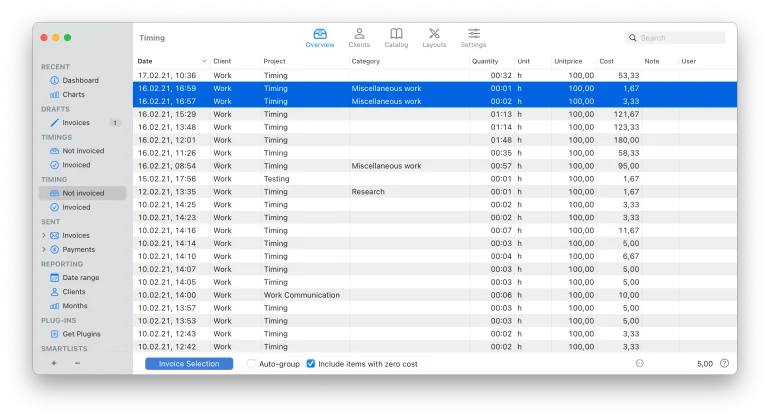
GrandTotal is our top choice for Mac invoice software. It lets you create invoices in a blink of an eye using logical workflows, custom templates, and automated processes to speed up your efficiency and accuracy.
For freelancers and consultants, you can integrate GrandTotal with Timing (an automatic time tracking app) and seamlessly export your billable hours.
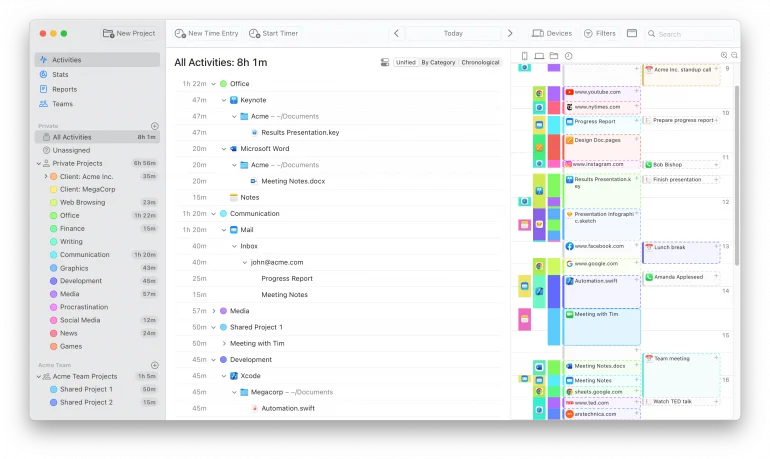
Timing helps you generate accurate timesheets from your activity logs, so you never have to worry about billing inaccurate amounts of time again.
Once you install the Timing plugin for GrandTotal, your time entries will automatically appear. Then, you can add the items to specific GrandTotal invoices by pressing the “Invoice Selection” button. The plugin’s automatic import requires Timing Connect; on other plans you can still drag time entries from Timing’s activity list straight onto a GrandTotal invoice, or copy and paste them.
To keep the handoff tidy, Timing also has a built-in Billing Status field that lets you tag every time entry as Not Billable, Billable, Billed, or Paid. Set a default status per project — client work defaults to “Billable,” internal projects to “Not Billable” — so most entries get categorized automatically as you track your time. When you invoice through GrandTotal, flip the exported entries over to “Billed,” and update them to “Paid” once the money lands. You’ll always know exactly which hours are waiting to be invoiced, which invoices are outstanding, and you’ll never accidentally bill the same time twice.
GrandTotal is a top invoicing software for Mac, known for its intuitive and user-friendly interface, making it accessible even for beginners. It’s highly efficient, allowing for quick creation of invoices and quotations with automated processes.
It also comes with other notable features to make managing your invoicing effortless: You can send out estimates and quickly convert them into invoices, create your own invoice templates to align with your business branding, use the client management feature to quickly generate new invoices and keep tabs on unpaid invoices.
At the end of the month, you can pull detailed statistics on your revenue, export it, and further analyze it to get a clear picture of your company’s financial health.
Pros:
- Excellent integration with Timing for automated time tracking and billing of your time.
- Customizable invoice templates.
- Robust reporting features and data encryption.
- It supports multiple currencies and offers flexible tax settings.
- E-invoicing compliance with XRechnung 3.0 and PEPPOL BIS Billing — essential for EU and international invoicing requirements (available from the L tier upwards).
- 30+ integrations and an AI Plugin Generator for building custom ones.
- Consistent updates since 2008 — now on GrandTotal 9 — and is actively maintained by the developers, setting it apart from other native macOS invoicing applications.
Cons:
- May have a learning curve for new users.
- The entry tier doesn’t tell the whole story — e-invoicing formats, inbound invoice handling and project features only arrive at the L tier and above.
Rating: 4.5/5 stars
Pricing: A free trial is available for unlimited time until you’re ready to send your first invoice. To remove the “trial” watermark, you can subscribe to one of four tiers, from €59/year (S) up to €149/year (XL), or €5.90 to €14.90 per month if you’d rather pay monthly. Note that e-invoicing support starts at the L tier (€99/year).
What Users Say
“Terrific piece of software! Comprehensive, clean, well-executed, thorough, well-tested, appropriate and thoughtfully designed. Documentation is right there at your fingertips all the time.” – Cnet.com Review
Read More: The Modern Freelancer: Freelance Time Tracking Tips, Tricks & Tools
2. Bill by MOApp
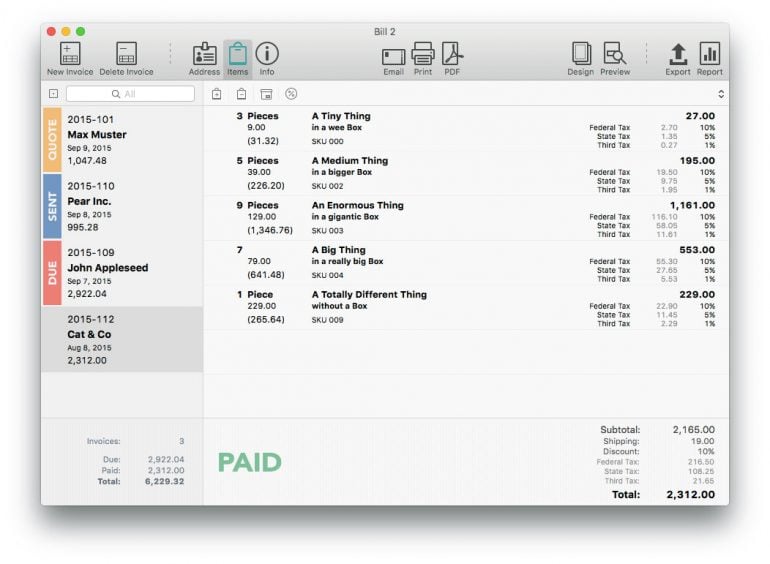 Image: Bill by MOApp
Bill by MOApp makes invoicing fun. It’s perfect for freelancers or small business owners who want all the essential features with custom functionality at an affordable price point.
Designed for Mac users, the interface is user-friendly and streamlines invoicing in three easy steps:
Step 1: Add your client information. Bill automatically remembers your clients, and you can import details directly from your macOS Contacts app.
Step 2: Add your items, taxes, SKU number, and any discounts or shipping costs. Bill remembers recent line items, saving you from re-typing each time you generate an invoice.
Step 3: Print or send your invoice. Bill lets you turn your invoices into PDF files or send them as email attachments.
Pros:
- Easy to set up and use.
- Mac-native interface with intuitive design.
- Custom templates.
- Design mode to tweak the look and feel of your invoices.
- Import clients directly from your macOS Contacts app.
Cons:
- Limited features on the free version.
- The app has not received any visible updates since 2024, and the developer’s online presence has gone quiet. While the app still functions, its long-term future is uncertain.
- Limited integrations.
Rating: 4.1/5 stars
Pricing: There is a freemium version available. The full paid version of Bill 2 is a once-off purchase of $49.
What Users Say
“Have been looking for something like this for ages, and now I’m using it for my business invoicing. Its HTML and CSS underpinnings mean that if you don’t like the provided invoice templates, you can tweak the code in ‘design’ mode and change it to suit. Well worth giving this a try!” – MacUpdate Review
Note: Billings Pro was previously included in this guide, but Marketcircle has discontinued active development and sales. The app is incompatible with macOS Ventura (13) and later, making it unsuitable for modern Mac users. Marketcircle now focuses exclusively on their CRM product, Daylite.
3. Bonsai
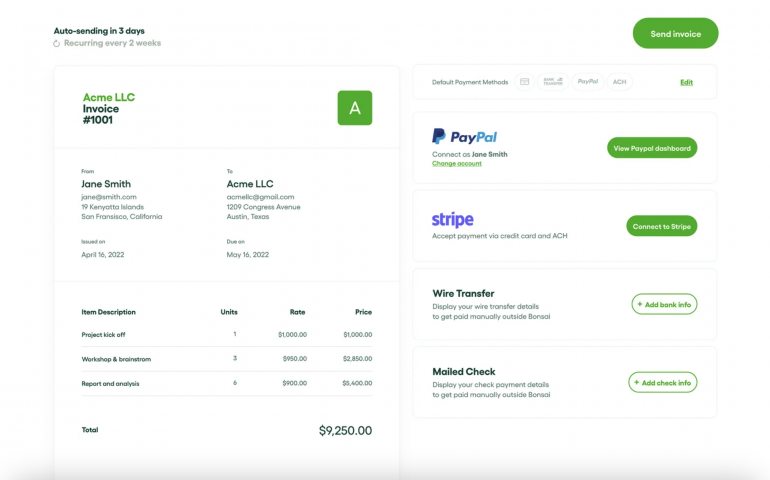
Image: Bonsai
Bonsai is more than smart invoice software for Mac users. It’s a complete business management tool.
Get paid faster with secure payments embedded into your invoices, set up recurring and subscription billing for longer-term projects, and automatically generate and send invoices once a client accepts your proposal.
You can also create a library of your most frequent services and custom packages to speed up invoice creation.
Besides streamlining your invoicing, Bonsai offers additional functionality like:
- Tracking 1099 expenses for the US tax season.
- A secure client portal and CRM.
- Time tracking for individual projects.
- Legally binding contracts for various industries.
- Templates for scope of work, briefs, and client questionnaires.
If you’re at the point in your business where you’re using multiple tools for all of the above, switching to a holistic solution like Bonsai makes sense.
Pros:
- Comprehensive business management suite for freelancers and small business owners.
- Customizable invoice templates.
- Add payment links to invoices and include tipping functionality.
- Automate invoice creation, scheduling, reminders, and penalty fees for late payments.
Cons:
- It’s an expensive investment if you won’t use the full suite of features.
- It only has a web and mobile-based app, which some Mac users won’t prefer.
- Time tracking tool is a web-based timer that can complicate the accuracy of invoice timesheets.
- Its tax functionality is only for the US market.
Rating: 4.6/5 stars
Pricing: A 7-day free trial is available. Paid plans start at $15/user/month (Basic), with Essentials at $25, Premium at $39, and Elite at $59/user/month. Annual billing saves around 40%.
What Users Say
“Bonsai is easy to get started, and I was up and running in no time. I like how easily I am able to create and send invoices to my clients. It’s been a game changer, and it helped me scale my business” – Capterra Review
Read More: Time Tracking Software for Small Business: The Ultimate Guide
4. Invoice.app
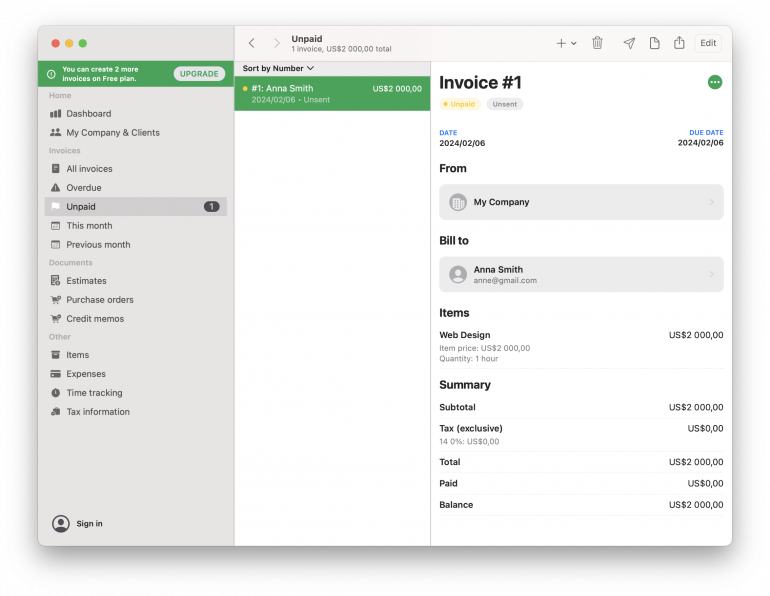
Invoice.app is a straightforward, no-frills Mac invoicing software.
While simple, it’s a powerful invoicing app with all the basic functionality you need to keep track of payments for your business.
You can:
- Create estimates, invoices, and credit memos.
- Track and export your expenses.
- Customize your PDF templates.
- Offer discounts and calculate taxes and totals.
Available on iOS, iPadOS, and macOS, Invoice.app lets you create and send invoices on the go, work offline, and sync your data across devices.
It’s ideal for freelancers, contractors, and small business owners with basic invoicing requirements who want a low-cost native Mac app solution.
Pros:
- Clean, native Mac app interface.
- Affordable price point.
- Simple and easy to use.
- Time and expense tracking features.
- Work offline and sync data across devices.
Cons:
- The best features require upgrading to the Premium version.
- Not ideal for complex invoicing requirements.
Rating: 3.8/5 stars
Note: Invoice.app now requires macOS 14.6 (Sonoma) or later.
Pricing: A freemium version is available for three invoices. Paid plans range from $1.49/month to $4.49/month, and there is a one-time payment option for $99.99.
What Users Say
“No idea why someone left this a 1-star review. This app works just as expected. A stable, native Mac app for estimates, time tracking, and invoices. Just what I need at a fraction of the cost of Harvest.” – Apple Store Review
5. QuickBooks Online
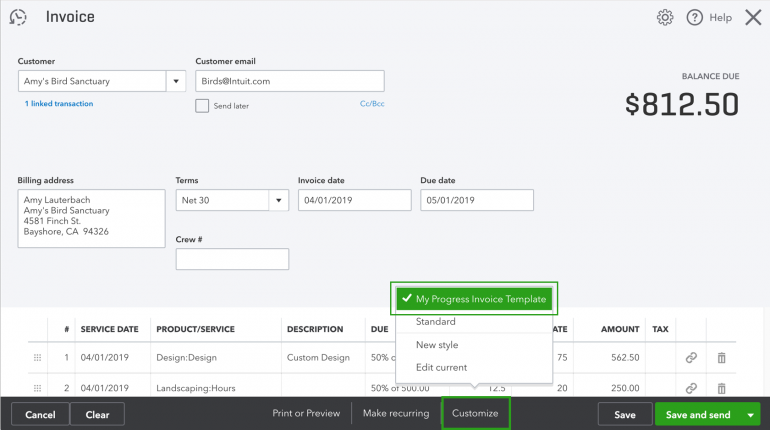
Image: QuickBooks Online
QuickBooks Online is a market leader for accounting software.
It offers paid plans for all business sizes but shines as a comprehensive invoicing solution for small business owners.
Once you create an account, you can:
- Create custom payable invoices and get paid faster.
- Set up recurring invoices and reminders.
- Use progress invoicing to split up estimates into multiple payments.
- Add your billable hours with the time-tracking integration.
- Create payment links and get payment dispute protection.
The only downside to using QuickBooks Online as invoicing software for Mac is the price point. Unless you use all the other functionality that comes with a paid plan, like receipt capture and expense reporting, it’s hard to justify the price point.
Pros:
- Extensive functionality covering all aspects of business accounting and invoicing.
- It comes with options for every business stage.
- Automatic sales tax.
- Integrates with a range of other business applications.
Cons:
- It is not the best option for new freelancers who need less functionality.
- Expensive for new small business owners, and QuickBooks has seen roughly 12-17% annual price increases since 2023.
- No native Mac app.
- Time tracking is not automatic and relies on stop/start timers.
Rating: 4.3/5 stars
Pricing: A 30-day free trial is available (promotional pricing of 50% off the first 3 months is often offered). Plans range from $20/month (Solopreneur) to $275/month (Advanced), with Simple Start at $38 and Essentials at $75.
What Users Say
“I found the program to be user-friendly and effective in managing their finances. I discovered Quickbooks Online as a Small Business owner & found that QuickBooks Online makes it simple to prepare and send expert invoices, track spending, and produce reports to aid in financial decision-making.” – Capterra Review
6. Zoho Invoice
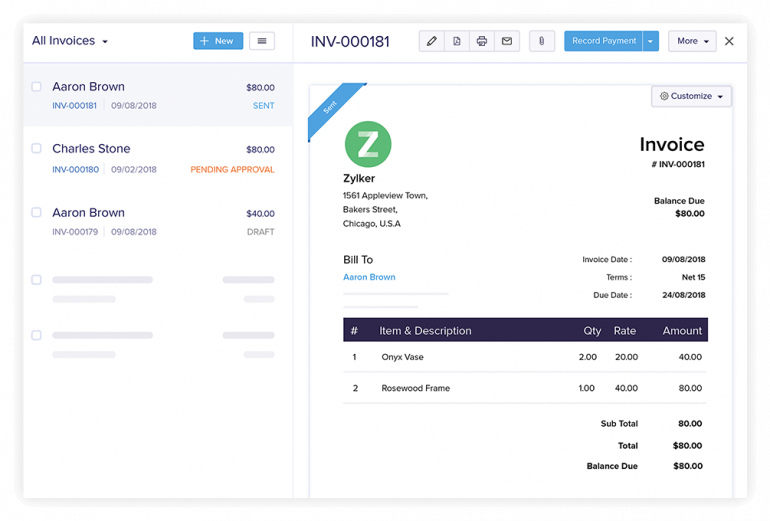
Image: Zoho Invoice
Zoho Invoice is a 100% free cloud-based invoicing solution.
It’s an incredible option for small business owners who want more than basic invoicing functionality but don’t need all the additional features that come with a full accounting solution.
For $0/month, you’ll have access to everything your business needs to thrive.
Create custom invoices, track your expenses, accept online payments, automate payment reminders, provide a customer self-service portal, and run the built-in manual timer while you work.
If you’re on your phone or away from your laptop, you can use Zoho Invoice Maker (available on iPhone, iPad, and Apple Watch) to manage your business wherever you are.
When your business eventually scales and grows out of Zoho’s free plan, you can upgrade to Zoho Billing for more complex billing needs.
Pros:
- Best value for small business owners who want a feature-rich solution.
- Simple, secure, and user-friendly interface.
- Supports 10+ languages for invoices.
- Save your customer’s card details for auto payments.
- Strong integration with other Zoho apps.
Cons:
- No native Mac desktop app.
- A limited number of payment gateway integrations.
- It’s not a good option for larger businesses.
- Its time-tracking relies on a stop/start timer.
Rating: 4.7/5 stars
Pricing: Free
What Users Say
“The best part about using Zoho, aside from it being free, is that it gives me exactly the features in an invoicing software that I need for my business. Client lists, easy-to-create and customize invoices, and revenue and expense tracking are among the top highlights.” – G2 Review
7. FreshBooks
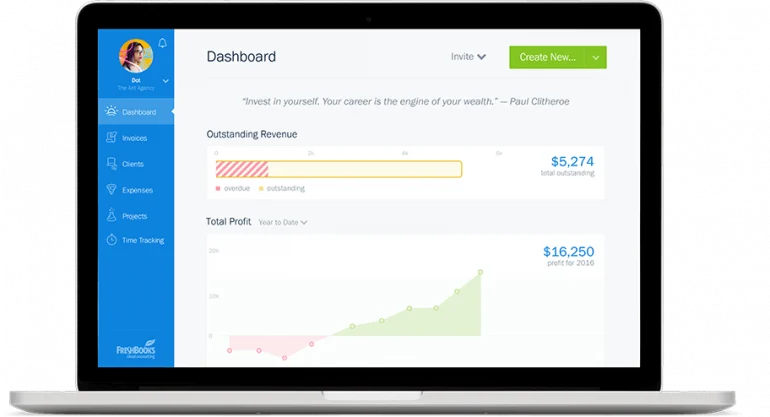
Image: FreshBooks
If you’re at the stage where you need something more than customizable invoices from your Mac invoicing software, FreshBooks is a good option.
It makes invoicing easy with automations, payable invoices, and upfront deposits, and it also comes with additional accounting software features to help you run your small business efficiently.
Keep an eye on your profit and loss, get a sales tax summary, and seamlessly share your financial information with your accountant.
Pros:
- Custom invoice generator.
- User-friendly and designed for non-accountants.
- Automate reminders, late fees, and recurring invoices.
- Integrates with 100+ partners.
- Includes project management, expense tracking, and reporting features.
- Accept VISA, MasterCard, AMEX, Apple Pay, and ACH payments.
Cons:
- It is more expensive than some other options for small businesses.
- Each plan has a client cap: Lite supports 5 clients, Plus supports 50, and only Premium offers unlimited clients.
- Time tracking relies on a stop/start timer.
- It only integrates with PayPal for international payments.
- Limited functionality for larger businesses.
Rating: 4.5/5 stars
Pricing: A 30-day free trial is available with paid plans ranging from $23/month (Lite, 5 clients) to $70/month (Premium, unlimited clients).
What Users Say
“I love this tool because it is easy to use, it helps me with the accounting of my small business. What I like most about FreshBooks is its ability to create and manage custom invoices, it integrates seamlessly with accounts like PayPal, which facilitates even more online payments, it is amazing the control that keeps track of expenses allowing me to keep up with the profits and losses of my company.”– G2 Review
8. ZipBooks
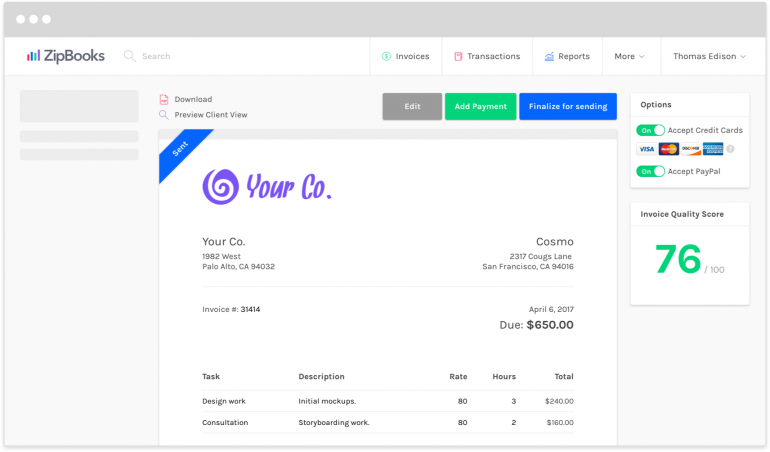
Image: ZipBooks
What makes ZipBooks stand out from all the other invoicing apps for Mac?
It’s smart feedback.
Every time you create an invoice, you’ll get a “Quality Score” based on research from 200,000+ invoices. In short, it helps you focus on the details that matter and tweak your invoices to get paid faster.
Besides feedback, ZipBooks has all the essential invoicing features like automatic workflows, multi-currency support, billable expenses, and credit card processing.
With paid plans starting at $15/month, it’s one of the most affordable options without skimping on functionality.
Pros:
- Beautiful, intuitive design.
- A cheaper alternative to QuickBooks.
- Connect your bank account and credit card to pull transactions into your bookkeeping system automatically.
- Team management functionality.
- A mobile app to manage your invoices and payments on the go.
Cons:
- Limited features in the free version.
- Time tracking is not automatic.
- It can’t connect non-USA bank accounts.
- ZipBooks’ development activity has slowed, and their vendor profile on G2 has not been active for over a year. The service remains operational, but prospective users should be aware of the reduced development pace.
Rating: 4.7/5 stars
Pricing: A freemium version is available with paid plans ranging from $15/month to $35/month.
What Users Say
“I love the ability to track time and projects and then easily create invoices. Whether you are on your own or managing a team, you can keep it all together. Plus, it’s very budget-friendly.” – G2 review
9. Moon Invoice
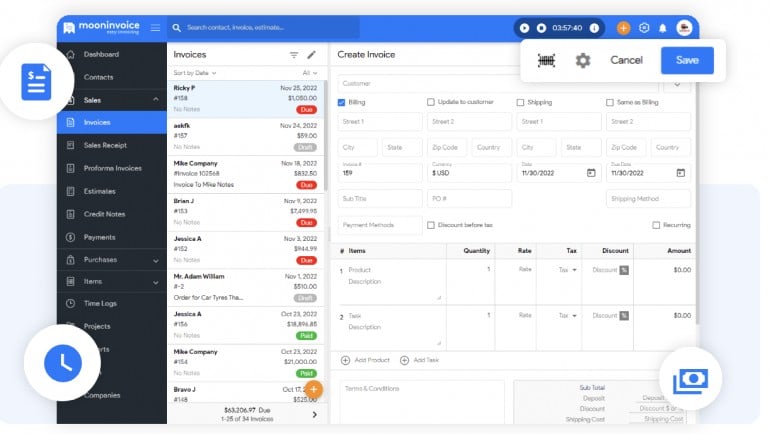
Image: Moon Invoice
Moon Invoice ticks off a lot of boxes for Mac invoicing software.
First, it runs seamlessly on Mac. You can download the desktop app for free on the Apple Store, and there is an iOS version to help you manage your finances no matter where you are.
Then, there are the many ways Moon Invoice saves you time. The software comes with automatic invoicing capabilities, helps you get paid faster with over 20 online payment methods, free invoicing templates, and converts estimates into invoices in a single click.
Moon Invoice offers some of the best value for money for freelancers, contractors, and small businesses who want more functionality and time efficiency.
You will need to invest in a higher tier to unlock all of the invoicing and accounting features. With plans topping out at $19.99/month, it’s considerably cheaper than Bonsai or QuickBooks.
Pros:
- Mac and iOS invoice maker apps.
- Over 65 invoice templates and 15+ business report templates.
- AI-powered quick scan invoicing for faster data entry.
- Zapier and Make integrations for workflow automation.
- Get stock alerts, payment alerts, and other notifications on the go.
- Manage multiple companies with a single dashboard.
- Convert time logs into timesheets for invoices.
- Live customer support.
Cons:
- There is a learning curve, and the amount of features may be overwhelming to some users.
- The higher tiers give you access to all the invoicing features.
- The time tracking feature is not automatic, and there’s a risk your timesheets won’t be 100% accurate.
Rating: 4.4/5 stars
Pricing: A 7-day free trial is available with paid plans ranging from $7.99/month to $19.99/month (starting at $6.67/month with annual billing).
What Users Say
”Easy and efficient invoicing. Love the template features for both email templates and invoices, estimates, and PDF templates. I love that I can run this from a Mac app and do not have to log into a website to use it (and also from my phone)” – Capterra Review
10. Invoice Ninja
Invoice Ninja is an open-source invoicing platform used by over 200,000 businesses worldwide. If you’re a tech-savvy freelancer who wants full control over your invoicing data — and zero monthly fees — the self-hosted version is hard to beat.
You get a complete invoicing workflow: create and send invoices, track time and expenses, generate proposals, manage projects, and accept payments through 40+ payment gateways including Stripe, PayPal, and Square.
Invoice Ninja also supports multi-currency invoicing, recurring invoices, and client portals where your customers can view and pay invoices online.
The platform runs as a web app with desktop and mobile companion apps for iOS and Android, so you can manage your invoicing from anywhere.
Pros:
- Open-source transparency — you can inspect, modify, and self-host the entire platform.
- Free self-hosted option with no limits on invoices or clients.
- Rich feature set: time tracking, expense tracking, proposals, and project management.
- 40+ payment gateway integrations.
- Multi-currency support and client portals.
Cons:
- Self-hosted version requires technical setup and server maintenance.
- Less polished UI than native Mac apps like GrandTotal or Cakedesk.
- No native Mac app — runs in the browser with an Electron-based desktop app.
Rating: 4.7/5 stars (Capterra)
Pricing: Free (self-hosted, unlimited). Ninja Pro starts at $140/year (~$11.67/month) for the hosted version, with Enterprise at $180/year.
What Users Say
”It took a lot of customization but with the help of the community and the developer team I was able to make it just how I need. Even after coming from a huge platform, I’m glad that we made the switch.” — Capterra review
Read More: How to Bill Time Accurately and Stop Leaving Money on the Table
11. Cakedesk
Cakedesk is a Mac-native invoicing app built for freelancers and self-employed professionals who value privacy and simplicity.
Unlike most modern invoicing tools that live in the cloud, Cakedesk stores your data locally on your Mac. There’s no account to create, no subscription to manage, and no data leaving your machine unless you want it to.
The app supports e-invoicing standards (ZUGFeRD and XRechnung), which is increasingly important for EU-based freelancers and businesses dealing with government clients. You can customize your invoice templates with HTML and CSS, work with over 100 currencies, and add QR codes for easy payment.
Cakedesk is actively developed — the most recent release was in January 2026 — and it follows Mac design conventions with proper keyboard shortcuts and a clean interface.
Pros:
- Mac-native design with keyboard shortcuts and a clean interface.
- One-time purchase — no recurring subscription fees.
- Local data storage with no cloud dependency, giving you full control over your data.
- E-invoicing support (ZUGFeRD and XRechnung) for EU compliance.
- Actively developed with regular updates.
Cons:
- Smaller user base than established platforms like FreshBooks or QuickBooks.
- Limited integrations compared to cloud-based solutions.
Rating: Not yet widely reviewed on major platforms — but actively maintained and well-regarded in the Mac freelancer community.
Pricing: Free for your first 3 clients, quotes, and invoices. The full version is a one-time purchase of €69 (regularly €99), with one year of free updates and a 60-day money-back guarantee.
12. The No-App Solution: An Invoice Template for Pages
Sometimes, the best invoice software for Mac is the one that comes with your laptop.
For a simple, zero-cost solution, look no further than Apple’s Pages.
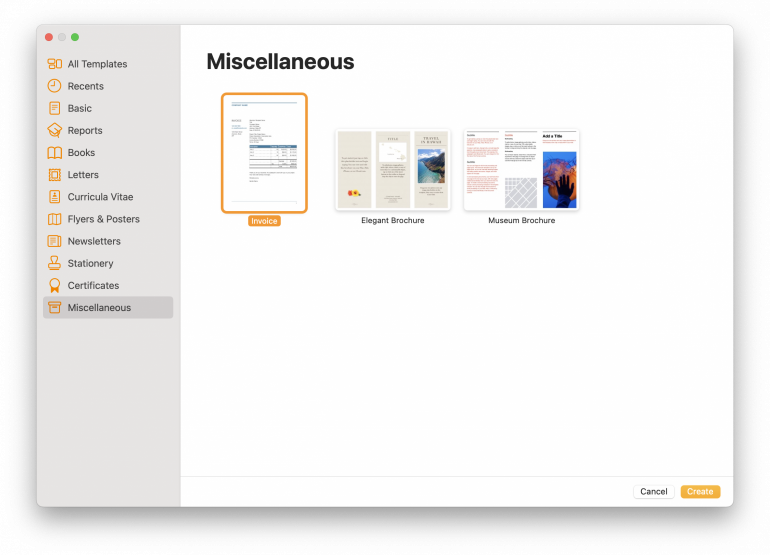
Open a new document, navigate to the “Miscellaneous” template folder, select “Invoice” and you’re done.
The invoices are 100% customizable, and you can change everything from the font color to inserting your logo.
It’s a great option for freelancers or contractors starting out in business who aren’t ready to invest in paid software options and don’t want the learning curve that comes with other free options like Zoho Invoice.
Pros:
- Free and easy to use.
- Fully customizable templates.
- It is ideal for small businesses or individuals with basic needs.
Cons:
- It lacks advanced features and automation like following up on overdue invoices or creating a recurring billing cycle.
- No client management, which can make your invoicing process inefficient.
- No direct integration with accounting software or time-tracking tools.
- Manually generating and sending PDF invoices may be inconvenient and time-consuming.
Rating: 4.6/5 stars
Pricing: Free
What Users Say
“I use Pages to write proposals, invoices, to-do lists, and scripts – it is part of my daily workflow. I enjoy it thoroughly!” – Software Advice Review
Finding Your Perfect Match
Still trying to decide which Mac invoicing software is right for you? Think about your requirements as a business owner and a Mac user.
- Do you need an app with seamless macOS integration? Then GrandTotal, Invoice.app, Moon Invoice, and Cakedesk fit the bill.
- Does your business rely on hourly billing? Choose invoicing software for Mac with time-tracking, but make sure it’s automatic or integrates with Timing to ensure your timesheets are accurate and not guesstimates.
- Do you need all-in-one functionality? While Bonsai, QuickBooks Online, and FreshBooks cost more, these apps offer a suite of tools beyond invoicing and can help you reduce your tool stack.
If you’re looking for a powerful invoicing solution that can grow with your business and is a native macOS invoicing app, consider GrandTotal. It has a very extensive feature set, and different subscription tiers at affordable price points, giving you the ability to upgrade as your business scales.
Its integration with Timing (an automatic time tracker) means you’ll never leave money on the table again and can stay on top of your time without timers.
Curious to see how these two apps can transform your finances? Grab your free trial with Timing and GrandTotal today.
Invoicing Software for Mac: Frequently Asked Questions
How Do I Create an Invoice on My Mac?
You can create an invoice on Mac in a number of ways. There are native apps like GrandTotal you can download, web-based applications like ZipBooks, or you can use Apple’s Pages invoice template.
What Is the Best Mac Invoicing Software?
The best Mac invoicing software depends on your needs. If you’re looking for powerful invoice functionality at an excellent price point with automatic time-tracking, GrandTotal is the right choice for you. But if you need all-in-one accounting software, a holistic solution like Zoho Invoice, QuickBooks Online, or Bonsai might be better suited to your needs.
Does the Mac Have a Free Invoice Template?
Yes, macOS comes with a free invoice template. You can access it in the “Miscellaneous” templates section of Apple’s Pages app, and Apple Numbers also has an editable invoice template.
How Do I Keep Track of Which Hours I’ve Already Invoiced?
Use Timing’s Billing Status field. Every time entry can be marked as Not Billable, Billable, Billed, or Paid — individually or in bulk via right-click. Set a default status per project so entries are categorized as you work, then flip invoiced entries to “Billed” and update them to “Paid” once payment arrives. This closes the loop between your time tracking and your invoicing software and guarantees you never double-bill a client.