
Apple Intelligence on Mac: Everything You Need to Know About Apple’s AI Features

Artificial intelligence (AI) is changing how we interact with technology, each other, and how we work. With so much disruption across the board, it’s unsurprising that one of tech’s prominent innovators, Apple, has developed Apple Intelligence for Mac – the brand’s distinct approach to AI-powered features.
However, it’s not another AI system.
Apple Intelligence’s main goal is to improve user experience across macOS, iOS, and iPadOS in a way that feels natural, intuitive, and, most importantly, private.
First introduced in 2024, Apple Intelligence is built directly into macOS and iOS and focuses on delivering AI that is genuinely useful in everyday life. After initial delays in Europe due to regulatory compliance, Apple Intelligence became available to EU users in April 2025, and with macOS Tahoe 26 (released September 2025), it now supports 16 languages across more than 190 countries.
The rollout hasn’t been without controversy—Apple faced criticism for fabricated notification summaries and for overpromising on advanced Siri features that remain delayed into 2026. Meanwhile, a major Google Gemini partnership announced in January 2026 signals a new direction for Apple’s AI ambitions.
Despite the growing pains, Apple Intelligence continues to mature rapidly. From smarter writing assistance and AI-powered email management to creative tools and real-time translation, it is making your Mac more capable than ever.
In this guide, we’ll explore everything you need to know about Apple Intelligence on Mac in 2026, from the latest features to how it compares with AI tools like ChatGPT and Gemini, and what’s coming next.
Table of Contents
TOC
How Does Apple Intelligence Work?
Apple Intelligence works in the background, understanding and responding to you in real-time. Whether drafting an email, editing a photo, or managing your schedule, it intelligently assists by leveraging on-device data while prioritizing your privacy.
To strike the perfect balance between performance and security, Apple uses a hybrid approach:
- On-Device Processing: Handles quick tasks instantly, keeping data private.
- Private Cloud Compute (PCC): Steps in for more complex AI functions while ensuring no personal data is stored or accessible.
Unlike traditional AI models that rely on remote servers, Apple Intelligence keeps your information secure and anonymized, even when extra computing power is needed. And when tasks require capabilities beyond Apple’s own models, requests can be routed to third-party AI partners like ChatGPT (GPT-5) or Google Gemini—always with your explicit consent.
Rather than aiming for the most powerful AI, Apple focuses on practical, seamless intelligence to help you write better, stay organized, and communicate effortlessly.
It’s AI that feels intuitive, useful, and unmistakably Apple.
Apple Intelligence Features on Mac
Apple Intelligence introduces a suite of AI-powered tools to improve your productivity, work habits, creativity, and communication across iOS and macOS devices. As of macOS Tahoe 26, these features are available globally in 16 languages across more than 190 countries.
Here’s everything you need to know about the Apple Intelligence features currently available on your Mac.
Writing Tools
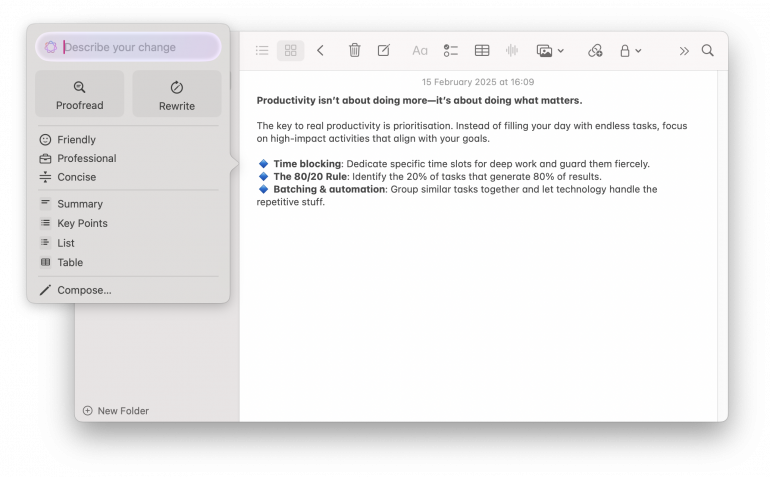
Apple Intelligence brings powerful AI-assisted Writing Tools to your Mac, helping you easily craft clear, compelling text.
Seamlessly integrated into Mail, Notes, Pages, and other third-party apps, these tools go beyond basic grammar and punctuation errors. Use the tool to improve your writing, summarize key information, and refine your tone to match intent. In macOS Tahoe 26, Writing Tools also integrate with Shortcuts, allowing you to build automations that invoke AI-powered text summarization, rewriting, or translation as part of your workflows. macOS 27 Golden Gate went further and made proofreading systemwide: blue underlines appear beneath spelling and grammar problems as you type, and you can hand any selection to Siri to rewrite, proofread, retone, or critique it.
Key Features:
- Grammar Correction: Automatically identify and fix typos, punctuation errors, and grammar mistakes.
- Style Suggestions: Get instant recommendations to improve your tone, clarity, and readability in emails, documents, and messages.
- Rewriting Assistance: Highlight text and request alternative phrasings, a different tone, or a concise summary.
- Systemwide Proofreading (macOS 27): Blue underlines flag spelling and grammar issues as you type, anywhere in macOS, and you accept corrections one at a time.
Availability:
- macOS 15.1 or later on Mac models with M1 or later, enhanced in macOS 26 and again in macOS 27 with systemwide proofreading.
- Basic proofreading and rewriting run on device on any Apple silicon Mac; longer requests go to Private Cloud Compute.
- iOS 18.1 or later on all iPhone 16 models, iPhone 15 Pro, and iPhone 15 Pro Max.
- Available globally in 16 languages.


Managing your inbox just got smarter.
Transform how you handle emails using AI-driven sorting, smart replies, and intelligent summaries to cut through clutter and highlight what matters most.
It can prioritize urgent messages, condense long email threads into key points, and even suggest context-aware responses, helping you communicate more efficiently without getting lost in endless threads.
Key Features:
- Priority Messages: Automatically identifies urgent emails and messages. It highlights emails from important contacts, time-sensitive notifications, and event invitations.
- Smart Reply: Uses AI to generate quick, context-aware responses. Smart Reply tailors responses to the tone of your conversation, whether you need a formal reply to a work email or a casual response to a friend.
- AI Summaries: Condense long email threads and message conversations into short, easy-to-read highlights.
- Mail Categorization (macOS 15.4+): Automatically sorts incoming emails into Primary, Transactions, Updates, and Promotions categories, helping you focus on what matters most.
- Digest View: Groups messages from the same sender into a single condensed thread, reducing inbox clutter from newsletters and recurring updates.
Availability:
- macOS 15.1 or later on Mac models with M1 or later. Mail Categorization requires macOS 15.4 or later.
- iOS 18.1 or later on all iPhone 16 models, iPhone 15 Pro, and iPhone 15 Pro Max.
- Available globally in 16 languages.
Image Playground
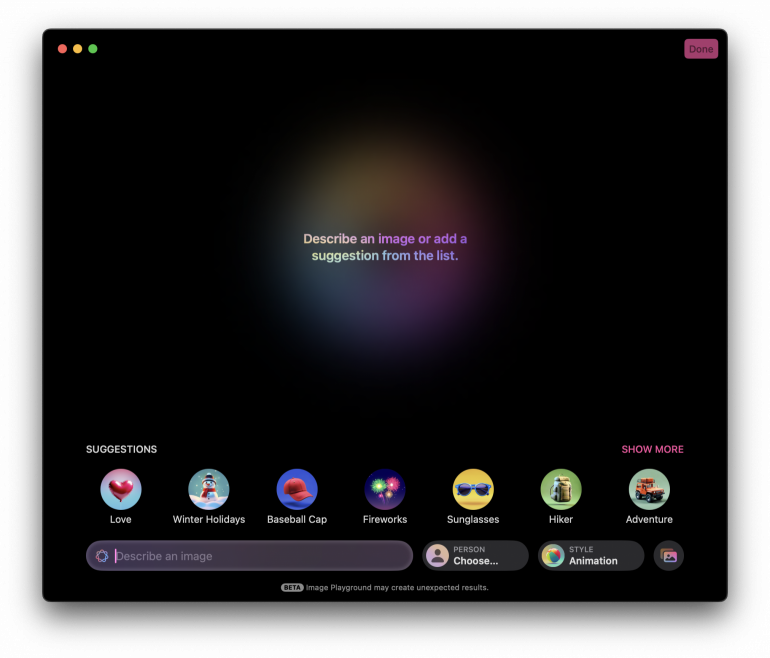
Image by: Apple
Apple’s Image Playground brings generative AI creativity to macOS, allowing you to generate original images with a description instantly.
Use it to illustrate an idea, enhance a message, or experiment with different artistic styles. Fully integrated into Messages, Notes, and other Apple apps, it offers a more accessible and secure alternative to external tools like DALL·E and MidJourney.
Key Features:
- AI-Generated Artwork: Users can type a description like “a futuristic city skyline at sunset,” and Image Playground will generate custom artwork.
- Deep Integration: Integrates with apps like Messages and Notes, allowing you to generate and share images without switching apps.
- Personalized Styles: The tool adapts generated images to user preferences, creating consistency with existing visuals.
- Sketch Style (macOS 15.4+): A new academic-inspired style with vibrant colors and detailed technical lines, ideal for illustrations and diagrams.
- ”Any Style” (macOS 26): Powered by ChatGPT integration, this option lets you describe exactly the art style you want—oil painting, vector art, watercolor, and more. ChatGPT Plus subscribers get expanded access for heavy use.
Availability:
- macOS 15.2 or later (Sketch style in 15.4+, “Any Style” in macOS 26) on Mac models with M1 or later.
- iOS 18.2 or later on all iPhone 16 models, iPhone 15 Pro, and iPhone 15 Pro Max.
- Available in English, French, German, Italian, Portuguese (Brazil), Spanish, and Japanese.
AI-Generated Emojis (Genmoji)
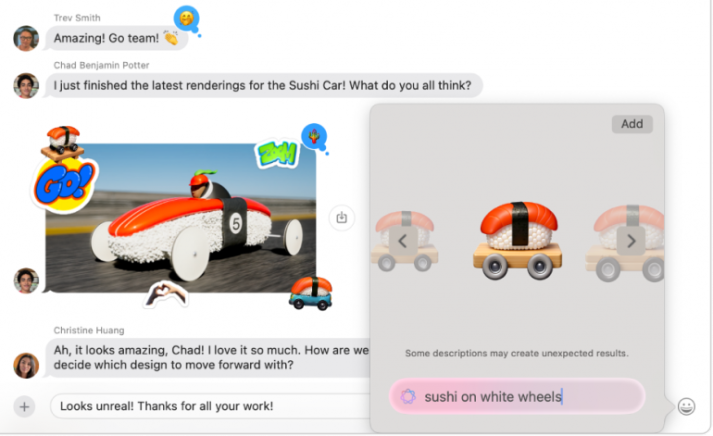
Photo by: Apple
Genmoji reimagines emoji creation with the power of Apple Intelligence, allowing you to generate custom, AI-crafted emojis that match your unique expressions and personality.
Describe what you need, and Genmoji will bring it to life. Seamlessly integrated into Messages and other Apple apps, the feature creates conversations that are more expressive, creative, and distinctly yours.
Key Features:
- Custom Emoji Creation: Describe what you want, and Apple Intelligence will generate a matching emoji.
- Emoji Mixing (macOS 26): Combine two existing Unicode emoji to create entirely new Genmoji—a quick way to express exactly what you mean.
- Personalized Style: AI adapts Genmoji to match your frequently used emojis, giving you a consistent tone and appearance. In macOS 26, you can also customize contact-based Genmoji with different expressions, hairstyles, accessories, and more.
- Seamless Integration: Genmoji works across native apps like Messages, Notes, and other third-party apps.
Availability:
- macOS 15.2 or later (emoji mixing and appearance customization in macOS 26) on Mac models with M1 or later.
- iOS 18.2 or later on all iPhone 16 models, iPhone 15 Pro, and iPhone 15 Pro Max.
- Available in English, French, German, Italian, Portuguese (Brazil), Spanish, and Japanese.
Photos

Your gallery just got smarter with a more intuitive way to organize, edit, and relive your memories.
The AI-powered search feature helps you find any photo instantly using natural language. The auto-generated Memory Movies crafts dynamic stories from your best moments with curated music and transitions.
Key Features:
- Create Memory Movies: Describe a theme or story, and Apple Intelligence will automatically select relevant photos, videos, and music to create a beautifully edited Memory Movie. This feature came to Mac specifically in macOS 15.4 (it was previously iPhone-only).
- AI-Powered Search: Use natural language queries to find specific photos or moments. Search for descriptions like “sunset at the beach last summer” or “Charlie’s graduation ceremony.” Now available in 16 languages.
- Clean Up Tool: Easily remove unwanted objects or distractions in images. Whether it’s a photobomber or clutter in the background, Apple Intelligence removes elements with a simple tap, brush, or selection. Edits are explicitly marked as AI-generated in metadata and are fully reversible.
- Smart Video Search: Search within videos to find specific moments using descriptions or keywords—perfect for quickly locating highlights in long recordings.
- Pinned Collections (macOS 26): Pin your most important photo collections for quick access, with new filtering options to organize your library.
Availability:
- macOS 15.1 or later on Mac models with M1 or later. Memory Movies on Mac require macOS 15.4 or later.
- iOS 18.1 or later on all iPhone 16 models, iPhone 15 Pro, and iPhone 15 Pro Max.
- Available globally in 16 languages.
Visual Intelligence
Visual Intelligence expands how you interact with the world using AI-powered object recognition. Originally limited to the iPhone 16’s Camera Control button, Visual Intelligence has been significantly expanded in iOS 26 to work with any on-screen content—not just what the camera sees.
This means you can get AI-powered information about anything you’re viewing on your device, from identifying products in a Safari page to looking up items in a photo someone sent you.
That changed for the Mac in macOS 27 Golden Gate, where Visual Intelligence runs natively on the desktop. Press Command-Shift-Space, select any region of your screen, and ask Siri about it — it works on images, PDFs, text and anything else on display, with no iPhone involved.
Key Features:
- Camera-Based Recognition: Press and hold the Camera Control button on iPhone 16 to identify objects, landmarks, plants, and animals in seconds.
- On-Screen Awareness (iOS 26): Visual Intelligence now works with any content on your screen—long-press or use a command to get AI information about whatever you’re viewing in any app.
- Native on Mac (macOS 27): Command-Shift-Space captures any part of your screen and turns it into a question for Siri — no iPhone Mirroring required.
- Product Search: Highlight specific objects in images to search for them across Google, eBay, Poshmark, and Etsy.
- ChatGPT Integration: Ask ChatGPT questions about anything you’re viewing on screen for deeper analysis and insights.
- Privacy-Focused Processing: The captured image is not stored on your device, and Apple doesn’t retain a copy.
Availability:
- Camera-based recognition: iOS 18.2 or later on all iPhone 16 models.
- On-screen awareness: iOS 26 on all iPhone 16 models.
- Mac: natively in macOS 27 Golden Gate via Command-Shift-Space. Before that, only through iPhone Mirroring.
- Available globally, including Europe.
Smart Notifications and AI Summaries
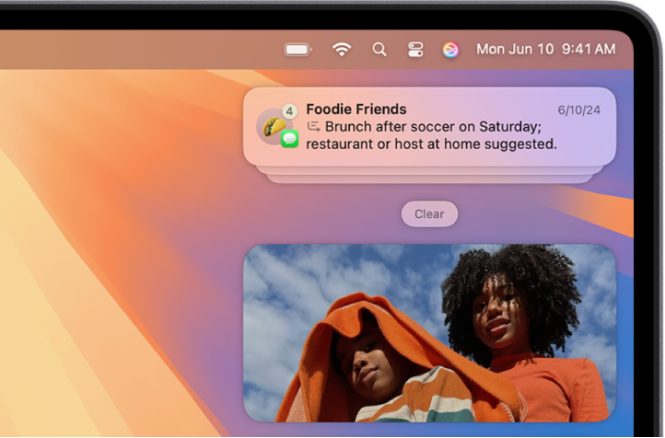
Image by: Apple
Smart Notifications and AI Summaries streamline alert management, ensuring only the most relevant messages, emails, and updates capture your attention.
Instead of overwhelming you with endless notifications, Apple Intelligence prioritizes what matters, condensing long threads into clear, actionable insights and helping you reduce screen time. With AI-driven filtering and intelligent summaries, staying informed becomes effortless.
Important caveat: In late 2024 and early 2025, Apple Intelligence notification summaries generated fabricated headlines for news apps—including falsely attributing statements to the BBC and other outlets. Apple responded by disabling notification summaries for news and entertainment apps in macOS 15.3 and iOS 18.3. Non-news notification summaries remain available, but AI-generated summaries are now displayed in italics to help users distinguish them from original notification text.
Key Features:
- AI Summarization: Apple Intelligence automatically condenses long notifications, emails, and messages into clear, digestible summaries, highlighting the most relevant details. Summaries are now displayed in italics to distinguish them from original content.
- Smart Prioritisation: AI intelligently sorts notifications based on importance, ensuring that urgent updates and essential messages take priority.
- Per-App Control: Users can enable or disable notification summaries on a per-app basis, giving fine-grained control over which apps use AI summarization.
- Universal App Support: Notification summarization works across all apps in macOS 15.1 and later, with the exception of news and entertainment apps (disabled since macOS 15.3).
Availability:
- macOS 15.1 or later on Mac models with M1 or later. News summaries disabled since macOS 15.3.
- iOS 18.1 or later on all iPhone 16 models, iPhone 15 Pro, and iPhone 15 Pro Max.
- Available globally in 16 languages.
Reduce Interruptions Focus vs Standard Focus Mode
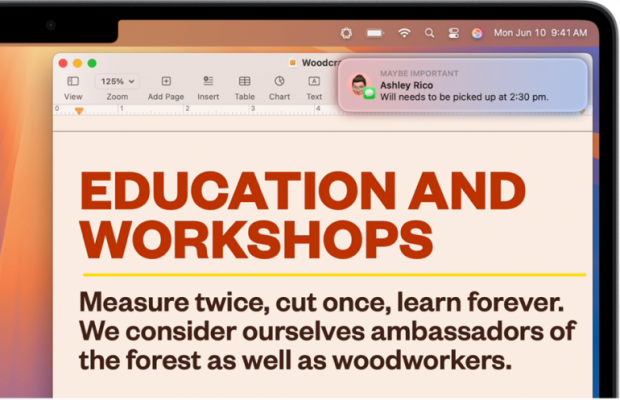
Photo by: Apple
Reduce Interruptions takes Focus Mode to the next level by using Apple Intelligence to prioritize essential notifications while filtering out distractions.
Unlike the traditional focus settings on Apple that mute alerts, the AI-driven feature dynamically assesses urgency to make sure you don’t accidentally miss something important.
Key Features:
- Intelligent Notification Filtering: Unlike standard Focus Modes, Reduce Interruptions doesn’t just silence all alerts. It uses AI to determine which notifications matter and lets the important ones through.
- Intelligent Breakthrough & Silencing: This new setting allows Apple Intelligence to override standard Focus Mode rules when it detects a high-priority notification (e.g., an urgent message or time-sensitive reminder).
- Dynamic Adjustments: Over time, Apple Intelligence learns from your behavior to refine what gets through and what stays silent.
Seamless Focus Mode Integration: The feature works with existing Focus Modes, allowing for a more context-aware experience.
Key Differences Between Reduce Interruptions vs. Standard Focus Mode
| Feature | Reduce Interruptions | Standard Focus Mode |
| AI-Driven Notification Filtering | ✅ | ❌ |
| Learns from User Behaviour | ✅ | ❌ |
| Allows Critical Notifications | ✅ | ✅ (if manually configured) |
| Automatically Adjusts Over Time | ✅ | ❌ |
Availability:
- macOS 15.1 or later (including macOS 26) on Mac models with M1 or later.
- iOS 18.1 or later on all iPhone 16 models, iPhone 15 Pro, and iPhone 15 Pro Max.
- Available globally in 16 languages.
Siri AI in macOS 27
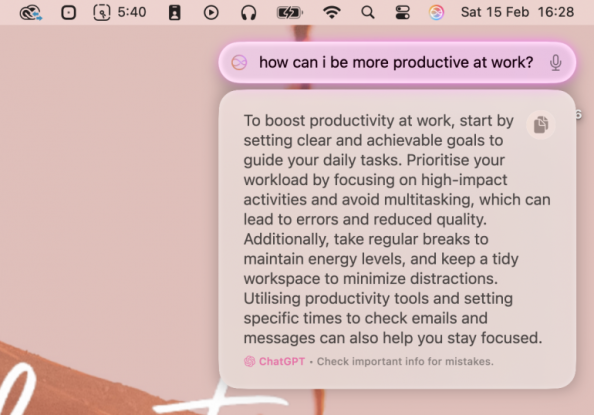
Apple Intelligence has brought improvements to Siri, making it a more conversational and context-aware assistant across all your Apple devices. With macOS Tahoe 26, Siri gained product knowledge (answering thousands of questions about Apple features and settings), more natural voice synthesis, and more resilient handling of unclear requests.
The most ambitious Siri features Apple showcased at WWDC 2024—personal context awareness, on-screen content recognition, and complex multi-app actions—slipped past their original spring 2026 target and finally shipped in macOS 27 Golden Gate on 14 September 2026. Craig Federighi had acknowledged that the earlier architecture was working but “not well enough”; the version that shipped is rebuilt on a new generation of Apple Foundation Models.
In a sign of how seriously Apple is taking the Siri overhaul, AI chief John Giannandrea announced his retirement in December 2025 and was replaced by Amar Subramanya, a former Microsoft and Google AI executive who previously led Gemini Assistant engineering.
Those foundation models were custom-built in collaboration with Google and its Gemini models, following the partnership announced in January 2026, and they run on device and on Apple’s Private Cloud Compute servers (see the ChatGPT and Third-Party AI section below for details).
Currently Available Features:
- More Natural Conversations: Siri now remembers context across multiple interactions, allowing for more natural follow-up questions without full clarification.
- Type to Siri: Users can now type to Siri and seamlessly switch between text and voice input.
- Better Speech Recognition: Siri handles stumbles in speech more gracefully, making interactions feel smoother.
- Product Knowledge (macOS 26): Siri can answer thousands of questions about Apple product features, settings, and how-to guides.
- Basic System Integration: Siri can control more settings and assist with simple multi-step actions across macOS, iOS, and iPadOS.
- Expanded App Intents: Developers from Uber, AllTrails, WhatsApp, YouTube, Amazon, and others are integrating App Intents to make their apps accessible through Siri.
New in macOS 27 Golden Gate:
- Personal Context Awareness: Siri can draw on your emails, messages and photos to answer questions like “What was that restaurant Mark recommended?”
- On-Screen Awareness: Siri can read what is currently on your screen and act on it.
- Advanced In-App Actions: Expanded app intents let Siri carry out multi-step actions within and across apps.
- A Dedicated Siri App: Start a conversation on one device and pick it up on another, attach files and images, and keep a chat history.
- Spotlight Integration: On the Mac, Siri AI answers questions directly from Spotlight.
Availability:
- Earlier Siri improvements: macOS 15.2 or later (enhanced in macOS 26) on Mac models with M1 or later.
- Siri AI: macOS 27 Golden Gate on Mac models with M1 or later, shipping in beta and in English only at launch, with French, Japanese, Korean, Portuguese and Spanish arriving in October 2026.
- On the Mac, Siri AI is available in the EU — unlike on iPhone and iPad. Apple confirmed that EU users get Siri AI on macOS 27, with the delay applying to iOS 27, iPadOS 27 and watchOS 27 because of how the Digital Markets Act bears on those platforms. Your Mac’s language does need to be set to one Siri AI supports.
- Expressive Siri voices and upgraded dictation need an M3 chip or later with at least 12 GB of memory.
- iOS 18.2 or later on all iPhone 16 models, iPhone 15 Pro, and iPhone 15 Pro Max.
- The earlier Siri features are available globally in 16 languages. Siri AI’s own language rollout is separate, as above.
ChatGPT and Third-Party AI Integration
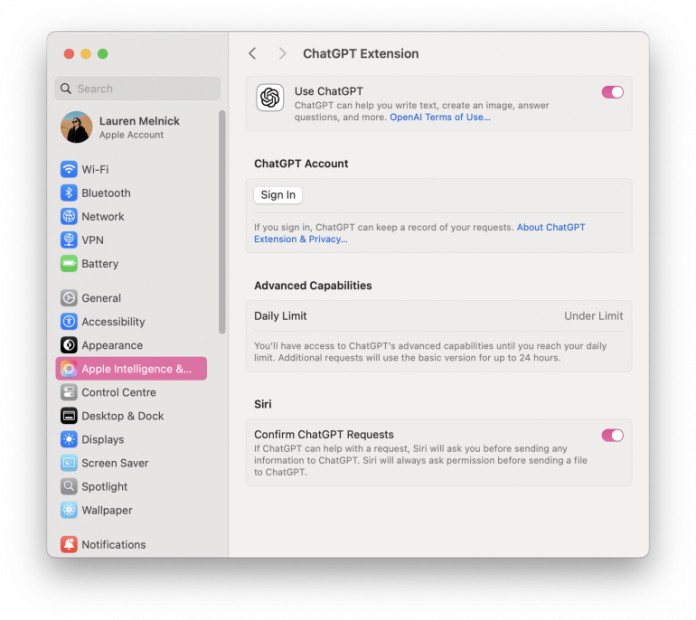
Apple Intelligence’s third-party AI landscape has evolved significantly. ChatGPT was the first external AI partner (launched with macOS 15.2), and in August 2025, Apple confirmed an upgrade to GPT-5 for macOS Tahoe 26.
Then in January 2026, Apple announced a major partnership with Google to integrate a custom 1.2 trillion parameter Gemini model—roughly 8x larger than Apple’s own Private Cloud Compute models—to power next-generation Siri and Apple Intelligence features. The deal is reportedly worth approximately $1 billion per year, with the Gemini model running through Apple’s Private Cloud Compute infrastructure (not Google’s servers) and a contractual guarantee that Google cannot use Apple traffic for model training.
With Gemini handling core Siri intelligence and complex reasoning, ChatGPT is shifting to a more specialized role—similar to how Wikipedia or Wolfram Alpha serve specific knowledge domains—focusing on creative writing, coding assistance, and Image Playground’s “Any Style” feature. Apple is also reportedly in talks with Anthropic and Perplexity for additional AI integrations.
Key Features:
- Siri + ChatGPT: When Siri encounters a complex request, it can send queries to ChatGPT (now GPT-5) for richer insights and creative responses.
- Google Gemini Integration (2026): A custom Gemini model powers next-generation Apple Intelligence features, processed through Apple’s Private Cloud Compute for privacy.
- Writing Tools + ChatGPT: Apple’s AI-assisted Writing Tools leverage ChatGPT for advanced text generation, creative writing, and summarization.
- Image Playground + ChatGPT: The “Any Style” option in Image Playground uses ChatGPT to generate images in user-specified art styles.
- System-Wide AI Access: Third-party AI is available across iOS, macOS, and iPadOS, integrated into apps like Notes, Mail, and Safari.
- Opt-In & Privacy-Focused: Users must opt in before Siri or Writing Tools send any data to external AI partners. Requests are anonymized, and IP addresses remain hidden to protect user privacy.
- Paid Subscription Perks: ChatGPT Plus subscribers can sign in to unlock expanded GPT-5 usage and premium features across Apple devices.
Availability:
- ChatGPT: macOS 15.2 or later (GPT-5 in macOS 26) on Mac models with M1 or later.
- Google Gemini: Apple’s Gemini-developed foundation models power Siri AI in macOS 27 Golden Gate.
- iOS 18.2 or later on all iPhone 16 models, iPhone 15 Pro, and iPhone 15 Pro Max.
How to Use Apple Intelligence on Mac
Ready to explore its capabilities? Follow these simple steps to enable Apple Intelligence on your Mac.
Step 1: Check Compatibility
- Ensure your Mac has an M1 chip or later and is running macOS 15.1 or later (macOS 27 Golden Gate recommended for the latest features).
- To check, go to Apple menu > About This Mac.
For more details on device eligibility and rollout timelines, see the Appendix: How to Get Apple Intelligence on Your Mac.
Step 2: Enable Apple Intelligence
- Open the Apple menu > System Settings.
- Click Apple Intelligence & Siri.
- Click Get Apple Intelligence to activate AI-powered features.
Step 3: Use an Apple Intelligence Feature
- Ask Siri more complex, contextual questions with typed or voiced commands.
- Open Notes, Mail, or Pages and highlight text to see options for rewriting, summarising, or improving tone.
- In Messages or Notes, type a description and select Genmoji to generate a custom emoji.
How to Disable Apple Intelligence
If you prefer not to use Apple Intelligence, Apple provides an easy way to turn it off.
Here’s how:
Step 1: Open the Apple menu > System Settings.
Step 2: Click Apple Intelligence & Siri.
Step 3: Toggle Apple Intelligence off.
Apple Intelligence vs. ChatGPT and Other AI Tools
Apple Intelligence is built around its privacy-first approach. This sets it apart from other AI models like ChatGPT, Google Gemini, and Microsoft Copilot.
While these models focus on advanced AI-driven responses and deep customization, Apple Intelligence prioritizes seamless system integration and on-device processing to protect your data and privacy.
Here are the key differences:
| Feature | Apple Intelligence | ChatGPT/ Gemini / Copilot |
| Privacy | On-device processing + Private Cloud Compute (PCC) | Cloud-based, data stored on external servers |
| Integration | Built into macOS, iOS, and iPadOS | Web-based or app-dependent |
| Customization | Limited, Apple-controlled AI models | Highly customizable API integrations |
| Functionality | System-wide AI (Siri, Writing Tools, Photos, etc.) | General-purpose chatbot & content creation |
| Third-Party AI Access | Uses ChatGPT (GPT-5) and Google Gemini (opt-in) | Full AI model flexibility |
It’s important to note that Apple Intelligence isn’t competing with standalone AI models. Its focus is making Apple’s devices more intuitive and improving the user experience through blending AI into everyday tasks without sacrificing security.
ChatGPT, Gemini, or Copilot may be better options for users seeking standalone, fully customizable AI. However, Apple Intelligence is unmatched for those who want AI that “just works” across Apple devices—and with both ChatGPT and Gemini now integrated, the gap between Apple’s ecosystem and standalone tools continues to narrow.
Explore more AI app options in our roundup of the best AI apps for Mac, comparing chatbots, writing assistants, creative tools, and more.
What macOS 27 Golden Gate Added to Apple Intelligence
macOS 27 Golden Gate, released on 14 September 2026, is the largest Apple Intelligence release since the original launch. It also drops Intel support altogether, so every Mac that can run it has Apple silicon and is capable of Apple Intelligence.
Siri AI and the Siri App
The rebuilt assistant is the headline change: personal context, onscreen awareness and systemwide app actions, plus a standalone Siri app that carries one conversation across your Mac, iPhone and iPad. It is covered in detail in the Siri AI section above.
Systemwide Proofreading and Smarter Writing Tools
Proofreading is no longer something you invoke. Blue underlines appear beneath spelling and grammar problems as you type, anywhere in macOS, and you accept corrections one at a time. You can also select any passage and ask Siri to rewrite it, proofread it, change its tone, or give feedback on the writing. Basic proofreading and rewriting run on device on any Apple silicon Mac, while longer or more complex requests go to Private Cloud Compute.
Better Dictation
Dictation accuracy improved through multimodal processing, and Macs with an M3 chip or later and at least 12 GB of memory get upgraded on-device dictation models. The old dividing line between Intel and Apple silicon is gone, because Intel Macs cannot run macOS 27 at all. The split now falls between M1 or M2 and M3 or later.
Describe a Shortcut
The Shortcuts app now opens to a text box. Describe what you want in plain English and Apple Intelligence picks the actions, wires them together, and hands back a finished shortcut. Refining works the same way: you describe the change rather than editing individual actions. Apple also ships a set of starter shortcuts for common tasks.
Safari: Notify Me and Describe an Extension
Safari gained two features worth knowing about. Notify Me watches a page for changes — a price drop, a restock, a status update — and tells you when something moves, checking hourly, daily, weekly or monthly. Describe an Extension builds a working Safari extension from a plain-English description. Safari also groups tabs by topic on its own.
Finder, Calendar and Notes
- Finder suggests file and folder names based on what is actually inside them.
- Calendar creates, edits and updates events from a plain description.
- Notes adds trackpad handwriting, wider Markdown support with copy and paste, and Section Links.
Visual Intelligence on the Mac
Command-Shift-Space captures any region of your screen and turns it into a question for Siri. This is the one feature Mac users previously had to reach through iPhone Mirroring, and it is now native.
What macOS Tahoe 26 Added to Apple Intelligence
macOS Tahoe 26, released in September 2025, brought a wave of new Apple Intelligence features. Here are the most significant additions that weren’t available when Apple Intelligence first launched.
Live Translation
One of the most impressive new features in macOS 26 is system-wide real-time translation, powered entirely on-device for privacy. Live Translation works across Messages (auto-translates sent and received messages), FaceTime (live translated captions), Phone calls (spoken translation of both parties), and even AirPods for hands-free spoken translation. It supports a growing number of language pairs and runs without an internet connection.
Foundation Models Framework (Developer Access)
Unveiled at WWDC 2025 and shipped with macOS 26, the Foundation Models framework gives third-party developers access to Apple’s ~3 billion parameter on-device language model via a Swift API. Key capabilities include guided generation (structured output), tool calling, multi-turn conversation sessions, content tagging, and entity extraction. Because everything runs on-device, it’s free of per-request costs and fully privacy-preserving. Apps like Day One, SmartGym, and Stoic are already using it to add AI features.
Spotlight AI Overhaul
macOS Tahoe 26 introduced the biggest Spotlight update ever. AI-powered search now works across your entire system—files, folders, apps, calendar events, messages, and even iPhone apps (via iPhone Mirroring). New quick actions, keyboard shortcuts, third-party API support, and AI-powered result ranking make finding anything on your Mac faster than ever. Spotlight also replaces Launchpad with a new “Apps” view.
Shortcuts + Apple Intelligence
The Shortcuts app can now directly leverage Apple Intelligence models (both on-device and via Private Cloud Compute). You can build automations that invoke AI-powered text summarization, translation, or image generation as part of your workflows. New automation triggers on Mac allow shortcuts to run automatically based on conditions like time of day, file or folder changes, or connecting an external monitor.
AI-Powered Reminders
Apple Intelligence can review emails, websites, notes, and other content on your Mac to identify action items and suggest new reminders. It can also automatically categorize your existing reminders into sections, making long lists more manageable.
Additional macOS 26 Features
- Phone App on Mac: The Phone app comes to Mac for the first time in macOS Tahoe, providing access to recent calls, contacts, and voicemails via Continuity. Live Activities from iPhone appear in the Mac menu bar.
- Edge Light (macOS 26.2): During video calls in poor lighting, your Mac can illuminate your face with soft ambient light from the display.
- Enhanced Mail Summaries: One-click email summarization of long threads and audio transcript summaries for meeting recordings in Notes.
Looking Ahead: What’s Still Coming
Wider Siri AI languages: The deeply personal, context-aware Siri arrived in macOS 27 Golden Gate, but in English only. French, Japanese, Korean, Portuguese and Spanish follow in October 2026, and German is not yet on Apple’s published list—so across much of Europe the assistant reaches the Mac before it reaches the local language.
Expanded AI Partnerships: Beyond ChatGPT and Google Gemini, Apple is reportedly in talks with Anthropic (Claude) and Perplexity to offer additional AI models, potentially giving users a choice of AI providers.
User Adoption: Despite the rapid feature expansion, adoption remains a challenge. A January 2026 survey found fewer than 30% of eligible users actively engage with Apple Intelligence beyond initial setup—suggesting Apple still has work to do in making these features discoverable and compelling in daily use.
Language and Regional Availability
Apple Intelligence now supports 16 languages: English (US, UK, Australia, Canada, India, Ireland, New Zealand, Singapore, South Africa), French, German, Italian, Japanese, Korean, Portuguese (Brazil and Portugal), Simplified Chinese, Traditional Chinese, Spanish, Danish, Dutch, Norwegian, Swedish, Turkish, and Vietnamese. It’s available in more than 190 countries and regions.
Siri AI is the exception on both counts. It launched in English only, with French, Japanese, Korean, Portuguese and Spanish due in October 2026 — German is not yet on Apple’s published list. Regionally it runs the opposite way to what you might expect: Apple confirmed that EU users can use Siri AI on macOS 27 and visionOS 27, while iOS 27, iPadOS 27 and watchOS 27 in the EU do not get it, because of how the Digital Markets Act applies to those platforms. Siri AI is also unavailable in mainland China for now.
Summary: Apple Intelligence on Mac in 2026
Apple Intelligence has matured significantly since its 2024 debut. As of macOS 27 Golden Gate, it spans writing assistance, email management, image generation, real-time translation, notification intelligence, and a growing developer ecosystem—all built on Apple’s privacy-first architecture. The rebuilt Siri AI and its Gemini-developed foundation models are its biggest leap so far, while the notification summary controversy serves as a reminder that AI-generated content still requires human judgment.
Whether Apple Intelligence becomes a daily essential or a background convenience will depend on how well the rebuilt Siri AI delivers on Apple’s original vision. For now, it’s a capable and rapidly improving AI layer across your Mac.
For those seeking AI-powered productivity in addition to Apple’s ecosystem, Timing’s AI Summaries offer intelligent time tracking and workflow insights. While Apple Intelligence helps you work more efficiently with AI-powered writing, email management, and creative tools, Timing helps you understand where that time actually goes—automatically tracking how much time you spend using Apple Intelligence features, AI tools like ChatGPT and Claude, and everything else on your Mac.
Try Timing free for 30 days and experience AI-driven productivity today.
Frequently Asked Questions: Apple Intelligence Mac
What is Apple Intelligence on Mac?
Apple Intelligence is Apple’s built-in AI system that enhances productivity, creativity, and efficiency across macOS. It offers AI-assisted writing tools, smarter Siri interactions, Genmoji, AI-powered image generation, real-time translation, notification summaries, and more. Unlike standalone AI chatbots, Apple Intelligence is deeply integrated into macOS and prioritizes on-device processing and Private Cloud Compute to maintain user privacy.
How Can I Ensure That Apple Intelligence is Enabled on My Mac?
To enable Apple Intelligence on your Mac, you need an M1 chip or later running macOS 15.1 or later. For the latest features, update to macOS 27 Golden Gate. Go to the Apple menu > System Settings > Apple Intelligence & Siri and click Get Apple Intelligence to activate it. Once activated, AI-powered features like smart writing tools, Genmoji, Live Translation, and enhanced Siri will be available across macOS.
How Do I Use Apple Intelligence on Mac?
To use Apple Intelligence on your Mac, ensure your device has an M1 chip or later and runs macOS 15.1 or later (macOS 27 Golden Gate recommended). Go to the Apple menu > System Settings > Apple Intelligence & Siri and click Get Apple Intelligence. Once activated, you can use AI writing tools in Mail and Notes, generate Genmoji, enhance Photos with the Clean Up tool, search with AI-powered Spotlight, use Live Translation, and access the improved Siri.
What Languages Does Apple Intelligence Support?
As of macOS 26.1 (late 2025), Apple Intelligence supports 16 languages: English (multiple regions), French, German, Italian, Japanese, Korean, Portuguese (Brazil and Portugal), Simplified Chinese, Traditional Chinese, Spanish, Danish, Dutch, Norwegian, Swedish, Turkish, and Vietnamese. It’s available in more than 190 countries and regions.
Does Apple Intelligence Use ChatGPT or Google Gemini?
Both. Apple Intelligence integrates with ChatGPT (upgraded to GPT-5 in macOS 26) for complex queries, creative writing, and image generation. Apple’s next-generation foundation models were custom-built in collaboration with Google and its Gemini models, and they power the Siri AI that shipped in macOS 27 Golden Gate. Users must opt in before any data is sent to external AI partners, and all requests are anonymized.
What Happened With Apple Intelligence Notification Summaries?
In late 2024 and early 2025, Apple Intelligence’s notification summaries generated fabricated headlines for news apps, including false attributions to the BBC and other outlets. Apple disabled notification summaries for news and entertainment apps in macOS 15.3 / iOS 18.3 and updated remaining summaries to display in italics to distinguish them from original text. Non-news notification summaries continue to work normally.
Is the New Siri AI Available on Mac?
Yes. Personal context awareness, on-screen awareness and complex multi-app actions shipped with macOS 27 Golden Gate on 14 September 2026, running on Apple Foundation Models developed with Google’s Gemini models. Siri AI launched in English only, with French, Japanese, Korean, Portuguese and Spanish following in October 2026. On the Mac it is available in the EU, unlike on iPhone and iPad.
Which Macs Can Run Apple Intelligence in macOS 27?
Every Mac that can run macOS 27 Golden Gate can run Apple Intelligence, because macOS 27 dropped Intel support entirely — the oldest supported models are the M1 Macs from 2020, alongside the MacBook Neo. Two things sit behind a higher bar: expressive Siri voices and the upgraded on-device dictation models need an M3 chip or later with at least 12 GB of unified memory.
How Much Storage Does Apple Intelligence Need?
Apple quotes up to 14 GB on Macs with an M3 chip or later and at least 12 GB of unified memory, and up to 8 GB on other Apple Intelligence-capable Macs. Real-world figures run higher — MacRumors measured over 20 GB on some Macs on macOS 27 — so leave more headroom than Apple’s number suggests.
Appendix: How to Get Apple Intelligence on Your Mac
As mentioned earlier, Apple Intelligence is now available worldwide for Mac users. However, not every device is eligible. Your access depends on hardware, software version, and region.
Here’s everything you need to know about getting Apple Intelligence on your Mac.
1. Device Compatibility: Does Your Apple Device Support Apple Intelligence?
Not all Macs and iOS devices will receive Apple Intelligence. The AI technology requires Apple’s Neural Engine, which is only available on M1 chips and later. From macOS 27 Golden Gate this is moot on the Mac, because macOS 27 dropped Intel support — every Mac that can run it qualifies. A second tier sits above that: expressive Siri voices and the upgraded on-device dictation models need an M3 chip or later with at least 12 GB of memory.
Here is a list of the supported Mac Models:
- MacBook Neo (A18 Pro, 2026)
- MacBook Air (M1, 2020) and newer
- MacBook Pro (M1, 2020) and newer
- Mac mini (M1, 2020) and newer
- iMac (M1, 2021) and newer
- Mac Studio (M1 Max, M1 Ultra, 2022) and newer
- Mac Pro (M2 Ultra, 2023) and newer
- iPhone 16 models, iPhone 15 Pro, or iPhone 15 Pro Max
- Any iPad with A17 Pro or M1 and later
On storage, Apple quotes up to 14 GB on Macs with an M3 chip or later and at least 12 GB of memory, and up to 8 GB on other Apple Intelligence-capable Macs. In practice the models can take rather more: MacRumors measured over 20 GB on some Macs running macOS 27. Apple Intelligence now supports 16 languages—see the Language and Regional Availability section above for the full list.
2. macOS Requirements: macOS 15.1 at Minimum, macOS 27 for Everything
Apple Intelligence requires macOS 15.1 or later. For the full set of features—including Live Translation, the Foundation Models framework, Spotlight AI, and Shortcuts integration—update to macOS 27 Golden Gate, released in September 2026.
How to Update Your Mac:
- Open System Settings → Click General → Select Software Update.
- If macOS 27 Golden Gate (or a later update) is available, click Download and Install.
- Restart your Mac after installation to activate Apple Intelligence features.
3. Availability Timeline
Apple Intelligence has rolled out globally across multiple macOS versions.
Rollout Timeline:
- July 2024: First released to developers and beta testers
- October 2024: Initial rollout in iOS 18.1, macOS 15.1, and iPadOS 18.1 (U.S. English only)
- December 2024: Expanded to English-speaking regions beyond the U.S. (UK, Australia, Canada, New Zealand, South Africa)
- January 2025: News notification summaries disabled after fabricated headline controversy (macOS 15.3)
- March 2025: macOS 15.4 added Mail Categorization, Image Playground Sketch style, Memory Movies on Mac, and expanded language support in the EU
- April 2025: Rolled out in the European Union with support for French, German, Spanish, Italian, Portuguese, Japanese, Korean, and Simplified Chinese
- June 2025: Apple previewed macOS Tahoe 26 with next-generation Apple Intelligence features at WWDC 2025
- September 2025: macOS Tahoe 26 released with Live Translation, Foundation Models framework, Spotlight AI, Shortcuts + Apple Intelligence, and more
- Late 2025: macOS 26.1 expanded language support to 16 languages (added Danish, Dutch, Norwegian, Swedish, Turkish, Vietnamese, Traditional Chinese, Portuguese Portugal)
- January 2026: Apple announced Google Gemini partnership to power next-generation Siri and Apple Intelligence
- September 2026: macOS 27 Golden Gate released with Siri AI (personal context, on-screen awareness, cross-app actions), systemwide proofreading, and upgraded on-device dictation on M3 Macs; Intel support dropped