
-
How to Track Employee Time Effectively: Manual vs Automatic Time Tracking
To track or not to track… That was the question.
Not anymore.
To track manually or automatically – that is the question of today’s importance. Because of poor time tracking habits and, consequently, untracked time, US companies lose $8.8 billion per day.

Image author: Annie Spratt
Businesses still face burdensome disagreements around employee work hours and struggle to decide how to monitor the latter efficiently. Let’s take the controversy around old-fashioned paper timesheets vs digitally-driven solutions for worker time monitoring.
Are you still using paper timesheets or have you already switched to digital methods and productivity apps?
You’ll definitely change your mind in favor of automatic tools after reading this article. Dive in.
-
Introducing Timing for Teams: Share Projects and Time Entries with Your Entire Team!
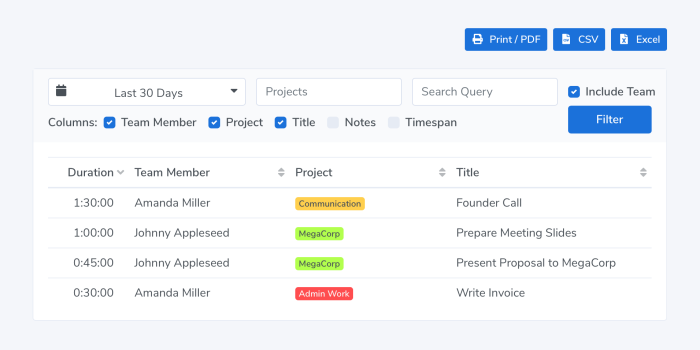
We are happy to announce the release of Timing 2021.1, featuring Timing for Teams!
Timing for Mac has always been a great way to track your time as an individual.
However, so far it has been cumbersome to coordinate your Timing projects across multiple team members.
Gathering timesheets from all team members has also been a difficult task, with a lot of emailing to collect all the needed reports.That’s where the brand-new Timing for Teams comes in.
It lets you share projects with team members and view their time entries in the Timing web app.
And with the year having just started, now is the ideal time to get your team’s time tracking in order!Read on for more information on how the new feature works, and how you can get the most out of it! Read More…
-
How to Manage Your Team’s Projects and Times with Timing and Zapier
Please note: while you can still use the guide below for managing your team with Zapier, we now offer Timing for Teams, which is much more convenient.
Two weeks ago, we explained how you can use Timing with Zapier to streamline your billing process. Today, we will build on these foundations to help you manage your team’s projects and times through Zapier. If you are unfamiliar with the process of connecting Timing to Zapier, have a look at that article for a detailed example.
In particular, you can have Zapier automatically create projects for each of your team members, then send their tracked time to a shared Google Sheet for reporting. That way, you can quickly consolidate your time tracking and billing in one place.
