
Best Habit Tracker Apps for iPhone and Mac (2026)
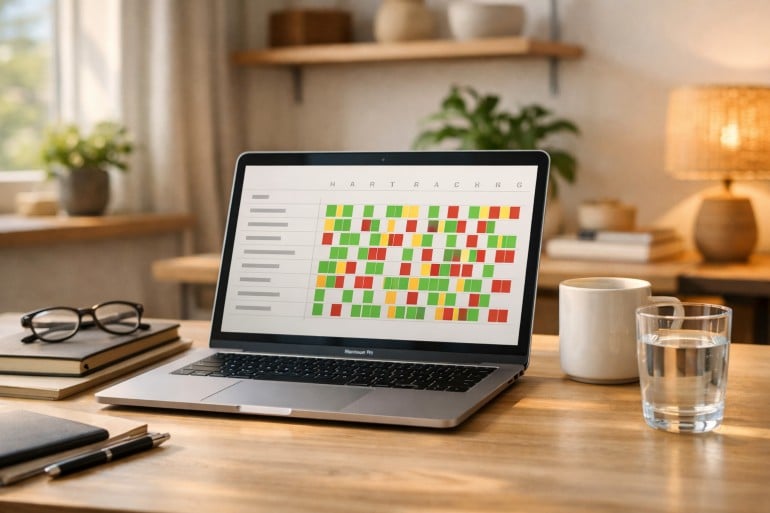
Image by: ChatGPT
Shifting the trajectory of our lives from stagnation to success often depends on one, seemingly simple, thing: pursuing the small daily habits that help us achieve our goals. This work can feel monotonous at times, even a little tedious, and as a result, difficult to remember and prioritize. But the impact of dismantling our negative habits and nurturing those that are positive can be enormous. Fortunately, we don’t have to do it alone. In 2026, there are a number of excellent habit tracker apps for iPhone and Mac we can use to help us along the way.
The right habit tracking app provides structure, motivation and accountability, ensuring you build consistency over time. Whether you’re trying to establish a morning routine, maintain client relationships or simply remember to step away from your desk, a strong habit tracker Mac app makes it easier to show up for yourself every day.
We’ve reviewed the leading habit trackers to help you find one that best suits your needs. Our list includes apps that can be used across both your Mac and iPhone, as well as a handful that are exclusively for one or the other.
Let’s dive in.
Table of Contents
TOC
Our Quick Picks: Best Habit Tracker Apps for iPhone and Mac
Short on time? We’ve summarized our reviews in the TL;DR paragraph and table below.
If you want the best streak tracker Mac app, Streaks gets our vote. But opt for Habitify if you want structured routines and deeper insights. For an app that combines habits and tasks in one productivity system, TickTick is excellent. And Everyday is a great cross-device solution. Awesome Habits features lots of customization options and a strong Apple ecosystem experience, and we love Strides for its unique tracking categories. HabitMinder is a brilliant reminder-heavy wellness tool. Finally, if you’re truly iPhone-first, consider (Not Boring) Habits, Productive, Fabulous or Way of Life. Or opt for DailyHabits if you prefer a lightweight web-based tracker you can use on Mac and mobile browsers.
The Best Habit Trackers at a Glance
| Use case | Pick | One-line explanation |
|---|---|---|
| Best overall (iPhone & Mac) | Streaks | The simplest, fastest streak-first tracker that works across Mac and iPhone |
| Best for structured routines | Habitify | Strong routines, reminders and progress insights across devices |
| Best habits & tasks in one system | TickTick | Ideal if you want habits tied to your daily planning and tasks in one productivity hub |
| Best visual chain and calendar motivation | Everyday | Great for visual consistency and do-it-every-day momentum |
| Best integration with the Apple ecosystem | Awesome Habits | Flexible setup, lots of customization and a strong Apple-native feel |
| Best reminder-heavy wellness habits | HabitMinder | Built for nudges, sessions, and wellness routines |
| Best flexible/low-guilt habits | (Not Boring) Habits | Best if strict streak pressure makes you quit after one missed day |
| Best data-heavy solution | Strides | Notable for its four distinct tracker types |
| Best iOS-only with curated templates | Productive | Great for organizing habits according to dedicated time blocks |
| Best iOS-only for wellness coaching | Fabulous | Holistic perspective on implementing meaningful changes beyond habits |
| Best iOS-only with flexible options | Way of Life | Easy, intuitive and flexible yes, no and skip options |
| Best web pick | DailyHabits | Lightweight browser-based habit tracking that works on Mac and mobile browsers |
What to Look for When Choosing a Habit Tracker App for iPhone and Mac
Finding the best macOS habit tracker app will likely require some sifting. Start your search by keeping the following criteria in mind.

Image: Karolina Grabowska
Mac and iPhone native
Apps that are either Mac native or specifically designed with Mac users in mind are optimized for Apple’s ecosystem. This means they offer better performance, smoother animations, and access to platform-specific features like widgets and shortcuts. They’re also more likely to integrate seamlessly across your devices through iCloud sync.
Tasteful design
You’ll interact with your habit tracker daily, so an intuitive, visually appealing interface matters. You’re less likely to engage with an app that feels cluttered or confusing every time you open it. A good design, on the other hand, makes logging your habits feel effortless.
Frictionless integration
The easier it is to log your habits, the more likely you are to maintain the practice. Your chosen app should integrate naturally into your workflow through menu bar icons, widgets or keyboard shortcuts. Logging should be a quick and easy process that doesn’t distract you from the task you’re working on.
Streak functionality
Habit trackers that use streaks monitor the number of consecutive days you successfully complete a habit without missing. They tend to elicit a love/hate response in users. Those who love them find them a powerful motivator. Those who hate them find that they often backfire, with a broken streak leading to abandoning a habit entirely. Decide whether streak tracking is something that works for you. And whatever your choice, try and build in some flexibility. Tracking your habits is about consistency, not perfection.
Reminders
Habit tracker users often have strong opinions about reminders, too. You might enjoy receiving a little nudge once or twice a day to track your habits. Or you might prefer receiving no notifications at all, and simply logging your habits as and when you remember. Look for apps that offer flexible notification scheduling, location-based triggers, and non-intrusive reminder styles that match your preferences.
Exporting functionality
Your habit data is valuable. Your app should allow you to withdraw your information if you want to analyze it or migrate to a different app. Look for a solution that allows you to export your data as a CSV or JSON file.
Pricing
Of course, your app’s cost and pricing structure are important, too. Consider whether you’re after basic features or advanced functionality. And conduct a cost-benefit analysis of one-off versus subscription offers. If an app you’re interested in has a free tier or trial period, test it out before you commit financially.
The Best Habit Tracker Apps for iPhone and Mac
Core Habit-tracking Apps
Our list of the best habit tracking apps for Mac features solutions that work across your devices, including your Mac, iPhone, iPad and Apple Watch. They include streak tracking apps for Mac and menu bar habit trackers.
1. Streaks
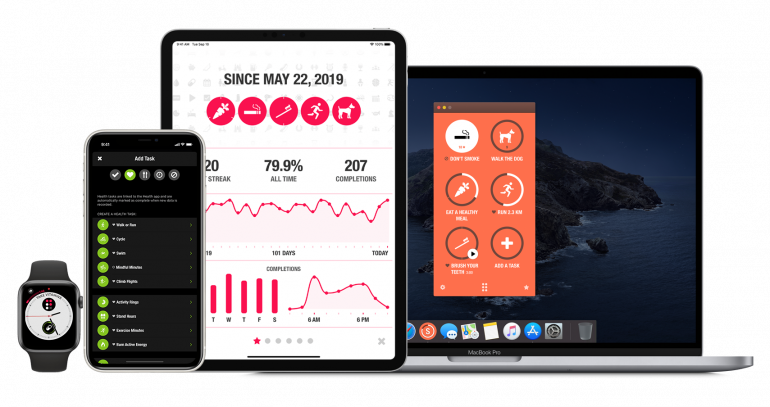
Image: Streaks
Best for: Focused, don’t-break-the-chain habit building.
Streaks claims the prize of our best overall Mac and iPhone habit tracking app. Its simple layout of only six visible habits per page (up to a maximum of 24) forces you to prioritize what truly matters rather than tracking everything. Since it’s streak-based, it’s excellent for monitoring your daily goals, whether you want to stay hydrated or write a minimum word count. It integrates seamlessly with Apple Health, automatically logging your steps, workouts and sleep. And it offers advanced Shortcuts support for powerful automation workflows. Streaks’ brilliant design features 78 color themes and over 600 icons, and it comes with an affordable one-time fee. The 24-habit ceiling might be a little restrictive for comprehensive trackers, although you could use this limit to get really specific about your goals.
Pros:
- Mac native with automatic tracking through Apple Health integration
- Exceptional design with extensive customization options
- One-time purchase, no subscription required
Cons:
- Limited to 24 total habits across all pages
- A streak-based app that requires you to log consistently
- Doesn’t include habit notes or journaling functionality
Pricing: Streaks costs $5.99 one-off.
2. Habitify
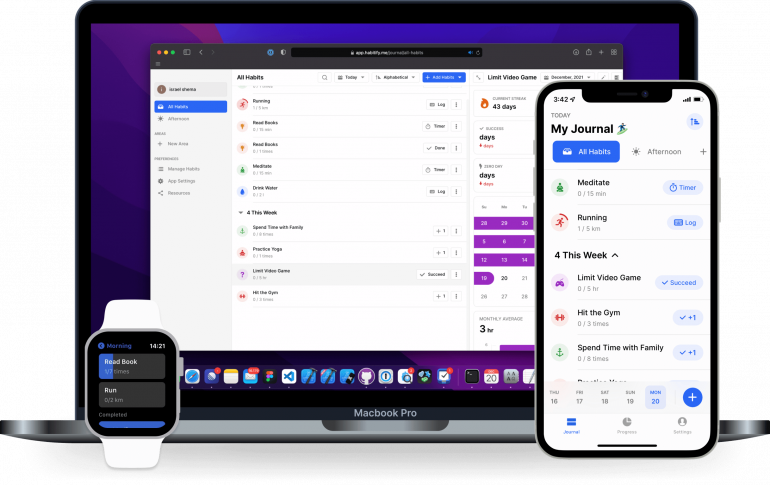
Image: Habitify
Best for: Structured routines and tracking across contexts.
What sets Habitify apart is its organizational depth. This habit tracking app lets you group your habits into customizable categories by time of the day (morning, afternoon or evening) or task (like fitness or mindfulness). The idea is to prevent overwhelming clutter as your habit list grows. Beyond check-ins, it offers action lists attached to every habit, mood tracking via emoji, and social challenges where you compete with friends or strangers on monthly leaderboards. Its automation capabilities are also impressive, and its integrations with Apple Health, Zapier, and IFTTT enable sophisticated workflows. Be warned that Habitify can be a little overwhelming and time consuming if you’re looking for a more straightforward habit tracker.
Pros:
- Habit areas organize routines by time or category
- Social challenges add competitive motivation
- Extensive integrations with Zapier, Apple Health and IFTTT
Cons:
- Interface can feel busy with multiple organizational layers
- Setting up categories and folders can be time consuming
- Some users find the social challenges and leaderboards distract them from personal habit building
Pricing: Habitify has a free forever plan. Its Premium plan costs $3.33 per month, billed annually at $39.99 per year. A Lifetime plan is also available at a one-off cost of $89.99.
3. TickTick
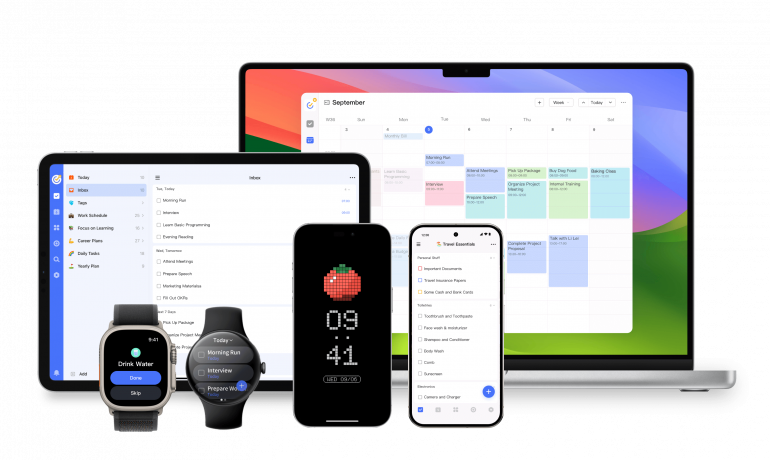
Image: TickTick
Best for: All-in-one productivity for users who want to log both habits and tasks.
TickTick differentiates itself by treating habits as one part of a comprehensive productivity system rather than a standalone focus. It bundles habits with task management, Pomodoro timers, calendar views and the Eisenhower Matrix to give you an integrated overview of things. Its habit gallery offers over 60 pre-built templates across categories like life, health and exercise, with flexible frequency settings. This is useful if streaks aren’t your thing, and you’d rather complete something three times a week than daily. Ticktick’s main downside is that the sheer breadth of features can be overwhelming, and you might find yourself constantly navigating between tasks, calendars, habits and timers.
Pros:
- Combines habits with task management
- Natural language input makes adding tasks lightning-fast
- Over 60 pre-built habit templates with flexible scheduling
Cons:
- Interface can feel cluttered with competing productivity features
- Habit tracking can feel secondary to task management
- As a result, habit tracking statistics are not as detailed as dedicated habit trackers
Pricing: TickTick has a free plan. Its Premium plan costs $35.99 annually.
4. Everyday
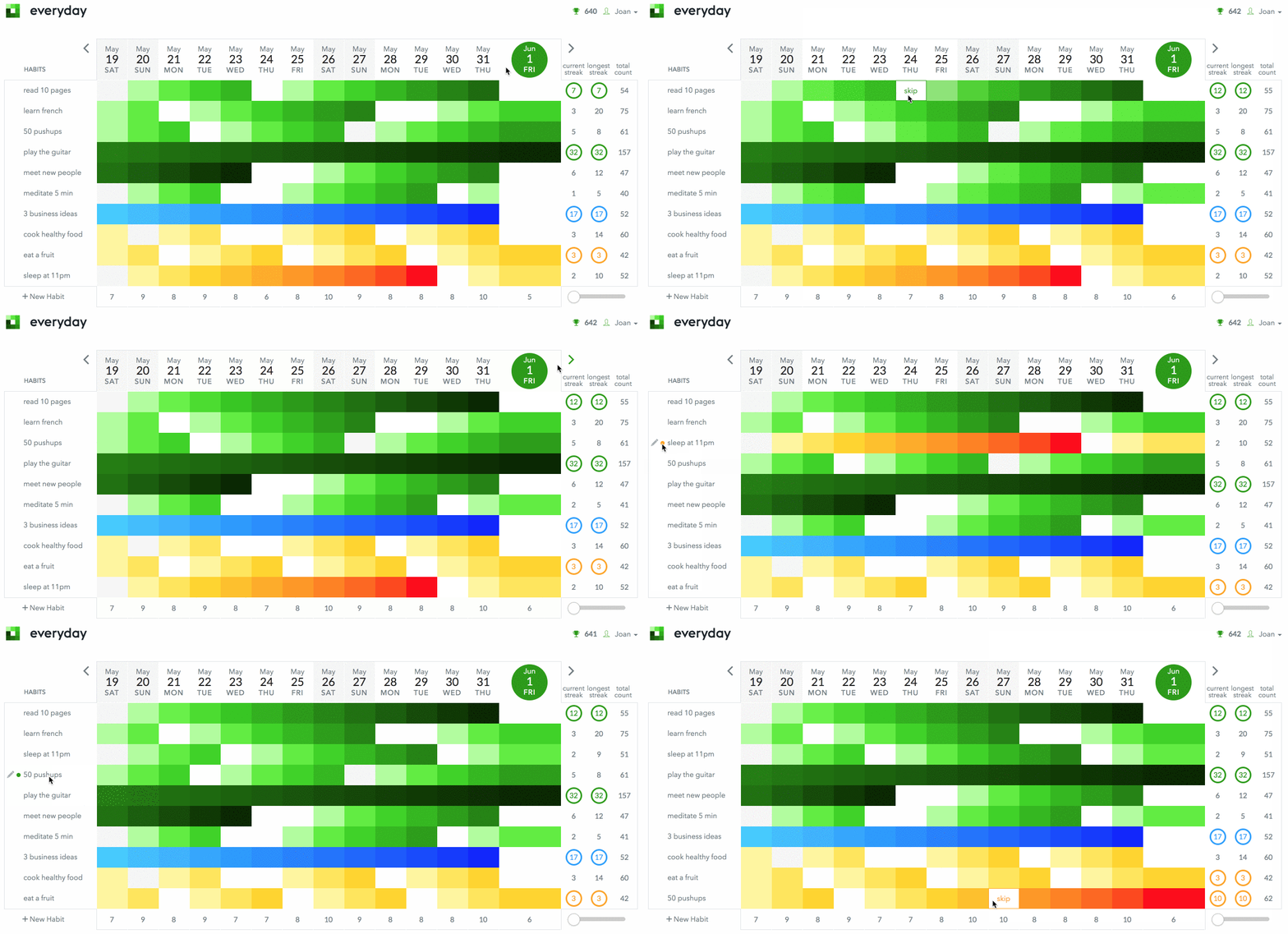
Image: Everyday
Best for: Visual learners who love colorful progress tracking.
Everyday’s all about visual simplicity. Habits stack vertically on the left, days progress horizontally across the top, and completing tasks fills squares with customizable colors. It’s like having a digital version of the classic yearly calendar up on your wall that becomes prettier with every completed day. You can see current streaks, lifetime best streaks, and total completions at a glance. The app also syncs flawlessly across web, Chrome extension and all Apple devices. And its helpful onboarding email series teaches you about habit science. There are only three habits available on the free tier before you have to upgrade.
Pros:
- Stunning visual interface with color gradients
- Seamless sync across all platforms including web
- Includes educational content on habit formation science
Cons:
- No Apple Health integration or automation features
- No flexible scheduling
- Reminder options are limited compared to reminder-first apps (primarily iOS push + email)
Pricing: Everyday has a free forever plan and a Premium plan that costs $2.50 a month, billed annually. Its Lifetime plan costs $99, one-off.
5. Awesome Habits
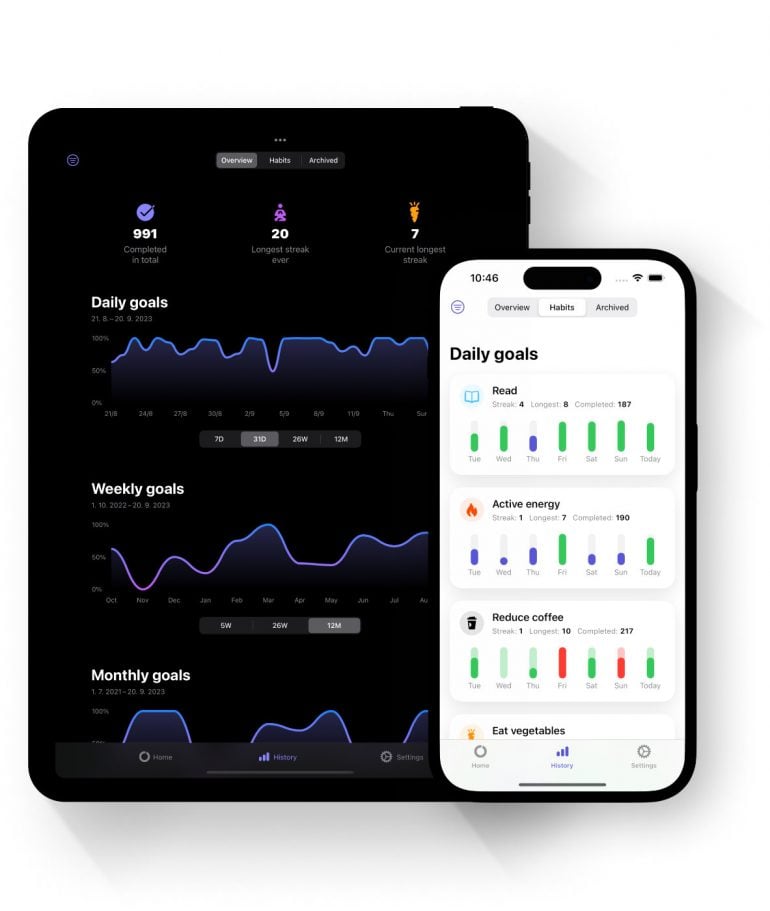
Image: Awesome Habits
Best for: Apple power users who want deep ecosystem integration.
Awesome Habits is great at leveraging every corner of the Apple ecosystem. It offers Live Activities in iPhone’s Dynamic Island, interactive widgets on your Home Screen and Lock Screen, Apple Watch integrations, Control Center shortcuts, and seamless Apple Health syncing. The interface is clean and easy to customize with over 2,500 icons. And it handles partial progress intelligently, reading 15 of 30 minutes logged as 50%, not failure. (If you hate failing at your streaks, you’ll love this feature.) However, be aware that weekly habits don’t show which specific days you completed them, making it hard to remember if you’ve already logged that day. And batch check-ins for missed days aren’t possible either.
Pros:
- Exceptional Apple ecosystem integration across all devices
- Tracks partial progress intelligently
- Affordable lifetime option
Cons:
- No habit templates or pre-built suggestions to help beginners get started
- Lacks organizational features like folders or habit grouping
- Weekly habits don’t display day-specific completion history
Pricing: Awesome Habits has a free version, a Monthly Premium subscription for $1.99, and a Yearly Premium subscription for $12.99. The Lifetime Premium subscription costs $22.99.
6. HabitMinder
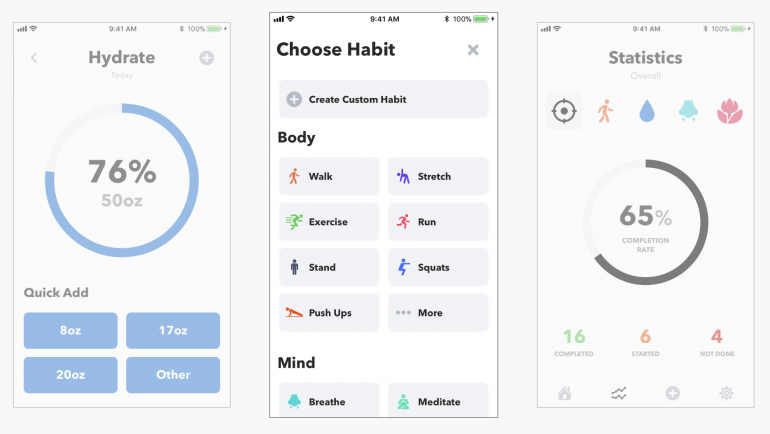
Image: HabitMinder
Best for: Users wanting guided sessions alongside habit tracking.
HabitMinder offers over 50 pre-defined habits, all of which can be customized with colors, icons and reminder tones. It comes with a clean interface that feels elegant without being overwhelming. And its Apple Health integration automatically syncs steps, workouts and sleep data, while Apple Watch support enables wrist-based logging. HabitMinder is perhaps best known for its “sessions”. Sessions are built-in mini-apps that guide you through activities like breathing exercises, meditation and hydration tracking rather than just checking boxes. It also makes it easy to skip days without losing your streak. There are occasional reports of bugs, however, including timers breaking and syncing issues.
Pros:
- Clean, elegant interface that’s not cluttered
- Strong Apple Health integration
- Unique sessions feature provides guided mini-apps for activities
Cons:
- Limited advanced features
- Reports of broken timers and sync issues suggest maintenance concerns
- No social features or the option to add accountability partners
Pricing: HabitMinder is free with various in-app purchase options.
7. Strides
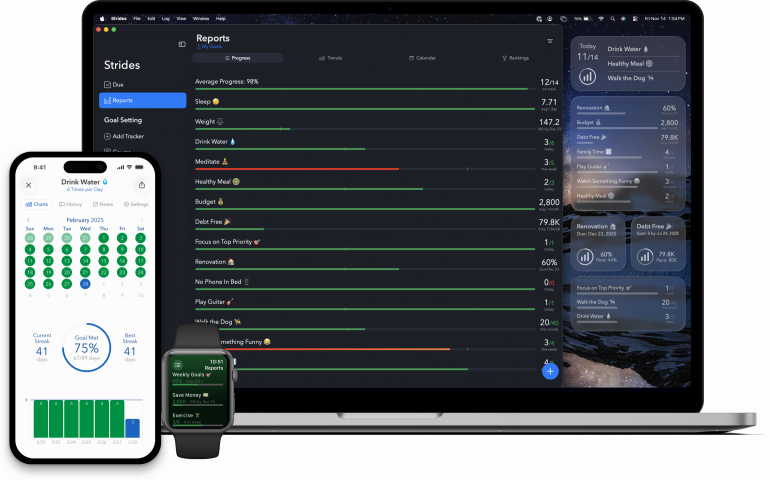
Image: Strides
Best for: Data enthusiasts who want flexible types of tracking.
Strides stands out for its four distinct tracker types:
- Habit: Simple yes/no
- Target: Reach $1,000 by June with pace line
- Average: Rolling averages, like sleep hours
- Milestone: Project checklists
This flexibility lets you track literally anything, whether you’re breaking bad habits, hitting your financial goals, averaging metrics or completing projects. It comes with over 150 templates to jumpstart your setup, while Apple Health integration auto-logs your fitness data. Detailed progress reports deliver charts, calendars, trends and rankings. And your accountability partners can view the goals you share. It’s a fairly comprehensive and complex app, however, and might feel like overkill if you’re looking for a simple habit tracking solution.
Pros:
- Four flexible tracker types handle any goal style
- Beautiful visual reports with charts, pace lines and rankings
- Lifetime purchase option beats endless subscriptions
Cons:
- Limited automation beyond Apple Health
- Complex interface
- Steep learning curve
Pricing: Strides is free with various in-app purchase options.
Best iOS-only and iPhone-first Apps
The following list of the best habit tracker apps for iOS will work on your iPhone, iPad and Apple Watch.
8. (Not Boring) Habits
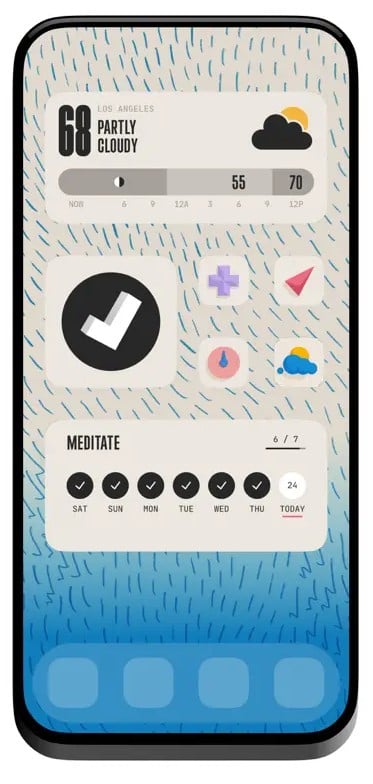
Image: (Not Boring) Habits
Best for: Users who want to focus on building one habit at a time without guilt-based streaks.
(Not Boring) Habits is an Apple Design winner that takes a refreshingly guilt-free approach to habit formation. There are no streaks involved at all. Instead, its focus is “not the goal but falling in love with the journey”. The interface is stunning, featuring customizable skins, 3D models that build as you progress, and hidden Easter eggs that make checking off habits genuinely enjoyable. Every completion feels rewarding with tactile button presses rather than simple taps. However, some users find the navigation a little confusing with unlabeled icons and unintuitive gestures that endlessly rotate 3D trophies. And it can be a little impractical for anyone juggling multiple habits, since it lacks any consolidated calendar or list view.
Pros:
- Stunning design with delightful animations
- Guilt-free philosophy that doesn’t punish missed days or broken streaks
- Motivating progression system with 3D models and Easter eggs
Cons:
- Poor navigation; switching between habits can be difficult
- Not practical for multiple habits
- Interface with ambiguous, unlabeled icons can be confusing
Pricing: (Not Boring) Habits is part of the broader (Not Boring) family of apps. It has a free version and you can buy its individual apps for $14.99 per year ($1.25 per month). There is also a Super plan that includes six apps, widgets, skins and extras and costs $49.99 per year ($4.25 per month).
9. Productive
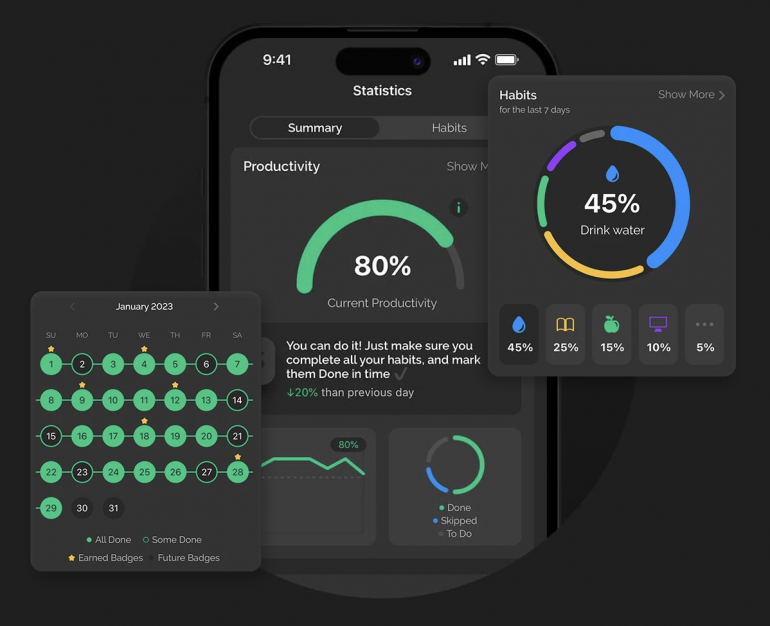
Image: Productive
Best for: Users wanting time-based habit scheduling with curated templates.
Productive is excellent at organizing habits according to morning, afternoon and evening time blocks (with ranges you can customize). Its curated habit packs are designed to help beginners get started, and its flexible scheduling allows multiple completions daily without having to recreate habits. Crucially, habits aren’t marked missed until the day ends, which reduces the pressure of maintaining your streaks. Challenges provide competitive motivation, articles offer inspiration, and location-based reminders add context. Productive is purely for iOS, though, so there’s no web or desktop version, and it regularly prompts you to upgrade, which some users find irritating and disruptive.
Pros:
- Time-based scheduling fits structured routines
- Curated habit templates help beginners get started quickly
- Flexible day-of-completion rule reduces streak panic
Cons:
- No web or desktop version
- Heavy upgrade prompts throughout app disrupt user experience
- Limited analytics, just basic streaks and trends
Pricing: Productive is free with various in-app purchase options.
10. Fabulous
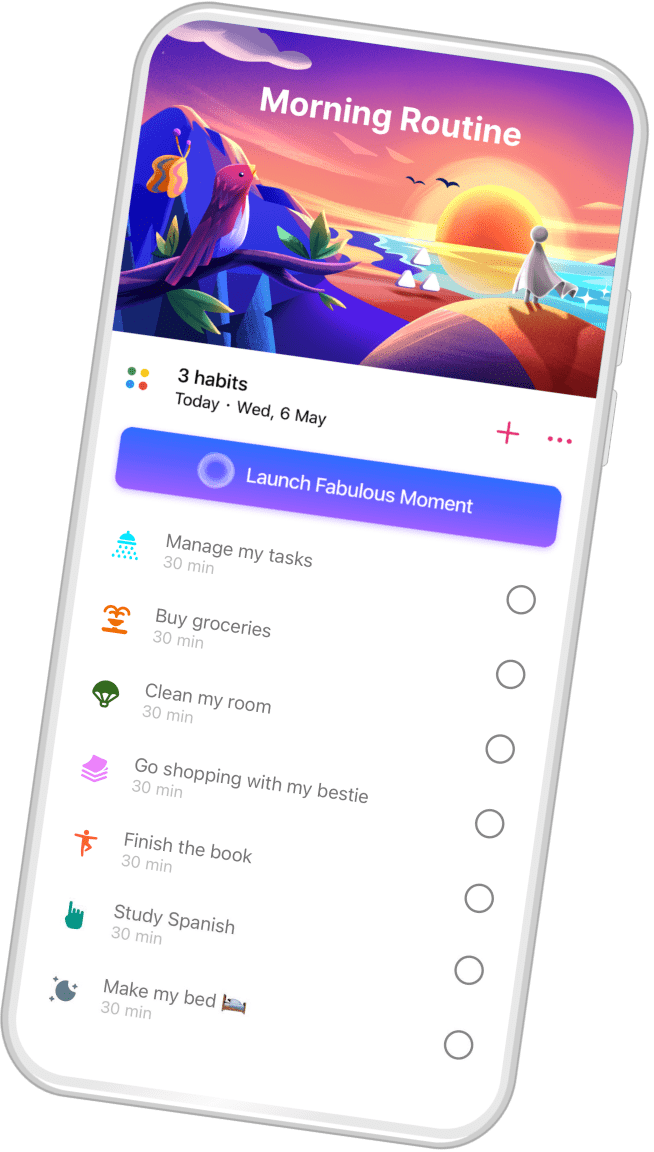
Image: Fabulous
Best for: Guided wellness coaching over simple habit tracking.
Fabulous takes a radically different approach. It’s less a habit tracker, and more a wellness coach. Born at Duke’s Behavioral Economics Lab, it guides you through multi-week “journeys” that use habit stacking to help you create the changes you want to see in your life. Its science-backed technique builds routines slowly rather than overwhelm you with 20 habits simultaneously. And it offers a beautiful, colorful design with animations, audio coaching and community circles. If you aren’t looking for a more holistic perspective on things, however, you might find Fabulous a little too broad. The free version is also very limited, and you’re likely to be constantly nudged by upsells.
Pros:
- Science-backed approach from Duke University Behavioral Economics Lab
- Gentle habit stacking starts small, builds gradually
- Beautiful design with guided coaching and community support
Cons:
- Not really a habit tracker, rather a slow-paced wellness coach
- Very limited free version
- Can only work on one journey at a time; heavy premium upsells
Pricing: Fabulous is free with various in-app purchase options.
11. Way of Life
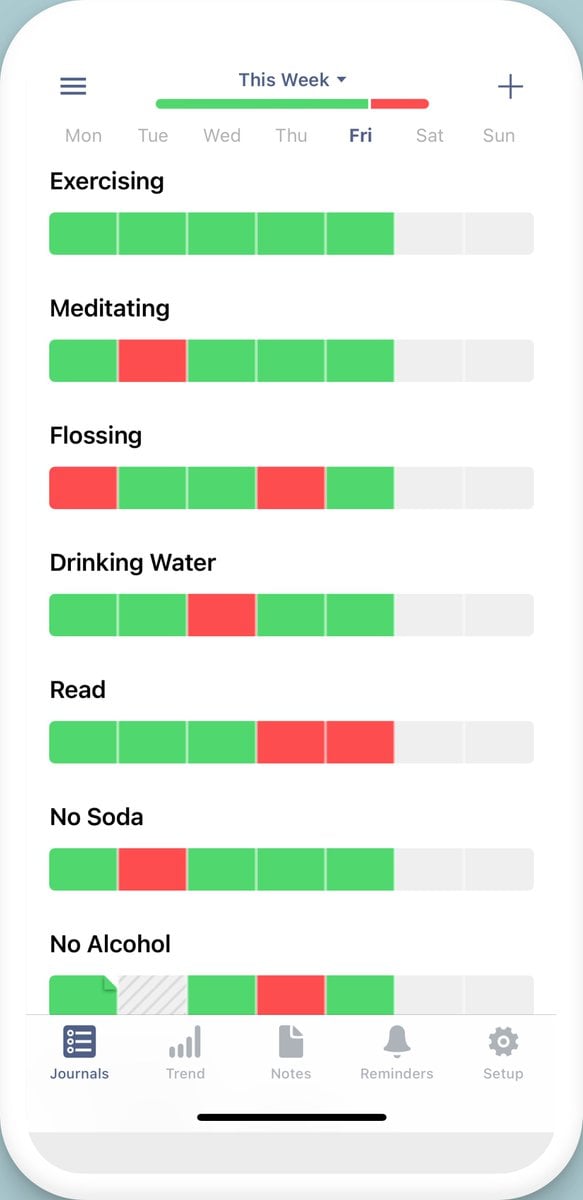
Image: Way of Life
Best for: Data-driven trackers who want flexible yes, no and skip options.
Way of Life allows you to mark your habits in three ways: “done”, “not done” or “skipped”. The good news is that skipping your habits doesn’t break your streaks, which makes it good for realistic habit building. (You can miss gym when you’re sick without the guilt!) Way of Life’s note-taking feature lets you journal why you broke a habit or what workout you did, creating rich behavioral data over time. And it offers excellent visualization through charts, bar graphs and trend lines. Its one critical flaw is that there are reports of data not being backed up — some users have lost years of data and streaks after updates.
Pros:
- Flexible three-option tracking
- Note-taking adds context; excellent trend visualization
- Fast daily logging takes seconds
Cons:
- Reported problems regarding data backups
- No widgets for home screen or lock screen access
- No Apple Health integration or automation
Pricing: Way of Life is free with various in-app purchase options.
Best Web-based Habit-tracking Apps
If you’re looking for an exclusively web-based app, DailyHabits gets our vote.
12. DailyHabits
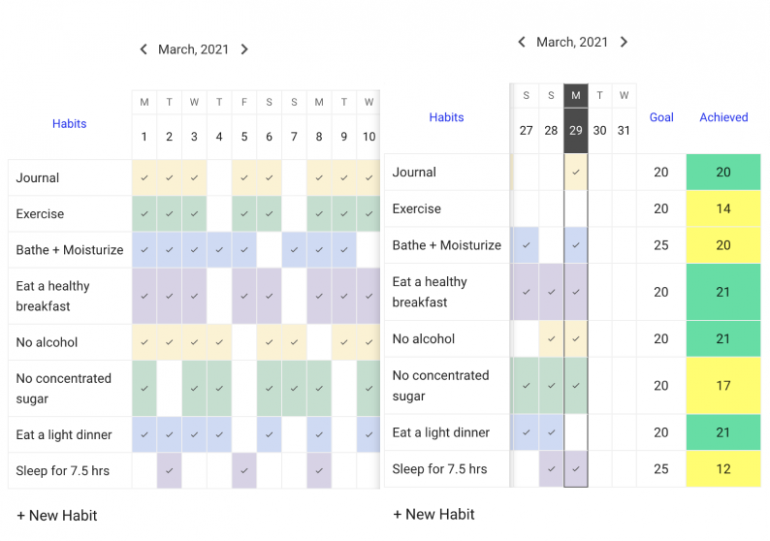
Image: DailyHabits
Best for: Budget-conscious users wanting a simple web-based tracker.
DailyHabits strips habit tracking to its essentials: a vertical habit list on the left, and a horizontal timeline at the top. You can mark your habits complete as you go and you can skip days without incurring any penalties. And the app’s reflection feature encourages you to be self-aware around your particular patterns and stumbling points. An educational toolkit is also available to help you understand habit science. DailyHabits is a web-based app and totally free, with no premium tier, ads or paywalls. However, being web-only limits its convenience compared to native apps and the interface feels basic compared to polished competitors. It also doesn’t have an offline mode.
Pros:
- Completely free with no premium tier or ads
- Simple, uncluttered interface with minimal learning curve
- Flexible consistency approach reduces pressure of perfect streaks
Cons:
- Web-only; no native apps, widgets or offline access
- Very basic features compared to dedicated mobile apps
- Lacks integrations, automation and advanced analytics
Pricing: DailyHabits is totally free to use.
A Few Final Apps Worth Mentioning
We couldn’t resist throwing in a few honourable mentions:
- Tiimo: Apple’s 2025 iPhone App of the Year is all about creating ADHD-friendly planning with calming visual timelines, color-coded emoji blocks and AI task breakdowns.
- stickK: This Yale-created platform makes you put money on the line. If you fail your goal, your cash goes to charity or an “anti-charity” you oppose. Financial loss aversion increases success rates up to three times, but requires measurable goals that are fully within your control.
- Coach.me: This free habit tracker comes with optional one-on-one coaching and supportive community “high-fives”. Its interface feels less polished than its competitors, however.
- Habitica: Habitica gamifies your life as an RPG where completing habits earns you gold and skipping tasks damages your pixelated character. Party quests with friends add social accountability, but RPG complexity overwhelms users who are looking for simple tracking.
Which Habit Tracker is Right for You?
If you’re still feeling a little unsure about where to start, take a look at the categories below. Knowing what kind of user you are can help to refine your list of options.
- If you’re a Mac freelancer: As a freelancer, you’re likely looking for a low-friction app that helps you stay focused. We recommend TickTick or Streaks.
- If you’re part of a small team: Small teams often need lightweight tracking and shared accountability. Web-based tools often work better in this scenario. We recommend DailyHabits and Habitify.
- If you’re a Mac minimalist: Looking for something sleek and uncluttered? Avoid feature-heavy apps and look for those that get down to work. We recommend Awesome Habits and Everyday.
- If you want to monitor both habits and tasks: Are the activities you want to track part habit and part task? We recommend TickTick.
- If you rely on your menu bar: The best menu bar habit trackers are all about minimal disruption and quick capture. We recommend Habitify and TickTick.
- If you’re an iPhone-first user: As an iPhone user, you’re looking for one-tap logging, strong reminders and widgets — apps that help you check off your habits easily and keep your streak going. We recommend Productive, Fabulous and Way of Life.
- If you’re an Apple Watch user: Apple Watch habit tracking is all about quick, in-the-moment check-ins, often for smaller habits like stretching, drinking water and monitoring your posture. We recommend Streaks and Everyday.
| App | Platform type | Best for | Workflow hook (Mac/iPhone) | Habit model | Team fit | Pricing model |
|---|---|---|---|---|---|---|
| Streaks | Apple-native (iPhone & Mac) | Simple don’t-break-the-chain habits | Fast daily check-off | Streak-first | Solo | One-time purchase |
| Habitify | Cross-platform (iPhone, Mac & web) | Structured routines & strong analytics | iPhone reminders & Mac review | Streaks & flexible goals | Solo/Small teams | Free tier & subscription/lifetime |
| TickTick | Cross-platform (iPhone, Mac & web) | Tasks & habits in one system | Plan on Mac, check off on iPhone | Habits inside task system | Solo / small teams (light) | Free tier & premium subscription |
| Everyday | Apple ecosystem (iPhone & Mac) | Visual habit calendar / consistency | See it at a glance | Streak-first (visual) | Solo | Free tier & IAP |
| Awesome Habits | Apple ecosystem (iPhone & Mac) | Feature-rich habits & customization | Strong widgets & export | Goals & streaks | Solo | Free tier & IAP |
| HabitMinder | Apple ecosystem (iPhone & Mac) | Guided sessions alongside tracking | Strong Apple ecosystem integration | Reminder-driven | Solo | Subscription & lifetime |
| Strides | Apple ecosystem (iPhone & Mac) | Measurable goals & analytics | Review metrics on Mac, check-in on iPhone | Flexible goals | Solo | Free tier & subscription/lifetime |
| (Not Boring) Habits | iPhone-first | No-streak philosophy | One habit at a time, gamified | Flexible goals | Solo | Free tier & subscription |
| Productive | iPhone-first | Strong routine builder | Great for iPhone-first check-ins | Routines & reminders | Solo | Subscription (common) |
| Fabulous | iPhone-first | Comprehensive habit building | iPhone-first interface | Guided coaching | Solo | Free tier & IAP |
| Way of Life | iPhone-first | Simple tracking & insight into patterns | Fast daily logging on iPhone | Tracking-first | Solo | Free tier & IAP |
| DailyHabits | Web app | Lightweight tracking | Pinned tab/web app workflow | Simple check-off | Solo/small teams (light) | Free |
Take Control of Your Habits and Goals with Timing
Your habit app is designed to help you record your progress against your goals. But it works best if it’s combined with an automatic time-tracking solution, like Timing, because your habits, goals and time usage are inextricably linked. You can’t put consistent habits in place that help you achieve your goals if you don’t have a solid handle on how you’re spending your time.
Timing runs in the background while you work, tracking the apps, websites and documents you use without you having to lift a finger. It provides critical insights into how you spend your time. By analyzing these results, you can boost your productivity, hone your focus, and improve billing accuracy.
If you want your habit tracker to supercharge your productivity, start by creating three to four habit-aligned categories in Timing. For example:
- Deep work: Time spent researching, writing, coding and designing
- Project work: Time spent in client tools and documents
- Marketing and sales: Time spent on outreach and proposals
- Admin: Time spent in your inbox, calendar and accounting software
Use Timing to automatically categorize your time into those categories. With this data on hand, you can see whether you’re investing enough time in the deep work that drives your business. Whether your administrative tasks are taking too long. Or whether you’re getting caught up in distractions and time sinks. You can then use this data to inform which habits you choose to focus on.
Timing’s timeline can also show you exactly when you opened a certain app, including on your iPhone. This helps you see how often you perform a desired (or undesired) habit-related action.
Timing can also import your iPhone and iPad usage from Screen Time. This feature lets you track your time spent on mobile devices just like your Mac usage, with the full functionality of Timing’s timeline and activity list. Even Timing’s rules are available to automatically categorize your mobile device usage, which, once again, informs your habit processes.
Finally, you can use Timing to see how often you’re using your chosen habit tracker. Take a moment to analyze your data at the end of every week. If Timing suggests you’re using your app too much, it might be because you’re finding it cumbersome and unintuitive. If you’re using it too little, perhaps it doesn’t suit your workflow or thought processes. Your habit tracking app should be a lightly used solution in your tool stack, one you dip in and out of as you monitor your progress and work towards your ambitions.
With this information, you can redesign your work habits and your time so that your habits actually stick. Try time blocking your calendar so that deep work doesn’t get interrupted, for example. And use productivity and focus apps to prevent you from accessing the news and social media sites that interrupt you.
Having a solid handle on where the hours and minutes go empowers you to adjust your schedule so that your habits and goals become a consistent priority. With Timing’s free 30-day trial, you can start getting to grips with time tracking today.
Wrapping Up: The Best Habit Tracker Apps for iPhone and Mac (2026)
Habit tracking apps have the power to transform your intentions into measurable progress and achievable goals. They provide accountability, motivation and visual proof of consistency. If you’re battling to see the changes you want to see in your life, selecting one of our habit tracker apps for iPhone and Mac can help you inch towards your dreams one step, one habit and one day at a time.
Bear in mind that in order to get the most out of this process, you need to know how you spend your time, too. While your habit tracker records what you intend to do, Timing automatically captures what you actually did. This combination allows you to stay on top of your daily check-ins and reminders, while using Timing to verify how your habits translate into real work, diagnose what’s breaking your streaks, and identify the time-wasting patterns sabotaging your progress.
Start by downloading Timing’s 30-day free trial to try it out for yourself today.
Frequently Asked Questions: Habit Tracker Apps for iPhone and Mac
What is the Best Habit Tracker App for iPhone and Mac?
For most people, Streaks is the best simple pick across iPhone and Mac. If you want deeper routines and insights, choose Habitify. Alternatively, TickTick combines habit and task tracking in one place. Try a few different apps to see which one suits your working style best.
Is There a Built-in Habit Tracker on iPhone or Mac?
Apple doesn’t come with a built-in habit tracker with streaks and analytics. The simplest workaround is Apple Reminders, which you can use to set recurring reminders and check off once complete. But for a dedicated habit app, it’s worth investing in a third-party solution.
Are Streaks Good for Habit Building or Do They Create Too Much Pressure?
Streaks can boost consistency because they reduce daily decision-making. But some users find they create “all-or-nothing” pressure if you miss a day. Rather than strive for perfection, aim for a minimum viable habit, follow a “never miss twice” rule, or switch to three-times-a-week goals if your schedule is unpredictable.