
The Best CRM for Mac in 2026: 14 Top Picks for Freelancers & Small Teams

Image: ChatGPT
TL;DR: Best CRM for Mac
The best CRM for Mac in 2026 depends on what you need. Daylite is the strongest fully native pick, Less Annoying CRM the simplest place to start, and Bonsai is great if you want invoicing and contracts bundled in with your client records. Here, native apps aren’t everything. Several of the best tools in this category, including Pipedrive, HubSpot and Capsule, are web apps that run smoothly on a Mac rather than being built for one. Most of these apps don’t track how long you actually spend on a client, though. If you bill hourly or on a flat fee, pair whichever CRM you pick with Timing.
Hunting for the best CRM for Mac? Search for “CRM” on its own and you’ll find page after page of enterprise sales platforms built for 20-person sales teams, bursting with features that likely don’t apply to you. Add “for Mac” to that search and it gets messier still. Some of what comes up is built specifically for macOS, some just happens to open in Safari, and most reviews don’t bother telling you whether that matters.
This guide is designed to make your decision quicker and easier. We’ve sorted our list of 14 recommended CRMs and contact managers into four categories: a handful built specifically for Mac, lighter contact-first native tools, web apps worth using because they feel right at home on a Mac, and all-in-one suites for freelancers who want everything under one roof. If you’re assembling the rest of your toolkit at the same time, our Best Freelance Apps for Mac article covers the wider ground.
Whatever unique challenge or workflow issue you’re trying to solve, you’ll find a solution that’s right for your needs. Start by taking a look at the comparison table if you want a high-level overview first.
Table of Contents
TOC
Is There a True Mac-native CRM?
While there are some true Apple CRMs, many also cater for other platforms. CRMs tend to fall into three categories:
- Those built natively for Mac: Daylite and Contacts Journal CRM lead this group.
- Others that are Mac native, but built around your contacts rather than a sales pipeline: Cardhop, BusyContacts and Mesh live here.
- Web apps: Everything else calling itself a “Mac CRM” is a web app, often a very good one that runs smoothly on Mac.
There are more web-based options than there are Mac native solutions because CRM vendors want to cater to a wider audience. Browser solutions run on Mac, Windows and Linux without a problem, and shouldn’t be considered inferior. On the contrary, some of the best apps in our list are designed for web.
What to Look for in a Mac CRM
Before we get into our recommendations, here are some of the important criteria to keep in mind as you consider your options:
- A user-friendly pipeline: Your CRM has to work the way you do. Don’t compromise on an intuitive and user-friendly interface and workflow.
- Useful integrations: Pick a solution that integrates well with other apps in your toolstack, such as Apple Mail or Gmail, Apple Contacts and your calendar app.
- Offline access: Ideally, your data should be available to you whether you’ve got a connection or not.
- Painless import and export: Make sure your chosen solution makes it easy to both import and export your contacts.
- Pricing: Check how pricing changes as you add people. Some CRMs charge per user, while others charge a flat rate, so the best fit depends on whether you work alone or with a small team.
- Advanced features: Carefully consider the features you’ll need. If you’re a freelancer, solo professional or the manager of a small team, you probably won’t need the forecasting, lead scoring, territory management and call-center features that enterprise solutions offer.

Image: Pavel Danilyuk
The Best CRMs for Mac in 2026: A Handy Comparison Table
Wondering how we chose the apps on our list? We evaluated a wide range of Mac CRMs and contact managers, looking for solutions that met the criteria outlined above. We deliberately left out the big enterprise sales platforms. Salesforce and its peers solve different problems for different kinds of teams, and we felt that including them here would muddy the list.
Our chosen solutions are ideally suited for individuals and small teams. Here’s what you can expect from each at a glance:
| App | Best for | Native or web | Price | Rating (out of 5) |
|---|---|---|---|---|
| Daylite | Full-featured Mac-native CRM | Native | Starting at $15.83pm | 4.5 (G2) |
| Contacts Journal CRM | Data privacy and excellent syncing | Native | Free and $49.99 one-off (Mac only) | 4.6 (Mac App Store) |
| Cardhop | Fantastical users who want instant contact access | Native | Free and starting at $4.75pm | 4.4 (Mac App Store) |
| BusyContacts | BusyCal users who want detailed contact history | Native | $49.99 one-off | 4.3 (Mac App Store) |
| Mesh | Self-populating network with no manual data entry | Native | Free and starting at $10pm | 3.7 (Mac App Store) |
| Less Annoying CRM | Users wanting a very simple and easy to use CRM | Web | $15pm | 4.9 (G2) |
| Capsule CRM | The middle ground between too simple and too complex | Web | Free and starting from $18pm | 4.7 (G2) |
| Pipedrive | Robust drag-and-drop visual CRM | Web | Starting at $14pm | 4.3 (G2) |
| HubSpot CRM | A CRM built to scale | Web | Free and $7pm | 4.5 (Capterra) |
| folk | A design-led interface | Web | Starting at $24pm | 4.5 (G2) |
| Streak | Gmail users who want a Gmail-based pipeline | Web | Starting at $49pm | 4.5 (G2) |
| OnePageCRM | Ensuring you won’t forget to follow-up | Web | Starting at $9.95pm | 4.7 (G2) |
| Bonsai | Combined CRM, proposals and contracting | Web | Starting at $9pm | 4.3 (G2) |
| HoneyBook | A polished, branded client journey | Web | Starting at $29pm | 4.5 (G2) |
Pricing correct as of October 2026.
Full-featured Mac-native CRMs and Contact Managers
The two apps below are full CRMs built specifically for macOS. Daylite covers the whole sales process from pipeline to project delivery, while Contacts Journal CRM focuses on relationships, with logs, follow-ups and activity reports but no deal pipeline.
1. Daylite
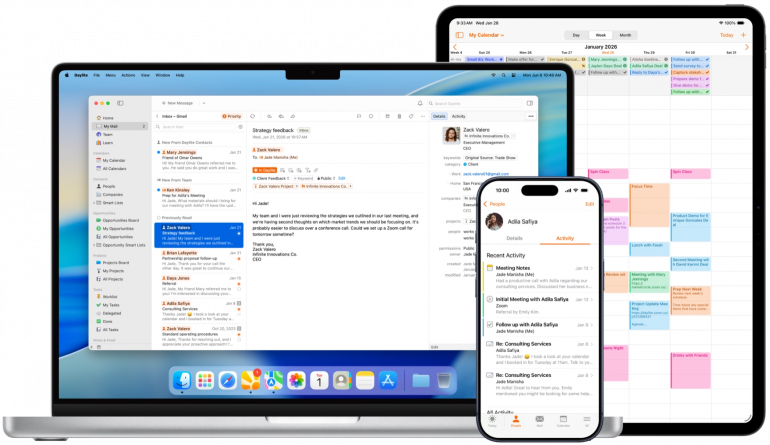
Image: Daylite
Best for: Mac users who want a full-featured Mac-native CRM.
Daylite is the only fully Mac-native CRM in our list with a complete sales pipeline. It looks, feels and works like a Mac product in every respect.
The Apple Mail integration is Daylite’s standout feature. It allows you to log emails, create follow-ups and pull up someone’s whole history without leaving your inbox. Daylite also handles both sides of client work well, with both projects and pipelines living side by side. This allows you to track a deal through to close and then manage its delivery in the same place, rather than switching tools halfway through. Daylite works well offline, which is handy if you regularly work from trains or coffee shops.
Be aware that the Daylite interface is quite feature-heavy. If you’re only managing a handful of clients, it might feel like overkill initially. But if you’re serious about having a comprehensive Mac-native product, it’s one of the best solutions on the market.
Pricing: Daylite has three tiers. Its Leap plan costs $15.83 per user per month, Growth costs $32.50 per user per month and Scale costs $49.17 per user per month, all billed annually. Custom pricing is available for larger organizations.
2. Contacts Journal CRM
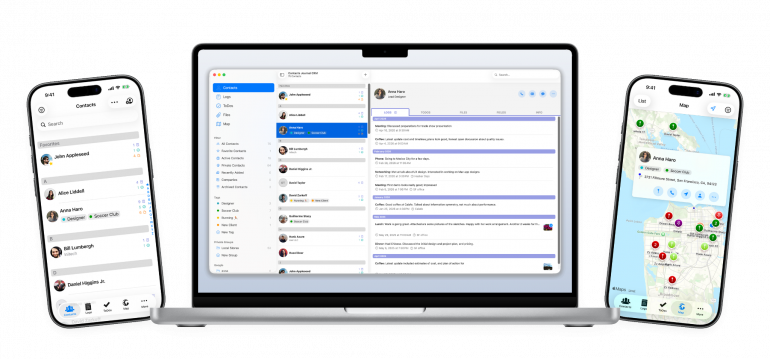
Image: Contacts Journal CRM
Best for: Apple users who want their client data private and synced across every device.
Contacts Journal CRM adopts a different approach to Daylite. Instead of focusing on pipelines and deal stages, it logs your interactions instead. Every call, coffee or email gets a note attached to the contact, along with a reminder if you need to follow up. You can also attach files, handwritten notes and photos, and it all sits against a particular person’s record. Map view allows you to plot your contacts geographically, and Siri Shortcuts and widgets mean you can log a quick note without fully opening the app.
Contacts Journal CRM syncs well across iPhone, iPad, Mac and even Apple Watch through iCloud. There’s no account or sign-up required, which is ideal for privacy-focused users.
The trade-off is that Contacts Journal CRM isn’t a pipeline tool. There’s no deal-stage tracking, although its dashboard does chart your logs, to-dos and most active contacts over time. It’s built for remembering people, rather than moving them through a sales process. If your work is mostly relationship maintenance rather than active selling, this is the app for you. If you need to see where your deals stand at a glance, opt for Daylite instead.
Pricing: Contacts Journal CRM has a free tier. The Unlimited Personal Plan costs $49.99 one-off. The Unlimited Plan for Mac + iOS costs $69.99 and the Mac Add-on (if you already own the iOS Unlimited Plan for $24.99) costs $44.99.
Lightweight Mac CRMs and Contact Managers
The three apps below are Mac-native too, but they’re lighter contact managers rather than full CRMs. They’re quick to set up and are designed to focus on finding, organizing and keeping in touch with your contacts. If you need deal stages, quotes or forecasting, you’ll likely outgrow them, so look at Daylite or the web-based CRMs in the next section instead.
3. Cardhop
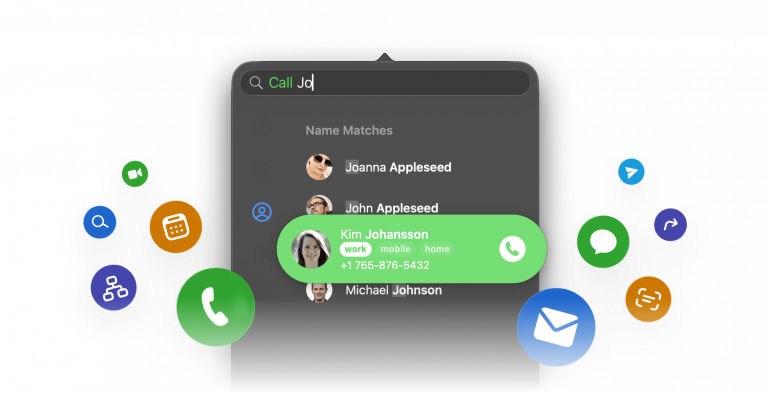
Image: Cardhop
Best for: Fantastical users, or anyone who wants to add and find contacts instantly.
Like other Flexibits products, Cardhop is all about efficiency. Enter “Call Sarah Tuesday 3pm” and it parses the name, action and time in one go, right from the menu bar. This friction-free entry process is likely to change how often you access and maintain your contacts. It’s just so easy, you can’t not use it. It’s also actively maintained. Updates in 2026 added Microsoft 365 Graph API support and improved the birthday widgets.
Cardhop doesn’t automatically log any of your interactions with a contact, however. There’s no email or meeting history tracking how often or recently you’ve been in touch. Contacts Journal CRM and BusyContacts both build in that kind of activity feed.
Pricing: Cardhop comes bundled into Flexibits Premium, alongside Fantastical. There’s a free plan, and Individual and Family plans that cost $4.75 and $7.50 per month respectively, billed annually. There’s also a Teams plan that costs $4.75 per user per month, billed annually.
4. BusyContacts
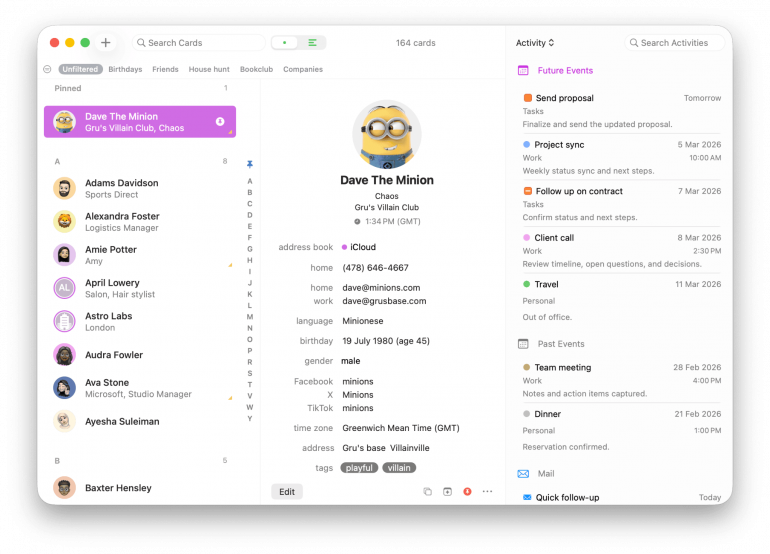
Image: BusyContacts
Best for: BusyCal users or anyone who wants a running history of every email and meeting with a contact.
BusyContacts’ activity feed is its most powerful feature. Pick a contact and you get a chronological list of every email you’ve exchanged, every calendar event you’ve shared, and their social profiles, all pulled together. Development is actively maintained, with updates landing at a steady clip. It pairs naturally with BusyCal if you’re already in that world, and it’s on Setapp too, which is worth factoring in if you already subscribe.
Be aware that BusyContacts is Mac-only, with no dedicated iPhone or iPad app. Your synced contacts show up on iOS through Apple’s Contacts app via iCloud. But you’ll only be able to see the app’s activity feed, tags and smart filters on your Mac.
Pricing: BusyContacts costs $49.99 one-off.
5. Mesh
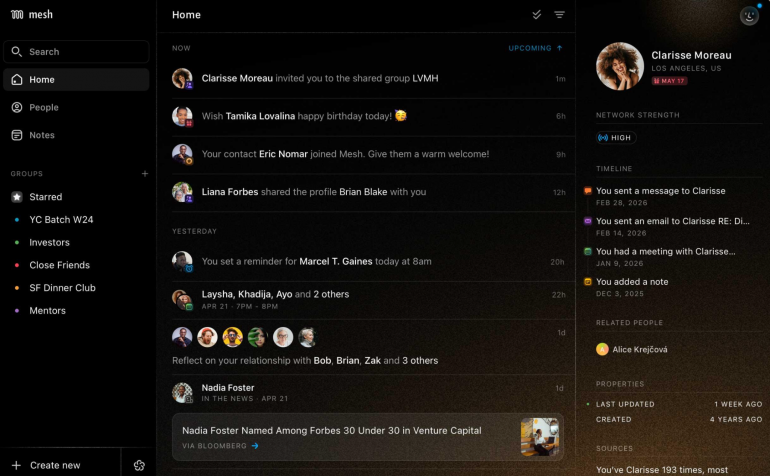
Image: Mesh
Best for: Users who want a network built for them, with no ongoing data entry.
Mesh pulls your contacts together automatically from your email, calendar, address book and social accounts. In this way, it’s designed to sidestep the reason most people give up on a CRM: they get tired of typing things in. It also prompts you to reconnect with people you haven’t spoken to in a while, and notifies you if your contacts change jobs or if there are catch-ups worth having. If you’re concerned about privacy, rest assured that Mesh only reads email headers and calendar details rather than the full content. It also encrypts everything and doesn’t train AI models on your data.
Mesh also offers iMessage and phone-call integrations, but if you want to use them it’s best to download Mesh from its website rather than the Mac App Store. Apple’s restrictions keep them out of the App Store version.
It’s worth remembering that Mesh is built for networking rather than client work. It’ll remind you to catch up with someone, but it won’t track deals, projects or what a client owes you.
Pricing: Mesh has a free version. Its Pro plan costs $10 per month and its Team plan costs $40 per seat per month. A custom-priced Enterprise plan is also available.
Non-native but Mac-friendly CRMs
The following apps are web apps, though they feel right at home on a Mac and deserve their place on our list.
6. Less Annoying CRM
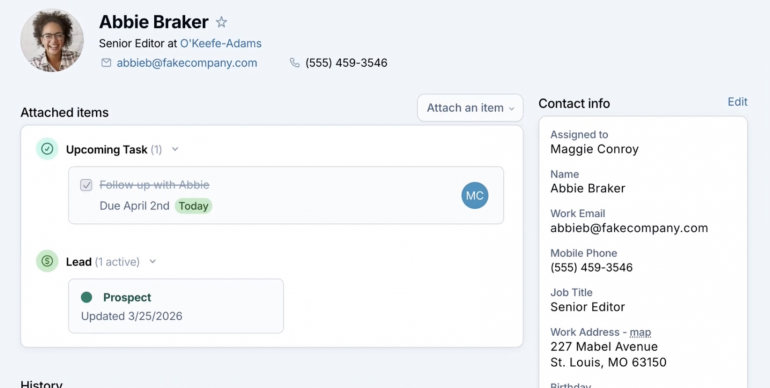
Image: Less Annoying CRM
Best for: Users who have found CRMs overwhelming in the past, and need one built for people who’ve never used a CRM in their life.
Less Annoying CRM is exactly what it says on the tin. It refuses to be anything more than it needs to be, and as a result, is hopefully “less annoying”. The whole interface lives across four tabs, and there’s nothing hiding behind menus you’ll never find. When you do get stuck, you’ll talk to a dedicated human support coach, not a chatbot or a ticket queue. This feature alone has earned the app a devoted fanbase.
Less Annoying CRM’s interface is deliberately plain, and can feel a little unpolished at times. And if your needs grow past straightforward contact and pipeline tracking, you’ll likely outgrow it.
Pricing: Less Annoying CRM costs $15 per user per month.
7. Capsule CRM
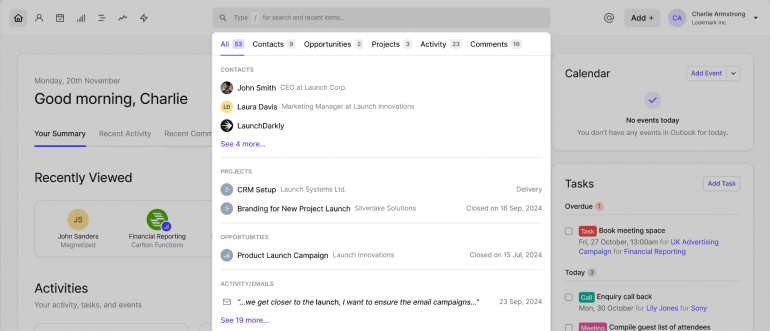
Image: Capsule CRM
Best for: Users who’ve outgrown Less Annoying CRM’s simplicity but don’t need Pipedrive’s full sales machinery.
Capsule CRM sits right in the middle of this tier. It offers a strong pipeline, with stages and forecasting, but without so many customization options that you spend your first week configuring it instead of using it. Sales Milestones and task categories give you just enough structure to see where things stand, without the branching automations and permission layers that make bigger CRMs complex and confusing. Its design is similarly clean and legible. For Apple users, Capsule connects to Gmail and Outlook and comes with a proper iOS app, so you can check your contacts on the run.
The shortcoming is that email sync only runs one way. Capsule can log messages against a contact, but nothing you do inside Capsule ever makes its way back into your inbox.
Pricing: Capsule CRM has a free plan. The Starter plan costs $18, the Growth plan costs $36, and the Advanced plan costs $54, all per user per month, all billed annually.
8. Pipedrive
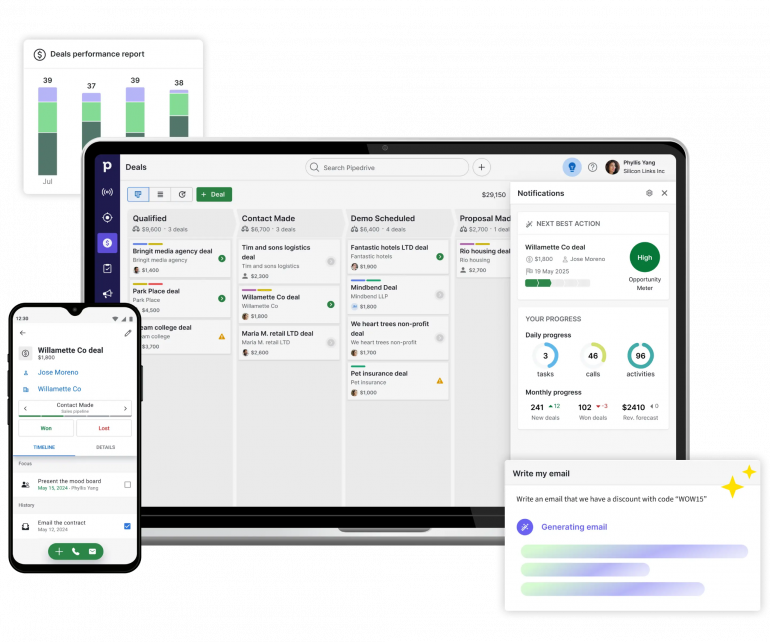
Image: Pipedrive
Best for: Users who want a drag-and-drop visual pipeline without buying into a full enterprise sales platform.
Pipedrive is probably the app most people think of when they think of CRMs, and it deserves its reputation. The pipeline is a Kanban-style board where every deal sits as a card you drag from one stage to the next. If you’ve never used one, it’s the fastest way to see exactly where every deal in your business stands without opening a spreadsheet.
What sets it apart is its underlying philosophy. Pipedrive is built around activity-based selling: the idea that you can’t control whether a deal closes, only the next action you take on it. As a result, the app nudges you to schedule that next step every time you tick one off, and a deal left untouched for too long gets flagged as “rotting”. This pointed notification helps to stop a lead going cold without you noticing.
Bear in mind that Pipedrive is built for people who sell, so if you’re managing delivery more than deals, a fair amount of it will go unused. Also, if you’re running an actual outbound sales team with real calling volume, Close is the better tool, though it tends to be too much for solo client businesses.
Pricing: Pipedrive has four plans: Lite, Growth, Premium and Ultimate. The Lite plan costs $14 per seat per month, billed annually. Prices for the other three plans vary by region, so check Pipedrive’s pricing page for the rates in your country.
9. HubSpot CRM
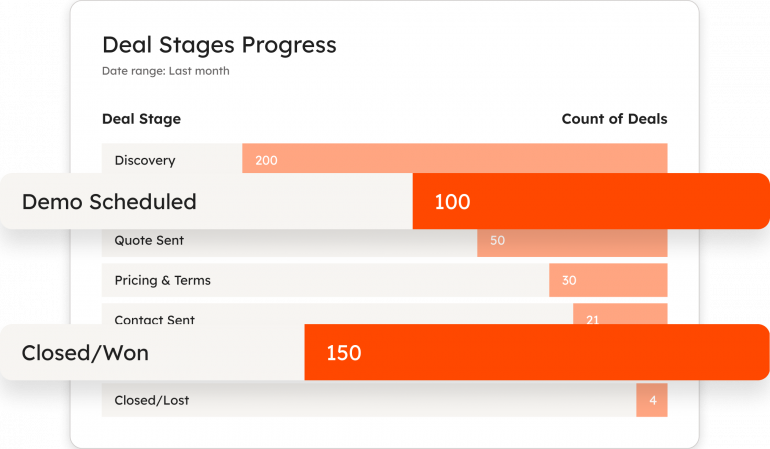
Image: HubSpot CRM
Best for: Users who want a CRM built to scale well beyond contacts and follow-ups.
HubSpot is the most fully built-out CRM in this list. It offers a proper deal pipeline, contact and company records, email tracking that tells you when someone opens your email, a library of report dashboards, and a deep well of integrations through its app marketplace. The email and calendar sync well with Gmail and Outlook, and its AI tools (Breeze) can draft follow-ups and summarize a contact’s history for you. It’s also built to grow with you, from a single pipeline up to full marketing and service tools.
The shortcoming is that HubSpot is built for marketing and sales teams. So if you want a contact list with follow-ups, it’s likely to be more than you need.
Pricing: HubSpot CRM has a free version and a Starter Customer Platform for $7 per user per month, billed annually.
10. folk
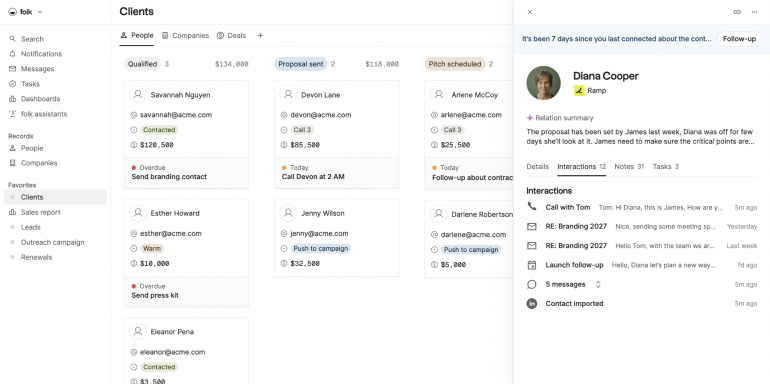
Image: folk
Best for: Users who want their contact list to look and feel like the rest of their design-led toolkit.
Like others on this list, folk excels at automatically bringing scattered conversations into a single timeline per person. What sets it apart is its folkX browser extension. Pull a contact straight off LinkedIn or several other platforms and it arrives enriched, with a job title, company and photo already attached. folk also allows you to create custom fields, multiple views and groups you define yourself. And there’s a set of built-in AI assistants that take on smaller admin tasks, like drafting notes and summarizing threads. Finally, folk is well loved for its interface, which feels more like Notion than a traditional sales CRM.
Be aware that its mobile functionality is thin. folk is built around the desktop web experience, and several reviewers describe the phone version as clunky to use day-to-day.
Pricing: folk’s Standard plan costs $24, the Premium plan costs $48, and the Enterprise plan starts at $80, all per user per month, all billed annually.
11. Streak
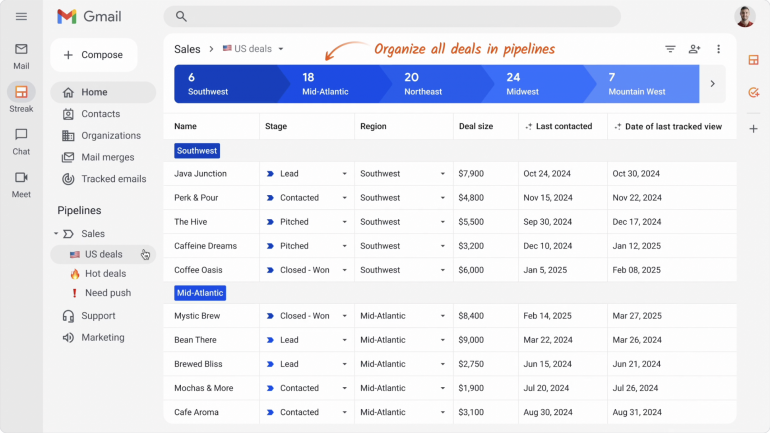
Image: Streak
Best for: Users who live in Gmail and want a Gmail-based pipeline.
Streak adopts a pretty unique approach. Rather than building a CRM and asking you to visit it, it builds the CRM into your inbox. Pipelines, deal stages and a sidebar all appear as native parts of Gmail itself, so tracking a lead is as simple as being in the email thread you’re already reading. In this way, it removes the step most people fail at with a CRM, remembering to open it, because there’s nothing separate to open. It’s all right there, in your email.
Streak is Gmail-specific, so it only works if your business runs through Gmail. If you’re on Outlook, Apple Mail, or split across several inboxes, Streak isn’t relevant to you. And because it lives inside your inbox, it can pull you into your email more than you’d like if you’re trying to spend less time there, not more.
Pricing: Streak has three plans. The Pro plan costs $49, the Pro+ plan costs $69, and the Enterprise plan costs $129, all per user per month, all billed annually.
12. OnePageCRM
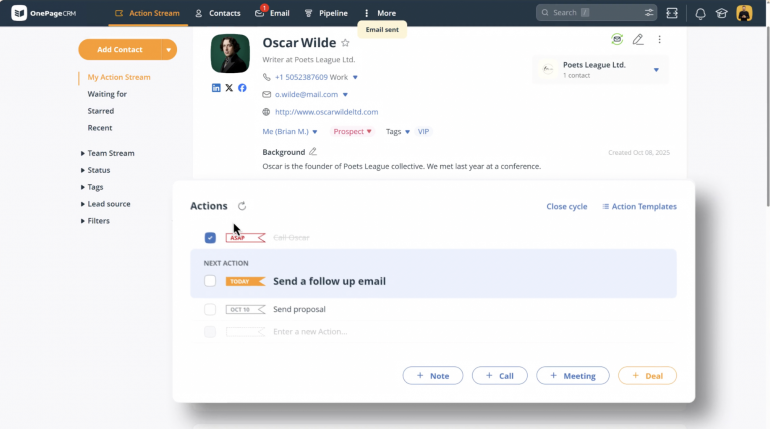
Image: OnePageCRM
Best for: Users who keep letting follow-ups slip and want a system that won’t let them.
OnePageCRM’s design rests on one rule: every contact needs a Next Action attached. This means that, instead of a database, you end up with a running to-do list ordered by what needs to be done today. Add a contact and it won’t let you move on without deciding what happens next: a call, an email and a follow-up date. If you tend to lose track of who you need to contact and when, OnePageCRM aims to install some discipline by chasing you ahead of time. Whether that feels like structure or more like nagging probably comes down to how you feel about software telling you what to do. Give the app a try before you commit.
The shortcoming is that OnePageCRM’s reporting functionality is fairly basic. You get task and activity tracking, but not much in the way of customizable dashboards or deeper sales-cycle insights. If you want to dig into trends over time, you might outgrow what’s built in.
Pricing: OnePageCRM has three plans. The Professional plan costs $9.95, the Business plan costs $19.95 and the Max plan costs $29.95, all per user per month, all billed annually.
All-in-One Freelancer Suites
The following two apps are all-in-one freelancer suites: CRM, invoicing and contracts under one roof. We cover them here for their client and pipeline tools. If getting paid is your main concern, see our guide to the Top Invoicing Software for Mac.
13. Bonsai
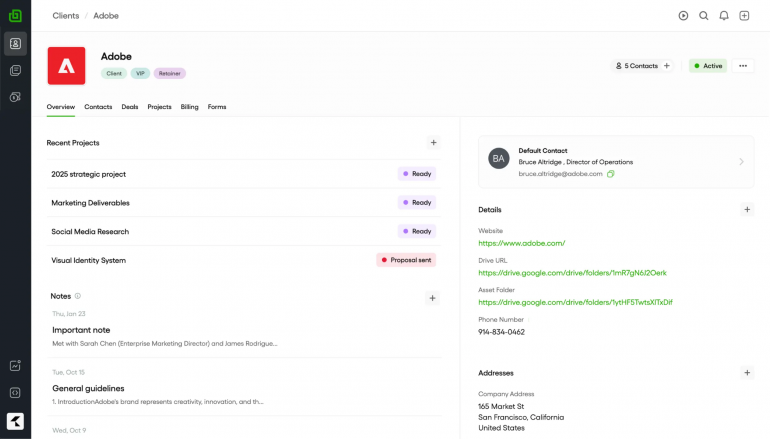
Image: Bonsai
Best for: Freelancers tired of stitching together separate tools for proposals, contracts and client tracking.
Bonsai prioritizes consolidation. Proposals, contracts and client records live in one place, with a pipeline you can move deals through, so you’re not copying a client’s details from a CRM into a separate invoicing tool manually. Its project boards are especially useful for displaying a client’s whole journey: from the first proposal through onboarding, delivery and your final invoice. In this way, it unites sales and delivery rather than treating them as two separate systems.
As a CRM, Bonsai’s capabilities are strong, not exceptional. It handles contacts, deals and client communications well enough for a solo operator, but not quite as well as a dedicated tool. And its mobile app lags noticeably behind its desktop dashboard.
We’ve focused here on Bonsai’s client and pipeline tools. For its invoicing, bookkeeping and tax features, see our review in the Best Accounting Software for Mac.
Pricing: Bonsai has four plans. The Basic plan costs $9, the Essentials plan costs $19, the Premium plan costs $29 and the Elite plan costs $49, all per user per month, all billed annually.
14. HoneyBook
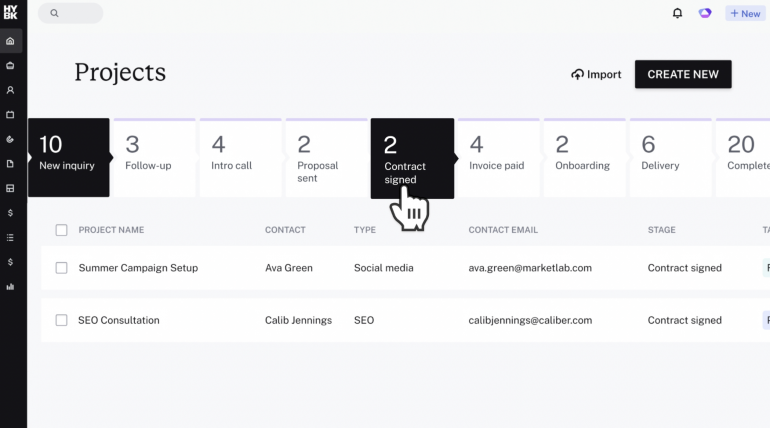
Image: HoneyBook
Best for: Service businesses that want the entire client journey running on autopilot inside a polished, branded experience.
HoneyBook caters for specific types of businesses, providing a useful structure for contractors to follow. Leads fill in a form, get sent a proposal, sign a contract, pay a deposit and land on your calendar — all without you needing to intervene. It’s built with a real feel for how professionals in these industries work, where the client’s experience from inquiry to delivery matters as much as the work itself. With this in mind, a dedicated client portal gives every client a branded space to see contracts, invoices and files, helping to make a one-person operation look established.
HoneyBook’s templates and automations are fairly rigid, however. Reviewers often note that customizing forms, workflows and automated sequences is cumbersome to implement, and there’s no easy way to tweak the structure to fit your unique workflow.
Pricing: HoneyBook has a Starter plan for $29 per month, an Essentials plan for $49 per month, and a Premium plan for $109 per month, all billed annually.
Track Client Time Alongside Your CRM
A CRM tracks who you work with and where you’re at in that relationship. But it doesn’t tell you how much time you spend on each client or on every particular project or task. Without a dedicated automatic time tracking solution supporting your client work, it’s impossible to know exactly where your hours are going. This is risky if you bill hourly or if a flat-fee client has the potential to eat away more hours than the fee covers.
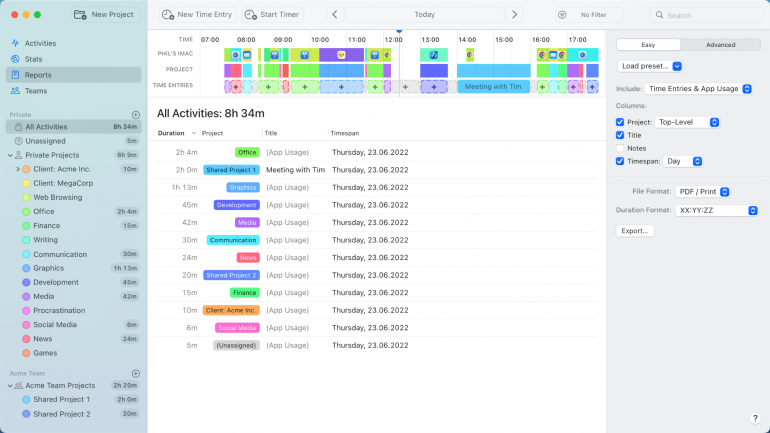
The automatic time tracking solution Timing works alongside your chosen CRM to mitigate these risks. It runs in the background while you work, tracking your time across apps, documents and websites automatically. Its rules-based functionality ensures that no minute is missed, and you don’t need to remember to start or stop a timer, though a manual option is available if you need it.
Timing turns tracked time into a billing status you can act on, so that any gaps in your commitments to your clients show up before they result in lost income. Pair it with any CRM on this list, or with GrandTotal if you want those hours turned directly into an invoice. Timing has a free 30-day trial.
Choosing the Best CRM for Your Mac
The best CRM for Mac is the solution that feels logical and intuitive, a natural extension of the way you work and a real value-add to your workflow.
If you want something that looks, feels and behaves like Apple software, right down to how it handles your inbox, start with Daylite.
If you’d prefer a simple solution that you’re likely to use, rather than the one with the most features, Less Annoying CRM and OnePageCRM will get you started today.
Need proposals, contracts and invoicing to live somewhere too, not just your contacts? Bonsai and HoneyBook are built to carry the whole journey in one place.
Don’t be too concerned that the CRM for your Mac is often a web app rather than something built specifically for macOS. Pipedrive and HubSpot, both web apps, are among the tools here we’d recommend without hesitation. In fact, many solutions in this field cater to a wide variety of users.
Whichever CRM you land on, remember to combine it with Timing so that you can track exactly how much time you’re spending on every client. Start by downloading Timing’s free 30-day trial today.
Frequently Asked Questions: Best CRM for Mac
Is There a Free CRM for Mac?
Yes, there are free CRMs for Mac. HubSpot’s free plan is the most complete at two users and 1,000 contacts. Capsule CRM’s is smaller at two users and 250 contacts. And Mesh’s free plan covers up to 1,000 contacts for relationship tracking rather than deals. All three are good to start with, though you might come up against limitations once your contact list or team grows.
Is There a Native Mac CRM?
Yes, there are a handful of native Mac CRMs. Daylite and Contacts Journal CRM are the two full native CRMs: Daylite is built around a sales pipeline, while Contacts Journal CRM is built around client relationships. Cardhop, BusyContacts and Mesh are native too, but they’re lighter contact managers rather than full CRMs, with no sales pipeline.
What is the Best CRM for Freelancers and Solopreneurs?
Which CRM is best for you depends on what you’re optimizing for. For simplicity, Less Annoying CRM’s single plan and easy sign-up process are hard to beat. For lowest cost over time, OnePageCRM keeps you organized for under $10 a user a month. If you want something that feels like proper Mac software, Daylite is the strongest full CRM.
Can You Use Apple Contacts as a CRM?
For a handful of clients, yes, you can use Apple Contacts as a CRM. Apple Contacts holds names, emails and notes. But it can’t do anything CRM-specific. It offers no pipeline to move a deal through stages, no reminder when a follow-up’s due, and no record of what you did for someone and when. Contacts Journal CRM, Cardhop and BusyContacts all build directly on your existing Apple Contacts to close that gap.
Is There a One-time-Purchase CRM for Mac?
Yes, there are one-time purchase CRMs for Mac. Contacts Journal CRM and BusyContacts are both one-time purchases. Many of the other options in our list are subscription based, which helps to cover ongoing development costs.