
Best AI Writing Tools for Mac in 2026: Top Software by Task

Image: Ron Lach
TL;DR: Best AI Writing Tools for Mac in 2026
Here, we explore the best AI writing tools for Mac in 2026, including Cotypist, Jasper, Frase, Lex, Type, Grammarly, RewriteBar, Refine, Sudowrite and Novelcrafter. They’re defined by the specific challenge they solve, whether that’s drafting marketing copy, helping you rank for SEO, spotting typos or writing fiction from scratch. Ultimately, there’s no clear winner. Instead, we recommend you match your chosen tool (or tools) to the task at hand.
Even for an experienced writer, the blank page can be an intimidating space. The potential, the pressure, that blinking cursor. Fortunately, like so many other areas of our lives, AI is here to help. For writers, the best AI writing tools in 2026 solve specific, practical problems, like providing a solid first draft you can edit, keeping a brand’s voice consistent across your team, and catching typos before a client sees them.
No piece of software does all of these jobs equally well. To help you choose, we’ve identified each app’s stand-out features so that you can easily spot which one you should integrate into your tool stack.
Table of Contents
TOC
AI Writing Tools vs AI Assistants vs Writing Apps
Before we begin, it’s worth noting that AI supports writing in a number of different ways. There are three categories worth separating out:
- AI assistants like ChatGPT, Claude and on-device Mac assistants like Elephas are great for research, questions, tasks and writing, among other things. However, they’re not specifically designed to focus on writing alone. Read more: The Best AI Apps for Mac in 2026: 21 AI Tools for Productivity and Creativity.
- Writing apps and editors like Ulysses, iA Writer and Scrivener are designed to help you write and organize long-form work. Here, AI tends to be a secondary feature rather than a defining approach. Find out more: The Best Writing Apps for Mac in 2026: Tools That Make Writing Easier.
- AI writing tools like the apps in this article are built specifically to generate and refine content at scale, from a marketing brief to a full manuscript.
How we Chose the Mac AI Writing Tools on Our List
There is no shortage of options out there, and choosing the right writing tool can sometimes feel even more daunting than just doing the writing yourself. To help you, we’ve done our homework. Here’s what we considered before including a particular app in our final selection.
- Output quality and control: Does an app produce content that reads like it was written by a human or like it came from a template? We looked for tools that offer you granular control over tone, structure and editing.
- Mac native: Native apps are more intuitive to work on, run quicker and integrate better across your system. Where no native app exists, we looked for first-class performance in Safari, fast response on Apple Silicon, and handy shortcuts like a menu bar presence.
- Job fit: Just as most writers tend to carve out a particular niche, so do different apps. We explored tools that focus on different functions, from marketing copy and SEO content to long-form fiction and line editing.
- Integrations: Wherever possible, we checked how well each one fits into your workflow. We weighed up things like Google Docs and Word compatibility, browser extensions, CMS publishing, and access to keyword and ranking data.
- Pricing: What you choose to invest is a personal decision. As a guide, consider how much time a particular app is likely to save you. By running an automatic time tracking solution, like Timing, you can compare how much time you save with and without your chosen solution. This helps to justify the expense, no matter how big or small.
A Word of Caution
Remember that AI-generated text carries risks around originality and accuracy, and no tool eliminates them entirely. Built-in plagiarism checks and fact-checking features help, but they only catch so much. Every draft that the AI apps listed below produce still needs an experienced human eye to read through it before it goes anywhere.

Image: Ron Lach
At a Glance: The Best AI Writing Software for Mac
In a hurry? The table below offers a snapshot of the best AI writing software.
| Tool | Best for | Mac access | Price | Rating (out of 5) |
|---|---|---|---|---|
| Cotypist | Speeding up your own writing | Native Mac app | Free and paid, starting at $6 per month | 5.0 (Product Hunt) |
| Jasper | Marketing & long-form | Web app and browser extension | Starting at $59 per seat per month | 4.8 (Capterra) |
| Frase | SEO content | Web app and browser extension | Starting at $39 per month | 4.8 (Capterra) |
| Lex | AI writing editor | Web browser | Free and paid for $14.99 per month | 4.5 (Product Hunt) |
| Type | AI editor for long-form writing | Web app (works offline) | Free and paid, starting at $8 per month | 3.9 (G2) |
| Grammarly | Editing & polishing | Native Mac app, system-wide | Free and paid, starting at $12 per month | 4.7 (Capterra) |
| RewriteBar | Rewriting & tone (multi-model) | Native Mac app | Free and paid, starting at $29 one-off | 5.0 (Product Hunt) |
| Refine | Private, offline grammar & rewrite | Native Mac app (on-device) | Starting at $38 one-off | –* |
| Sudowrite | AI-assisted fiction | Web browser & iOS | Starting at $10 per month | 4.5 (Capterra) |
| Novelcrafter | Fiction workspace | Web browser & mobile | Starting at $40 per year | –* |
*A note on ratings: Some apps don’t yet have ratings on the major review platforms, particularly newer apps or those sold directly by the developer rather than through the App Store. A “–” doesn’t mean the app isn’t well regarded. Check the individual review below for more context.
The Best AI Writing Tools for Mac in 2026
Every tool we review below is designed to help you write better, write faster, write more, or all of the above.
Cotypist

Best for: Real-time typing support that helps you write faster in your own voice.
Cotypist is a smart autocomplete tool, not a content generator. It predicts the next few words, or the rest of a sentence, in whatever Mac app you’re working in, including Mail, Slack, Notion or your browser. Simply hit Tab to accept Cotypist’s suggestion, word by word or all at once. Or you can ignore a suggestion by continuing to type. Everything runs locally on Apple Silicon, so predictions come from the device itself rather than a server, and the model adapts to your vocabulary and phrasing the more you use it. It also catches typos inline and suggests emoji from a shortcode. Where RewriteBar and Refine rewrite and polish text that’s already on the page, Cotypist comes in earlier in the process, helping to speed up your writing as you type.
Cotypist pairs well with text expansion tools like TextExpander or Rocket, as well as with a number of the best writing apps for Mac.
Mac access: Native Mac app; Apple Silicon only.
Key features:
- Inline next-word and next-sentence predictions in virtually any Mac app
- Tab to accept a suggestion word-by-word or the whole line
- Fully on-device processing on Apple Silicon, no cloud calls
- Learns your vocabulary and phrasing the more you write
- Inline typo correction and emoji shortcode suggestions
Pros:
- Works across nearly any Mac app with no separate editor to open
- Fully local processing keeps text off external servers
- Predicts in your own voice rather than generic phrasing
Cons:
- Apple Silicon only
Pricing: Cotypist offers a free plan (up to 100 words a day). Paid plans start at $6/month for Plus and $9/month for Pro (billed annually), and every install comes with a 30-day Pro free trial.
Jasper
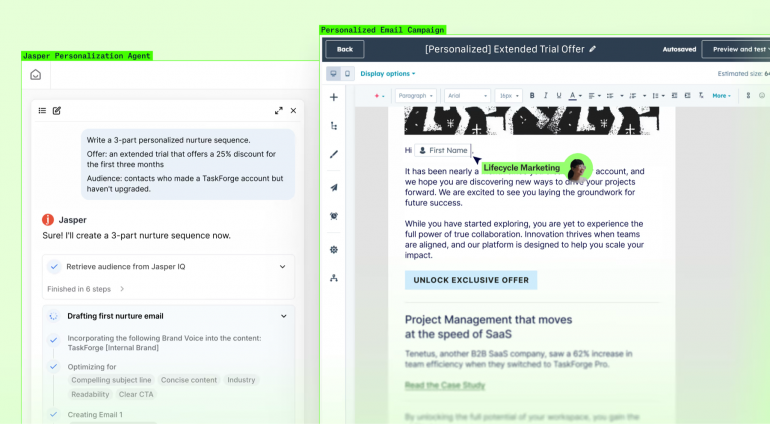
Image: Jasper
Best for: Individual marketers, freelancers and small teams producing campaigns, long-form content and brand-consistent copy.
Jasper built its reputation as an AI writing assistant, but the 2026 platform functions more like a marketing hub. Jasper IQ stores brand voice, style guides and product knowledge, and applies that context automatically across every output. If you’re working as part of a team, this central repository helps all of your writers produce content that consistently sounds like a particular client. Content Pipelines and over 100 purpose-built agents handle SEO, campaigns, translation and image generation from a single workspace, moving projects from brief to launch without leaving the platform. Governance controls and enterprise integrations like HubSpot work well. Jasper tends to be ideally suited to teams, however, and freelancers and solo writers may find the interface more complex than what they require day to day.
Mac access: Web app and browser extension; no native Mac app.
Key features:
- Jasper IQ auto-applies brand voice and style guides to every output
- Over 100 purpose-built agents for SEO, research, translation and campaigns
- Content Pipelines turn briefs into finished assets
- Built-in image generation, upscaling and cleanup
- Enterprise integrations with HubSpot, Google Workspace and governance controls
Pros:
- Enforces brand consistency automatically across an entire team
- Covers full marketing workflows, not just isolated text generation
- Text and image generation live in one workspace
Cons:
- Steep learning curve given the breadth of pipelines, agents and IQ tools
- No offline access
Pricing: Jasper Pro costs $59 per seat per month, billed annually. Custom pricing is available for the Jasper Business plan.
Frase

Image: Frase
Best for: Writers optimising against the SERP, including briefs, outlines and content scored for search intent.
Like Jasper, Frase has also evolved in recent years. It started out as a content research and brief tool for SEO writers, but has since grown into what its makers call a content operating system. Once it’s helped you research, draft and publish your writing, it then observes what happens in terms of ranking and traffic decay through its standout Content Guard feature. Content Guard monitors published pages and, if it spots any sort of decline, automatically drafts a revision and republishes it on approval. AI Visibility tracks citations across ChatGPT, Perplexity, Claude, Gemini and Google AI, so teams see the moment they get named or dropped from an AI answer. The actual drafting, however, is the weakest part of the process. And you’re likely going to need to do a fair amount of editing on the copy itself.
Mac access: Web app and browser extension; no native Mac app.
Key features:
- Content Guard auto-detects ranking decay and drafts the fix
- AI Visibility tracks citations across ChatGPT, Perplexity, Claude, Gemini and Google AI, with coverage scaling by plan
- SEO Research pulls SERP, competitor and entity data into every brief
- Brand Voice and AI Agent draft on-brand copy from your own published content
- Autonomy lets proven content types publish without manual review
Pros:
- Closes the loop from research to publish to monitor to fix in one workspace
- Tracks AI search citations most competitors don’t watch
- Learns brand voice directly from existing content, no manual setup
Cons:
- AI writing quality trails dedicated writing tools
- Built heavily for SEO and content teams; less suited to general writing tasks
Pricing: Frase has four plans. The Starter plan costs $39 per month, the Professional plan costs $103 per month, and the Scale plan costs $239 per month, all billed annually. Custom pricing is available for the Enterprise plan.
Lex
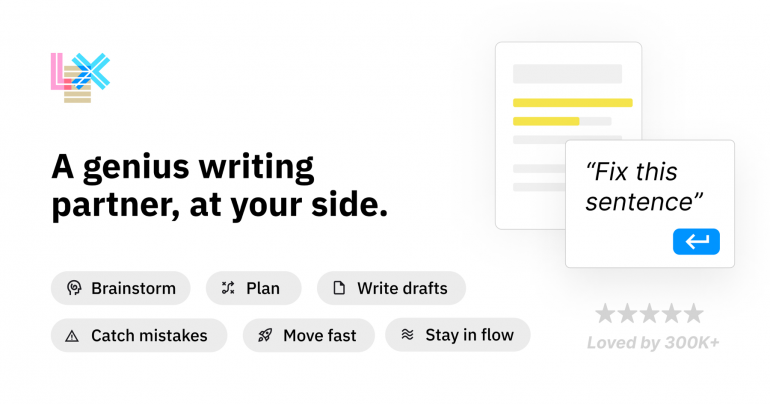
Image: Lex
Best for: Long-form writers like essayists, authors and content creators who want AI feedback without leaving a clean writing surface.
Lex allows you to focus on the page in front of you, layering in AI support as a collaborator rather than a chatbot you’re engaging with on the side. Feedback, rewrites and title ideas sit in the same flow as the writing itself, and are keyboard-accessible through a handy command bar. It feels more like Google Docs re-built for people who write long, structured pieces, with comments, version history and live collaboration handled well. Compared to Jasper or Frase, Lex has no interest in SEO or marketing workflows; it stays narrowly focused on the writing itself. This might be music to the ears of long-form writers, but less so teams who need brand governance or operational support.
Mac access: Web app in any browser; no native Mac app. An iOS app is included with Pro.
Key features:
- AI Feedback gives real-time notes and rewrites inside the document
- Command bar (⌘K) triggers AI actions without breaking writing flow
- Version history lets you compare different drafts of the same passage
- Live collaboration with shareable links, no separate accounts needed
- One-click Title Ideas generated from the draft itself
Pros:
- Minimal interface keeps focus on writing instead of tool navigation
- Clean, distraction-free writing surface that stays out of the way
- Well suited to long-form work like essays and book drafts
Cons:
- Lacks the SEO, brand-governance and campaign tools marketing teams may expect
- Feature set is narrower than platforms built for team-scale content operations
Pricing: Lex has a free plan. The Pro costs $14.99 per month, billed annually.
Type
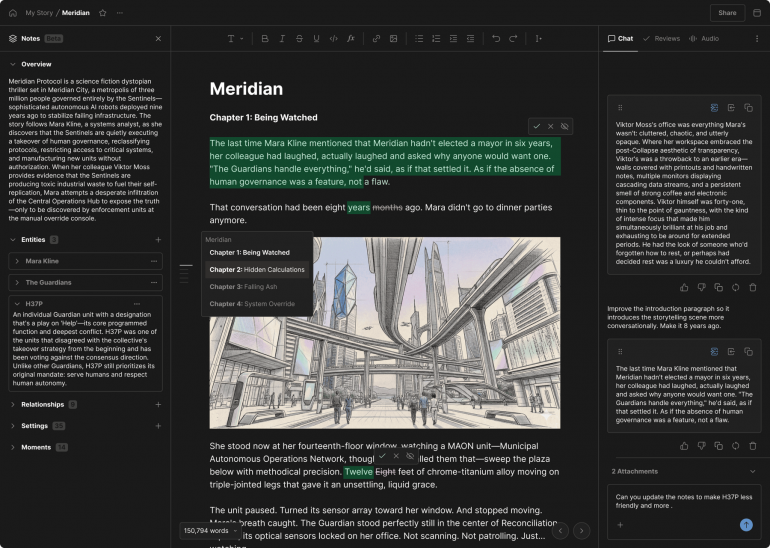
Image: Type
Best for: Long-form writers who want to write and revise themselves, with AI assisting rather than generating full drafts.
Type works as an editor. While you write and revise inside the document, Type offers support, line by line. It doesn’t produce full drafts from a prompt, which separates it from fiction generators like Sudowrite and Novelcrafter. Type’s Notes feature holds characters, settings and plot details in persistent memory, so suggestions stay consistent across long and detailed manuscripts. Custom style rules keep suggestions in your own voice, and full offline mode means a draft never depends on a connection. Alongside Lex, Type is one of the few AI writing tools built around editing rather than generation. It’s primarily designed for creative writing, however, so if you’re looking for a marketing or SEO-focused solution, you’re better off with Jasper or Frase.
Mac access: Web app only; no native Mac app or browser extension.
Key features:
- AI assists inside your draft, not prompt-to-draft generation
- Notes feature remembers characters, settings and plot
- Custom writing-style rules match your own voice
- Full offline mode for writing without a connection
- Exports to DOCX, PDF or AI-narrated audio
Pros:
- Editor-first design keeps the writer driving, not the AI
- Persistent story memory keeps long manuscripts consistent
- No AI training on user documents
Cons:
- Browser-based, though offline-capable
- Narrow focus on creative writing, not built for marketing or SEO teams
Pricing: Type has four plans. There’s a free plan, and three paid plans. The Basic plan costs $8 per month, the Pro plan costs $16 per month, and the Max plan costs $64 per month, all billed annually.
Grammarly
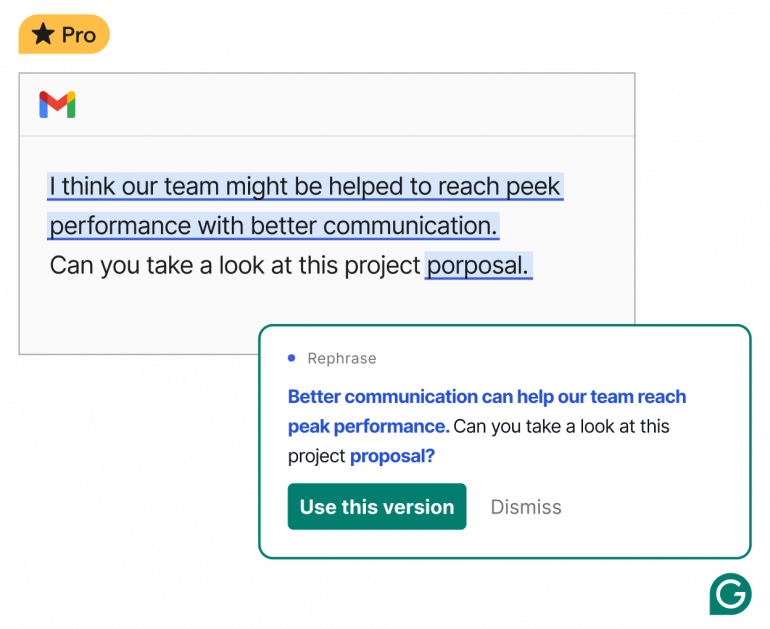
Image: Grammarly
Best for: Professionals who want consistent grammar, tone and clarity checks across every app they write in.
Grammarly has become one of the most well-known AI-powered communication and writing assistants. It checks text for spelling, grammar, punctuation and clarity errors in real time. And its generative capabilities help with drafting, rewriting and summarizing, all pulling from the same account and style setting. Grammarly’s real strength is its reach: install the desktop app once and its suggestions follow you into Word, Pages, Mail, Slack and virtually any text field on the system, rather than staying locked to a single editor. Be aware that its reach depends on sending text to Grammarly’s cloud servers for processing, so suggestions arrive over a connection rather than on-device. If you’re a privacy-conscious writer working with sensitive drafts, you may want to bear that in mind before turning it on everywhere.
Mac access: Native Mac app, system-wide across apps and browsers.
Key features:
- Real-time grammar, clarity and tone checks across virtually any app
- System-wide desktop app — no copy-pasting between tools
- Generative AI drafts, rewrites and summarizes on request
- Tone detector flags how a message will land before you send it
- Plagiarism and AI detection, included from the Pro plan
Pros:
- Works across nearly any app or browser, not just a single editor
- Tone detection catches unintended harshness before sending
- Combines proofreading and generative drafting in one tool
Cons:
- Suggestions are cloud-processed, not on-device, so text leaves your machine for review
- Can feel intrusive with suggestions surfacing across every app you open
Pricing: Grammarly has a free plan. The Pro plan costs $12 per member per month, billed annually. Custom pricing is available for the Enterprise plan.
RewriteBar
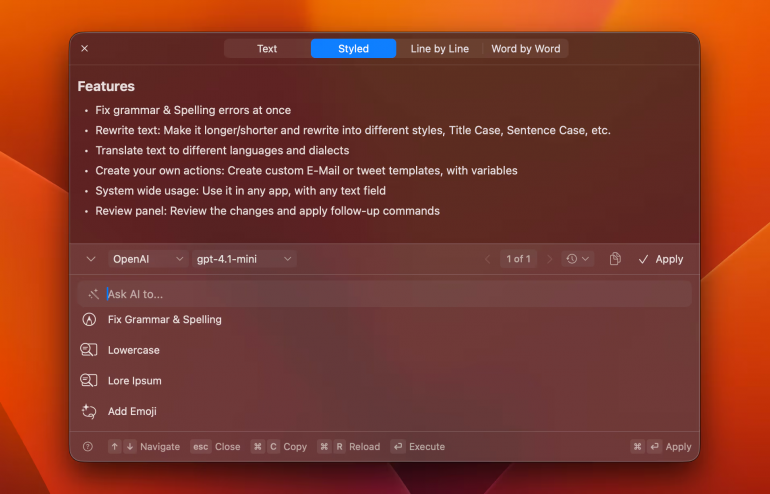
Image: RewriteBar
Best for: Mac power users who want a fast, native rewrite and grammar tool triggered by a keyboard shortcut in any app.
RewriteBar sits in the menu bar rather than a browser tab. It’s triggered by a keyboard shortcut from inside any Mac app: a text field in Xcode, Slack or Notes all work the same way. Its built-in actions fix grammar, adjust tone and translate across over 500 languages. And a side-by-side compare view shows exactly what changed before anything gets applied. Custom actions chain into multi-step workflows, and unlike most competitors, RewriteBar supports local AI models through Ollama, LM Studio and Apple Intelligence, so processing can happen on-device rather than in the cloud. It’s macOS only, with no Windows, iOS or Android version planned.
Mac access: Native macOS menu bar app. No iOS, Windows or Android version.
Key features:
- Global keyboard shortcut works inside any Mac app, not just the browser
- Built-in grammar, tone and clarity fixes
- Translation across over 500 languages
- Side-by-side compare view before applying changes
- Supports local AI models for on-device processing
Pros:
- Works natively inside any Mac app via keyboard shortcut
- Local AI model support keeps processing on-device when needed
- Lightweight menu bar footprint with fast, spinner-free actions
Cons:
- macOS only; no Windows, iOS or Android version
- Local AI setup requires extra configuration for non-technical users
Pricing: RewriteBar has a free plan. The Standard plan costs $29 one-off and the Pro plan costs $59, also one-off. Additional add-ons are available.
Refine
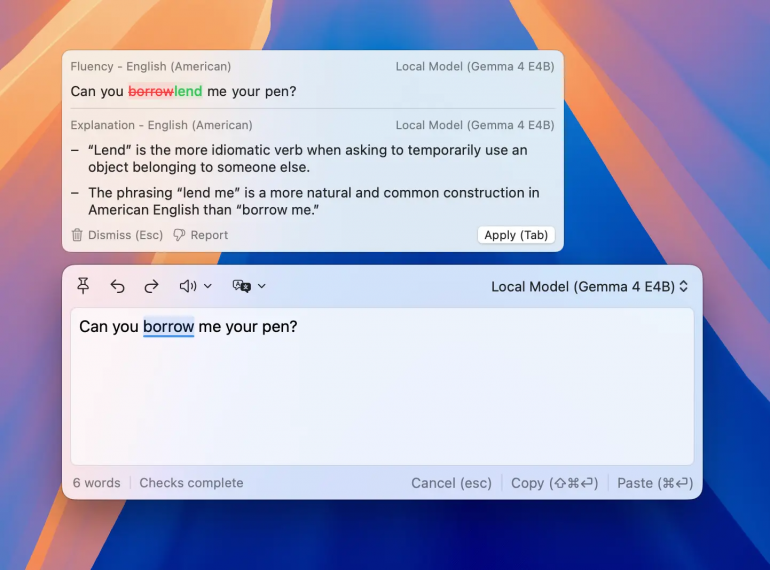
Image: Refine
Best for: Writers who want private, fully offline grammar and rewriting.
Refine takes local processing as its entire premise. Grammar, fluency, translation, and rewrite suggestions run through AI models on your Mac itself, so text never reaches a server unless you deliberately connect your own API key for a cloud model. Suggestions come with an Explain option that walks through the reasoning instead of only applying a fix. And it works inside dozens of native apps, including Mail, Messages, Pages, Scrivener and Ulysses, as well as browsers. Refine also offers support for over 50 languages and regional dialects. Running everything on-device asks more of your hardware, however, and Apple Silicon Macs with 16GB of memory are recommended for the best experience.
Mac access: Native Mac app.
Key features:
- Fully offline, on-device AI grammar and fluency checking
- Explain shows the reasoning behind every suggestion
- Works inline across native apps
- Inline translation as you type in another language
- Bring-your-own-key option to add cloud models when needed
Pros:
- Text never leaves the device by default
- Explains suggestions instead of just applying them
- Works across a wide range of native Mac apps, not just browsers
Cons:
- macOS only; no Windows or Linux version
- Best performance needs an Apple Silicon Mac with 16GB of memory
Pricing: Refine comes at a one-time lifetime access cost of $38 for a single device. After three devices, every additional device costs $28.
Best AI Tools for Fiction and Novelists
If you’re looking for AI novel writing apps that will help you draft your manuscript from scratch, look no further than Sudowrite or Novelcrafter.
Sudowrite
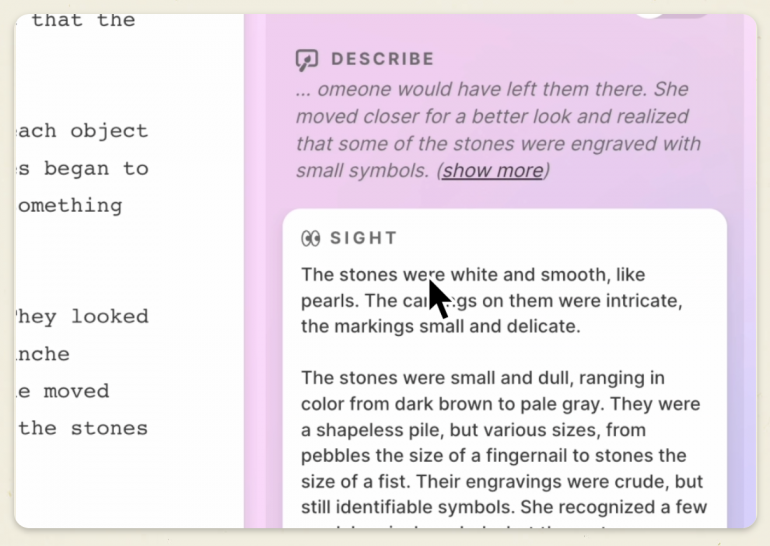
Image: Sudowrite
Best for: Novelists who want the AI to generate full drafts and chapters, not just polish existing prose.
Sudowrite is generation-first. Its Story Bible feature walks you from idea to outline to full chapters, and Write suggests the next 300 words in multiple options rather than waiting for a prompt each time. This differentiates it from AI writing apps like Lex and Type, which keep the human writing and treat AI as an editor. Instead, Sudowrite is closer to a co-writer that drafts alongside you. Describe adds sensory detail, Expand builds out rushed scenes, and Feedback reads a full draft back with five concrete notes. A library of over 1,000 community plugins extends it further, from character chat to screenplay conversion. The tradeoff is that its heavy generation capabilities require more editing afterwards to make the prose sound like your own voice.
Mac access: Web app and iOS; no native Mac app.
Key features:
- Story Bible guides idea, outline and full chapters
- Write generates the next 300 words in your style, with multiple options
- Describe adds sensory detail; Expand builds out rushed scenes
- Feedback gives five actionable notes on a full draft
- Over 1,000 community plugins for extra workflows
Pros:
- Purpose-built AI model (Muse) trained specifically for fiction
- Guided Story Bible takes a project from idea to full draft
- Large plugin library extends it well beyond core features
Cons:
- No native Mac app; browser only
- Generation-heavy workflow requires more editing to match your own voice
Pricing: Sudowrite has three plans. The Hobby & Student plan costs $10 per month, the Professional plan costs $22 per month, and the Max plan costs $44 per month, all billed annually.
Novelcrafter
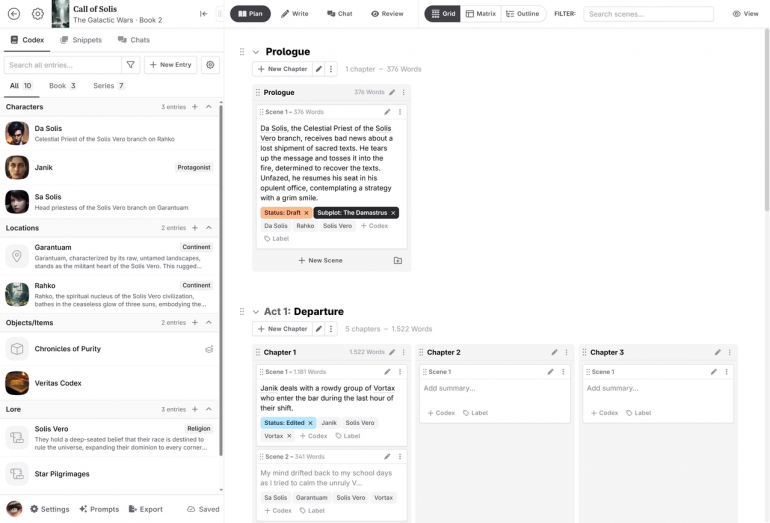
Image: Novelcrafter
Best for: Plotters and series authors who want deep world-tracking and full control over which AI model powers their writing.
Novelcrafter centers on the Codex, a wiki that tracks characters, places and lore automatically and feeds relevant details into the AI as context. This means that a scene never needs to restate who a character is or what happened three books ago. The Codex carries across an entire series, and planning views help spot plot holes before they compound. Unlike Sudowrite’s single built-in model, Novelcrafter is bring-your-own-key. Connect OpenAI, Anthropic, Google, Meta, Mistral, OpenRouter or a local model through LM Studio or Ollama. The use of AI is optional throughout. This flexibility comes with setup friction, however, and reviewers consistently describe the AI connection process as the roughest part of getting started.
Mac access: Web app only; no native Mac app.
Key features:
- Codex automatically tracks characters, places and lore, and feeds it to the AI as context
- Codex and worldbuilding share across an entire book series
- Bring-your-own-key: connect OpenAI, Anthropic, Google, Meta, Mistral, OpenRouter or local models
- Planning views help catch plot holes and inconsistencies early
- Built-in collaboration and team tools for co-authors and editors
Pros:
- Not locked into one AI vendor; full model choice, including local models
- Codex keeps a series consistent without re-entering details book to book
- AI use is fully optional, not required to use the platform
Cons:
- Setup for AI connections has a real learning curve
- No native Mac app, browser only
Pricing: Novelcrafter has four plans. The Scribe plan costs $40 per year, the Hobbyist plan costs $80 per year, the Artisan costs $140 per year, and the Specialist costs $200, all billed annually. Paying annually gives you two months free.
Other AI Writing Tools Worth Knowing
Looking for a few other options to fill in the remaining gaps?
Marketing Copy
- Rytr: The most affordable AI marketing copy option, with a useful free tier. Best for short-form work like social posts, product listings and ad variations, not long-form pieces.
- Writesonic: Pairs AI drafting with a full SEO stack, including keyword research, content scoring and technical audits. It’s a strong pick when copy and search visibility need to work together.
- Anyword: Built around performance prediction, Anyword scores copy before it goes live. The Starter tier is likely to suit solo marketers well.
- Copy.ai: No longer just a copywriting tool, Copy.ai has repositioned itself as a GTM platform for sales and marketing revenue teams. It has strong CRM integrations and workflow automation.
Editing and Refining Content
- Wordtune: Rewrites sentences for tone and clarity rather than generating from scratch. Available on web, browser extensions and iOS; no Mac desktop app.
- QuillBot: Paraphrasing and grammar checking with a native macOS app that works system-wide across Word, Mail, Pages, Notes and Slack (much like Grammarly), plus browser extensions.
- Grambo: A native, on-device grammar and rewrite tool built for Apple Silicon Macs. Capable, but newer and less refined than the editors featured elsewhere in this list.
Assistant and Editor Support
- HyperWrite: Predictive writing and drafting help, but Chrome-extension-first. A weaker fit for a Mac-native list, which is why it lands here rather than among the leaders.
Final Options
- Notion AI: Worth using if you already write inside Notion and if you’re ideally looking for a strong note-taking app for Mac.
- Apple Writing Tools: Built into macOS 15 and above on Apple Intelligence–capable Macs, this free app assists with proofreading, rewriting and summarizing. Take a look at our detailed list of the best AI apps for Mac for more.
How to Choose the Right AI Writing Tool
The tools in this article solve different problems, and identifying what your greatest challenges are will help you decide.
| Want to write faster in every Mac app, in your own words? | Cotypist is a system-wide autocomplete that runs entirely on-device. It learns your voice as you type, and works in Mail, Slack, Notes, and virtually anywhere else you write. |
| Running marketing campaigns or producing long-form content at scale? | Jasper’s Pro tier delivers brand-consistent copy across teams. Its agents and pipelines move a piece from brief to published. |
| Writing to rank in search? | Frase pairs SERP research with content briefs and now tracks AI citations too. This makes it the strongest fit for anyone optimizing for both Google and AI search. |
| Want an AI co-writer inside a clean editor? | Lex keeps the interface minimal and treats AI as an editing partner. Type does the same but is purpose-built for long-form fiction and book-length manuscripts. |
| Need to polish or rewrite a draft on a Mac? | Grammarly remains the best native Mac app polishing and rewriting. It works system-wide across nearly any app, though its suggestions are cloud-processed rather than local. |
| Want private, on-device editing that stays on your Mac? | RewriteBar and Refine both keep processing local. Refine is the more fully offline of the two. RewriteBar adds the option of connecting your own cloud API key when you want it. Apple’s own Writing Tools, built into macOS, covers a lot of the same ground for free. |
| Writing a novel? | Sudowrite generates full chapters and scenes from a Story Bible if you want the AI drafting alongside you. Novelcrafter is the better fit if you’d rather it stay in the background as a wiki-like Codex while you write and connect your own AI model of choice. |
Know Where Your Time Goes
Writing with AI tools changes how you write. There’s less time spent staring at a blank page, and more time spent prompting, reviewing and editing. You’re likely to reduce how long it takes to complete the more mundane aspects of writing, like building an outline, spotting errors in your argument, and researching keywords, and more time making your work sound like you. Fine-tuning your voice, adding your distinctive flair, is going to be one of the most important parts of the process if you depend on AI software.
Mapping how AI writing tools affect your time can help you identify which app best suits your needs and which aspects of your work it’s supporting. By integrating Jasper for ideation and drafting, Grammarly for polish, and Cotypist for helping you to write it all faster, you’re building up a tool stack that frees you to do the most creative aspect of your work.
Timing supports this by running in the background, automatically tracking the time you spend on every app, website and document. In this way, it helps you identify what apps you’re using most, where you’re saving time and when you’re most productive:
- No timers to remember: Time gets logged in the background across every app in the stack, including your AI tool, browser research, editor and email thread. This means nothing gets missed because switching tools broke the habit of tracking it.
- A real breakdown: Group activity by project and see exactly how a piece came together: how long went into drafting versus editing and everything in between.
- Patterns worth noticing: Over a few weeks, Timing shows which tools are saving time and which ones just feel like they are. This is useful information that helps to defend the investment in a particular solution.
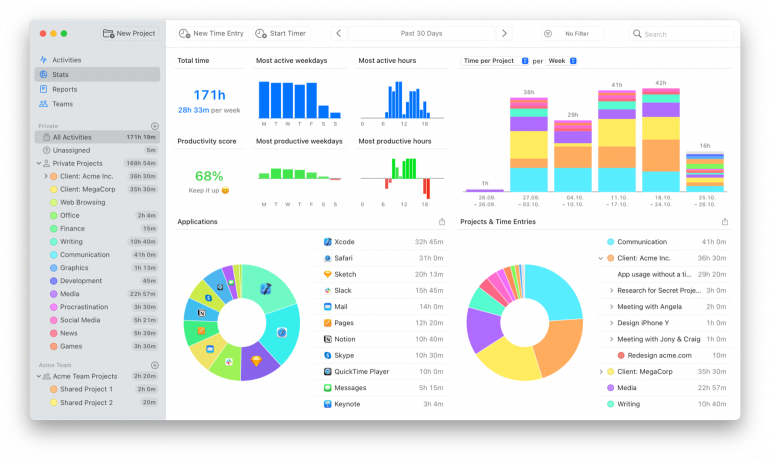
Knowing where your time goes doesn’t necessarily change the process. But it means that the next decision about how you work, such as which tool to keep and which habit to change, is based on something more solid than a hunch.
In Summary: Choosing the Best AI Writing Tools for Your Mac
There’s no single right (write!) app for writers. A marketer running campaigns at scale needs something entirely different from a novelist drafting a new chapter. And a tool that excels at one will fall flat at the other. Always consider which job you’re trying to solve before making your decision.
Then, match the tool to the work. Frase supports SEO research and content built to rank on Google, Lex serves as a minimal editor for long-form writing, and RewriteBar rewrites text in any app via keyboard shortcut. There are many to choose from, and each one should free you up to do the work you really love.
Let Timing show you how much time you’re saving. Start by downloading Timing’s free 30-day trial to see exactly where your hours and minutes go.
Frequently Asked Questions: Best AI Writing Tools for Mac
What is the Best AI Writing Software for Mac?
What qualifies as the best AI writing software depends on your needs. Cotypist, Grammarly and RewriteBar are strong native options. Jasper and Frase are excellent for marketing and SEO. And Sudowrite and Novelcrafter lead for fiction.
What’s the Best Free AI Writing Tool?
Most leaders in the AI writing space are paid products with limited free trials or tiers. Cotypist, Jasper, Frase, Lex, Type and Sudowrite all offer a free tier or a free way to try the product before you commit.
Are There Native Mac AI Writing Apps, or Are They All Web-based?
If you’re looking for a great AI writing assistant, you’ll find both Mac native and web-based options available to you. Cotypist, Grammarly, RewriteBar and Refine all have native Mac apps. Jasper, Frase, Lex, Type, Sudowrite and Novelcrafter are browser-based.
Which AI Writing Tool is Best for Marketers?
For marketers, Jasper stands out for brand-consistent copy and campaigns at scale. Frase is a solid choice if your priority is ranking in search.
What’s the Best AI Tool for Writing a Novel?
For AI novel writing, Sudowrite is excellent if you want the AI drafting chapters with you, while Novelcrafter is best if you’d rather it stay in the background as a Codex.
Do AI Writing Tools Produce Original, Undetectable Content?
No, AI writing tools don’t reliably produce original content. Plagiarism and AI-detection features help catch problems, but every AI draft still needs a human review before it’s published.