
The Best Journaling Apps for Mac: 10 Digital Diaries Compared (2026)

Image: Matheus Bertelli
TL;DR
If you’re trying to establish a journaling practice or improve your existing one, finding the right digital diary can take a little research. This roundup covers the 10 best journaling apps for Mac in 2026. It includes powerful all-rounders like Day One, structured tools like Grid Diary, and free, built-in solutions like Apple Journal. Take a look at our honest reviews and handy comparison to find the solution that best suits how you think and write.
The benefits of journaling are no longer anecdotal — the science speaks for itself. Maintaining a regular writing habit has been shown to alleviate depression, reduce the stress hormone cortisol, promote neuroplasticity, and even boost your immune function and physical health. If you’re looking for some or all of these advantages, our list of the best journaling apps for Mac is here to help.
Our reviews include everything from powerful heavyweights to minimal writing tools. And every app has been considered with Mac users specifically in mind. This means we’ve factored in how native the experience feels, how well it syncs between devices, and how it handles privacy. Whatever kind of journaler you are, or want to become, there’s something here for you.
Table of Contents
TOC
How to Choose the Right Journaling App
Picking the right journaling app depends on how you think and write, and what you’re hoping to gain from a regular practice. Here are some of the key factors worth thinking through before you commit.

Image: Volodymyr Felbaba
Keyboard-first Writing Experience
If putting words on a page is your primary goal, look for an app with a clean, distraction-free interface. Avoid feature-heavy apps that bury the writing experience under menus and options. Markdown support is worth considering if you like to format your entries (apps like Diarly excel here). If you prefer a warmer, more paper-like feel, take a look at Penzu.
Cross-device Sync, Especially iPhone and iPad
If you’re a digital journaler, chances are you don’t only journal on one device. A quick note on your iPhone during your morning commute might prompt a longer entry on your iPad or Mac in the evening. Seamless syncing across all your Apple devices should be non-negotiable. Most of the apps covered here handle this well, but if this is a priority for you, it’s worth double checking.
Calendar and Timeline Navigation
A good journaling app should make it easy to navigate your entries. Look for apps that allow you to jump to a specific date or that surface your history in a meaningful way. Day One’s “On This Day” feature is a good example. It automatically shows past entries from the same date in previous years.
Search and Tags
As your journal grows, the ability to search through what you’ve written becomes more important. Your app should have strong full-text search, and ideally tagging and filtering tools, too. With the latter, you can group your entries by theme, mood, location or any other category that matters to you.
Attachments, including Photos, Files and Audio
How do you want to capture your life in your journal? In words alone, or through multimedia, too? Some apps support rich multimedia entries, including photos, videos, audio recordings, and even location and weather data. Others keep things more text-focused.
Lock and Privacy
Your journal is personal — be aware of how your app handles privacy. It should offer end-to-end encryption and local password or biometric locking. You might want to go so far as reading the fine print as apps tend to handle privacy differently.
Export Options
No matter how much you love an app initially, it’s worth bearing in mind that you may want to switch at some point in the future. Transferring your data should be simple and easy. Check to see that your app exports to standard formats, including PDF, plain text and Markdown, so that your writing always remains yours.
Note: In addition to writing for personal reasons, you might also be interested in keeping a dedicated work journal. Read our guide here on what a work journal is and why you should keep one
The Best Journaling Apps for Mac at a Glance
If you’re eager to get started, we’ve put together a quick snapshot of what sets each of these apps apart:
- Best overall journaling app: Day One
- Best free built-in option: Apple Journal
- Best Day One alternative: Diarly
- Best cross-platform journal: Journey
- Best value, life log-style journal: Diarium
- Best web-first private journal: Penzu
- Best templated journal: Grid Diary
- Best guided reflection: Stoic
- Best AI journal: Rosebud
- Best notes app that works like a journal: Obsidian
| App | Best for | Works on | Privacy/Lock | Pricing plan |
|---|---|---|---|---|
| Day One | Overall classic journaling | Mac, iPhone, iPad | App lock & strong privacy positioning | Free / from $49.99/yr |
| Apple Journal | Free built-in journal | Mac, iPhone, iPad | Device/App lock (Apple ecosystem) | Free |
| Diarly | Day One alternative | Mac, iPhone, iPad | App lock/Privacy-focused diary | Free / In-app purchases |
| Journey | Best cross-platform journal | Mac, iPhone, iPad, web | Account-based sync; privacy depends on setup | Free / from $4,17/mo or $199.99 lifetime |
| Diarium | Daily record journal | Mac, iPhone, iPad | Local/Offline friendly; sync options vary | Free / $14.99 (one off) |
| Penzu | Web-first private journal | iPhone, iPad, web | Password/Lock features are plan-dependent | Free / from $19.99/yr |
| Grid Diary | Prompts/Templated journaling | Mac, iPhone, iPad | Typical app privacy controls | Free / $2.99/mo / $22.99/yr |
| Stoic | Guided reflection | Mac, iPhone, iPad | App lock; prompt-driven journaling | Free / In-app purchases |
| Rosebud | AI prompts | Mac, iPhone, iPad | Encrypted and app lock | Free / $8.99/mo / $107.99/yr |
| Obsidian | Notes-based journaling | Mac, iPhone, iPad | Local-first vault control | Free / from $4/mo |
The Best Journaling Apps for Mac in 2026
The apps in our list are classic journaling tools, not note-takers (with one exception, Obsidian). They offer a private space to write, a space to process your thoughts, build a daily reflection habit and capture your memories. You’ll notice they work in different ways:
- Free-form apps simply give you a blank page. They don’t offer any prompts or structure, making them the closest digital equivalent to a traditional journal or diary.
- Web-first apps are built around a browser-based experience. This means your journal is accessible from virtually anywhere without being tied to a specific device or ecosystem.
- Structured and guided apps offer prompts, templates and frameworks. They’re a great fit if you often feel like you don’t know where to start.
- AI-powered apps go a step further than static prompts. They use AI to respond to your entries in real time, asking follow-up questions and nudging you toward deeper reflection.
- Note-taking apps aren’t designed as journals at all, but their flexibility and organizational features mean that the right kind of user can use them to journal.
1. Day One
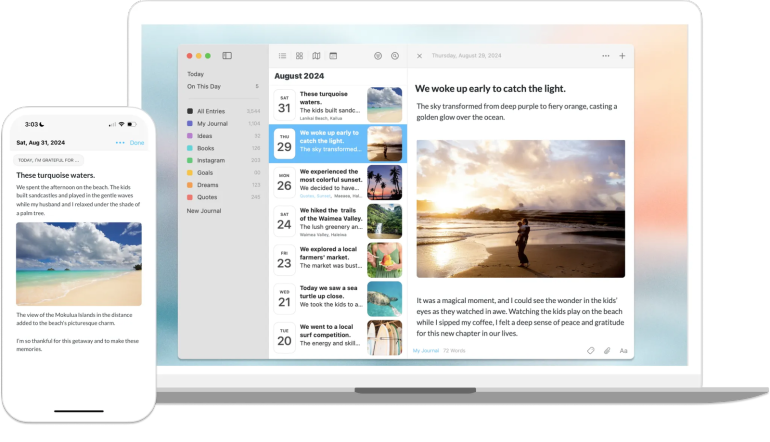
Image: Day One
Best for: Journalers who want a polished all-rounder for writing daily entries, adding photos and building a long-term journal.
Type: Free-form
Day One calls itself a “journal for life” and is the undisputed gold standard of journaling apps. Its clean, distraction-free interface makes daily writing a pleasure. Entries can be enriched with photos, audio, video, location data and even weather information, which gives your journal real depth over time. Its “On This Day” feature surfaces past entries, and end-to-end encrypted sync keeps everything private across your Mac, iPhone and iPad. You can also create multiple journals to keep different areas of your life neatly separated. That said, it’s a powerful app and can feel overwhelming if you’re just looking for a straightforward writing tool.
Pros:
- Exceptional native Mac and iOS experience with seamless iCloud sync
- Rich entry options including photos, audio, video, location and weather data
- End-to-end encryption gives peace of mind about the privacy of your entries
Cons:
- The sheer volume of features can feel excessive for users who want a simple, minimal journaling tool
- Formatting and entry organization options come with a steep learning curve
Pricing: Day One offers a free tier with limited features. The Silver plan costs $49.99 a year and the Gold plan costs $74.99 a year.
2. Apple Journal
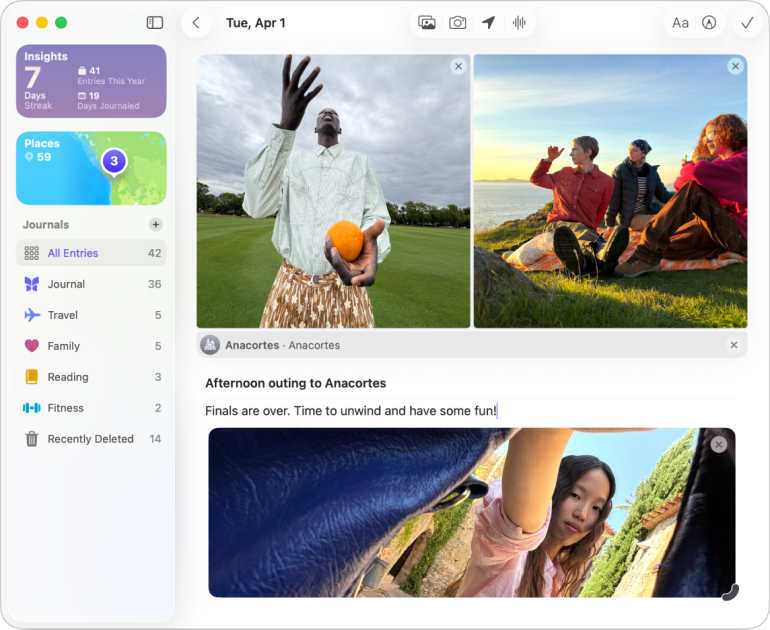
Image: Apple Journal
Best for: Apple users who want a simple, no-setup journaling experience that’s ready to use.
Type: Free-form
Apple Journal comes pre-installed on Macs running macOS Tahoe or higher and, following a recent update, is now available on iPhone and iPad, too (iOS and iPadOS 17.2 or later). In addition to being free, and easy to access and use, its standout feature is its intelligent journaling suggestions, which draw on your photos, workouts, music, and locations to prompt meaningful reflection. The writing experience is clean and focused, and deep integration with the Apple ecosystem means everything just works. However, Apple Journal remains relatively limited in features, and if you’re looking for real organizational depth or rich multimedia entries you may find it limited.
Pros:
- Comes built into Apple devices running macOS Tahoe, or iOS and iPadOS 17.2 or later — no download or setup required, and works seamlessly across Mac, iPhone and iPad
- Smart suggestions powered by on-device intelligence make it easy to start an entry
- Can be locked with your Mac login password or Touch ID
Cons:
- Feature set is notably basic compared to dedicated journaling apps, with limited formatting and organizational options
- Journaling suggestions can feel repetitive over time
Pricing: Apple Journal is free and comes pre-installed on newer versions of Mac, iPhone and iPad.
3. Diarly
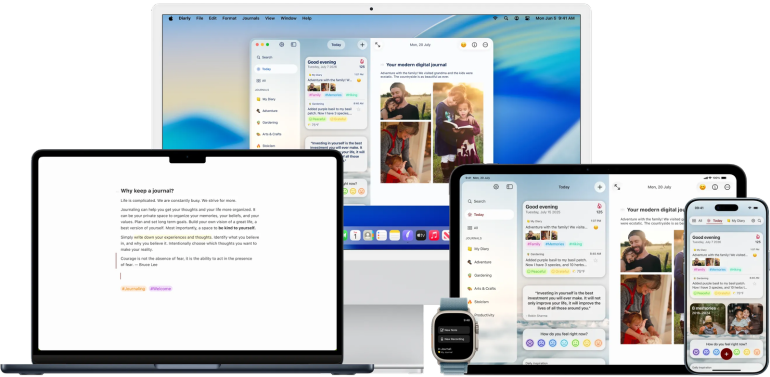
Image: Diarly
Best for: Writers who want a distraction-free, markdown-friendly journaling app.
Type: Free-form
Diarly is an impressive journaling app that prioritizes the writing experience above everything else. Its interface is clean and uncluttered, with strong markdown support, which you might enjoy if you like to format and structure your writing. Entries are organized by date in an elegant timeline view, and the app offers useful touches like templates and tags. Security is another strength. Diarly features solid encryption and robust password protection, making it one of the more trustworthy options for private journaling. And sync across Mac, iPhone and iPad works reliably. It doesn’t quite have the established reputation or user base as larger apps like Day One, however.
Pros:
- Minimal interface keeps the focus firmly on writing, with excellent markdown support
- Strong encryption and password protection
- Solid, reliable sync across Mac, iPhone and iPad
Cons:
- A smaller user base compared to larger and more established apps
- The app lacks some advanced features, such as rich journaling prompts and memory surfacing
Pricing: Diarly offers a free version with core features. In-app purchases are also available.
4. Journey

Image: Journey
Best for: Journalers who want a polished, feature-rich and cross-platform diary app.
Type: Free-form
Journey is one of the most popular diary-style journaling apps around, and its cross-platform reach is its most compelling differentiator. While many journaling apps are built primarily with one ecosystem in mind, Journey delivers a consistent experience across Mac, iPhone, iPad and the web. This is ideal if you tend to want your journal to be available wherever you’re working. Entries support photos, video, mood tracking and location tagging, and the writing experience is clean and inviting. AI-assisted journaling prompts add a nice touch that can help you get into a consistent writing habit. However, be aware that the interface can feel slightly less refined than some of Journey’s Mac-native competitors.
Pros:
- Exceptional cross-platform experience ensures your journal is always accessible
- Rich entry options available, including mood tracking, location, photos and video
- AI-powered journaling prompts and coaching tools offer thoughtful support
Cons:
- The interface, while functional and well-designed, lacks the polished Mac-native feel of some competitors
- The breadth of features can make the app feel slightly cluttered
Pricing: Journey offers a free tier with limited access. Journey Membership is available for $4.17 a month, billed annually. A Lifetime purchase is also available for $199.99 one-off.
5. Diarium
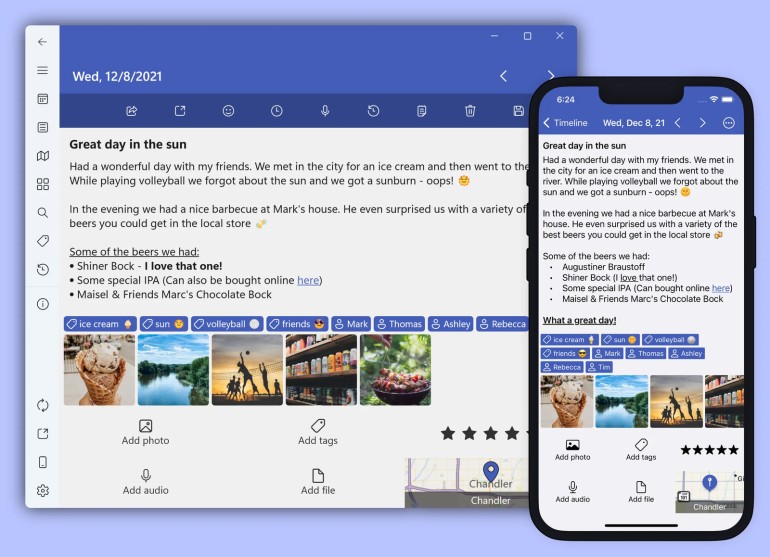
Image: Diarium
Best for: Journalers who want a structured daily record that’s easy to keep consistent.
Type: Free-form
Diarium sets itself apart through its impressive auto-import capabilities. It pulls in content from social media, fitness trackers and other connected services to build a rich picture of your day with very little input required. If you struggle to write regularly, you’re likely to love it — a lot of the work is done for you. The app supports photos, weather, location and mood tracking, and its search functionality is robust. One slight shortcoming is that Diarium was originally built with Windows in mind and has made its way over to Mac. This means that the experience occasionally reflects its cross-platform roots and doesn’t always feel as seamlessly native as apps built specifically for the Apple ecosystem.
Pros:
- Powerful auto-import from social media and connected services
- Comprehensive entry enrichment with location, weather, mood and photo support
- Strong search and tagging tools
Cons:
- The Mac experience, while functional, lacks the refined native feel of apps built specifically for Apple
- Auto-imported content can result in entries that feel cluttered or impersonal without additional manual editing
Pricing: Diarium is free to use, with a one-time Pro purchase listed at $14.99 for the macOS version. Licenses for other platforms are purchased separately.
6. Penzu

Image: Penzu
Best for: Journalers who want a trusted, web-first diary experience that’s accessible anywhere.
Type: Web-first
Penzu is one of the original names in online journaling. It’s built a loyal following since its launch in 2008 as one of the first dedicated digital diary platforms. Today, Penzu continues to deliver a focused, private journaling experience that’s all about simplicity and security. Entries are protected with double password locks and strong encryption, and the clean, paper-like writing interface has an appealingly timeless quality. However, Penzu’s web-first design means it never quite achieves the fluid experience that more recently developed Apple-focused competitors offer, and the interface can feel dated alongside them.
Pros:
- An established name in online journaling, with a platform refined over many years and a loyal, active user community
- Strong privacy credentials, including double password protection and encryption
- Clean, paper-like writing interface is warm and familiar
Cons:
- The web-first design means the Mac experience feels less native and polished compared to apps built specifically for the Apple ecosystem
- Some find that the interface has a somewhat dated aesthetic
Pricing: Penzu offers a free tier with core journaling features. Penzu Pro is available for $19.99 per year and Penzu Pro+ for $49.99 per year.
7. Grid Diary
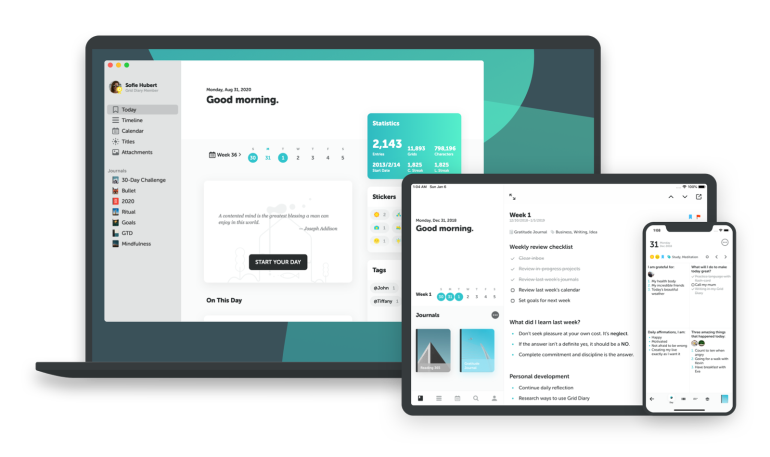
Image: Grid Diary
Best for: Journalers who find a blank page daunting and thrive with structured prompts to guide their daily reflection.
Type: Structured and guided
Rather than simply offer you an empty page, Grid Diary is built around a customizable grid of prompts. It opts out of the idea that journaling should be a free-form writing exercise and instead nudges you to reflect on specific areas of your life so that you can create a structured daily practice. It’s likely to be an appealing proposition if you struggle with consistency, and the template system is genuinely flexible, allowing prompts to be tailored to your personal goals and routines. The app feels polished and native on Mac, iPhone and iPad, with reliable sync throughout. The tradeoff, as you might imagine, is creative freedom. If you prefer unstructured, narrative-style journaling, you might find the grid format restrictive and irritating rather than helpful.
Pros:
- Unique templated grid format offers a compelling and structured alternative to free-form journaling
- Highly customizable prompt system allows the journaling experience to be tailored to your personal goals and habits
- Polished, native experience across Mac, iPhone and iPad with smooth and reliable sync
Cons:
- The structured grid format limits the free-form narrative writing experience that traditional journal keepers may prefer
- Prompt-driven entries can begin to feel formulaic over time,
Pricing: Grid Diary offers a free tier with basic features. Grid Diary Premium is available for $2.99 per month or $22.99 per year.
Other Diary Apps for Mac Worth Mentioning
8. Stoic
Type: Structured and guided
If you want guided prompts and structured reflection, Stoic is a good option. Rooted in Stoic philosophy, it pairs morning and evening reflection routines with mood tracking and breathing exercises to build a mindful daily practice. It’s less a traditional journal and more a structured wellness tool, but for users who want their journaling to serve a clear purpose, like reducing anxiety, building resilience and improving focus. Stoic delivers a thoughtful, well-designed experience that feels right at home on Apple devices. That said, if you’re looking for a traditional free-form writing experience, you might find its structured approach a little restrictive.
9. Rosebud
Type: AI-powered
Recently named the best AI-powered journaling app by the New York Times, Rosebud has earned its reputation. It uses AI to respond to your entries with thoughtful follow-up questions, gently guiding you toward deeper self-reflection in a way that feels relaxed and conversational. It’s especially well-suited if you’d like to use your journaling process to dig a little deeper. The experience is polished and the AI interactions feel surprisingly natural and personal. The one caveat is that, while Rosebud has data encryption in place, its AI-driven approach requires your entries to be processed in the cloud. You may find this uncomfortable if you’d prefer everything to remain on device.
Read more: The Best AI Apps for Mac in 2026: 21 AI Tools for Productivity and Creativity
10. Obsidian
Type: Note-taking
Obsidian is first and foremost a powerful note-taking app, but it can serve as a remarkably capable journaling tool, too. Its daily notes feature provides a simple framework for diary-style entries, while its signature linked notes system allows thoughts and ideas to connect across time in ways no dedicated journal app can match. It’s best suited to technically minded users comfortable with a little setup (casual journalers are likely to find the learning curve a little steep), but if you’re willing to invest the time you’ll find Obsidian offers a flexible and personal writing environment.
Read more: Declutter Your Mind with the 19 Best Note-taking Apps for Mac in 2026
Which Journaling App for Mac Should You Choose?
Still trying to figure out which diary app for Mac is right for you? Let’s take a final look at the best challenge each app solves.
| You want… | Best choice |
|---|---|
| A full-featured journal that just works | Day One: The most complete journaling app on Mac |
| To start journaling right now, for free | Apple Journal: Already on your Mac, no setup required |
| A minimal, private journal built for Apple devices | Diarly: Clean, secure, and feels right at home in the Apple ecosystem |
| To journal across multiple devices and platforms | Journey: The most consistent cross-platform experience of the bunch |
| A journal that helps you write consistently | Diarium: A capable, feature-rich journal designed to help you stay on track |
| Your journal accessible from any browser | Penzu: Web-first by design, available anywhere |
| Helps if you struggle with a blank page | Grid Diary: Templated prompts replace the empty editor entirely |
| Journaling to support your mental wellness | Stoic: Built around guided reflection, mood tracking and daily routines |
| AI to help you reflect more deeply | Rosebud: Responds to your entries with follow-up questions that push your thinking further |
| To stay in Obsidian without diving into another app | Obsidian: Daily notes turn your existing knowledge base into a capable journal |
Using Timing to Support Your Journaling Practice
Journaling is often part of a broader mindfulness practice. It provides the space to reflect on what has happened and to be intentional about what happens next. In many ways, it offers a means to help you be conscious of your time, and to ensure you spend it well.
Having an automatic time tracking solution like Timing brings a similar kind of awareness to your working hours. Instead of relying on memory, you can see exactly how you spend your time across apps, websites, documents and projects, and adjust your workflow accordingly.
Timing runs in the background while you work, turning your activity into useful productivity insights. While it offers many benefits — from time efficiency to more accurate quoting and billing — its productivity insights are probably its biggest advantage from a journaling perspective. Timing’s Stats page not only indicates what you’ve worked on, but also your most active and productive hours and days. Refer to this information and you’ll be able to see when to slot in your journaling time.
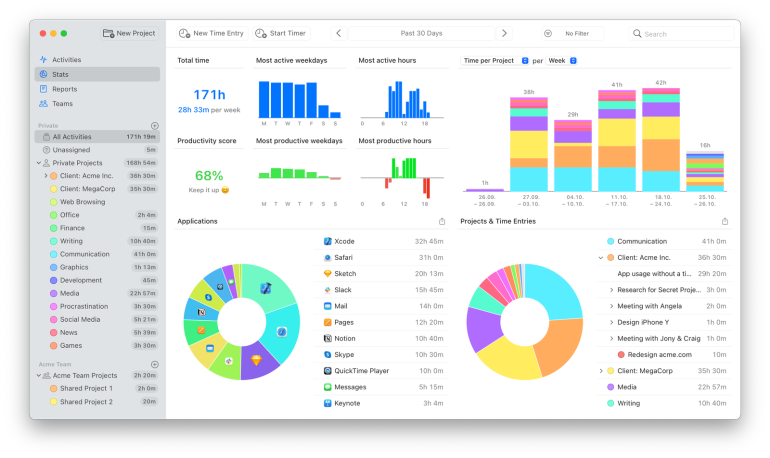
Perhaps you’d like to write during your most productive hours of the day, when your mind is sharp and focused. Or you might want to dedicate those hours to work, opting to journal once your brain has time to relax. Either way, Timing’s insights are valuable.
You can also use Timing to see exactly how often you’re opening your journal, how long each session lasts, and whether your habit is as consistent as you’d like it to be. Use this information to motivate you into making some changes into how you structure your time.
Final Thoughts on the Best Journaling Apps for Mac in 2026
Perhaps more than many other apps, finding the right journaling solution is a personal decision. This is a personal space, after all. It’s got to cater to your unique way of thinking and writing. But whether you land on a feature-rich tool like Day One, an app that offers structured prompts like Grid Diary, or simply opt for Apple Journal, which is already on hand, the most important thing is that it makes you want to show up and write consistently.
A journaling habit and a time-awareness habit often go hand in hand: both are about becoming more intentional with how you spend your days. If you’re a Mac user looking to get a clearer picture of where your time actually goes, Timing is worth exploring alongside whichever journaling app you choose. Give Timing a try by downloading the free 30-day trial today
Frequently Asked Questions: Best Journaling Apps for Mac
1. What is the Best Journaling App for Mac in 2026?
Day One remains the best journaling app for Mac in 2026. Its combination of a beautiful native experience, rich feature set and rock-solid privacy makes it the standout choice for most users.
2. What’s the Best Free Journal App for Mac?
Apple Journal is the best free journaling app for Mac. It comes built directly into your Apple devices, requires no download or setup, and has only grown more capable with its recent expansion to Mac.
3. What’s the Most Private Journaling App for Mac?
Day One and Diarly both take privacy seriously. Day One’s end-to-end encryption, combined with its long-standing reputation for security, makes it the strongest choice for journalers who consider privacy a top priority.
4. Can I use a Note-taking App like Obsidian as a Journal?
Yes! Obsidian’s daily notes feature makes it a surprisingly capable journaling tool, though it works best for technically minded users who are comfortable with a little initial setup.